
TL;DR: A WooCommerce Loyalty Plugin adds points, referrals, and VIP tiers that WooCommerce lacks by default. Pick one goal, such as repeat orders or referrals, and run that program for a full quarter. WPLoyalty suits stores wanting several programs in one plugin, while WPLoyalty Lite is a free starting point.
Many shoppers will buy once and never come back. Your ads can bring in new customers, but each new customer costs you money. When your order list is full of customers, covering the gap through repeat purchases can save you more money.
The default WooCommerce settings have no loyalty at all, but a dedicated WooCommerce loyalty plugin can offer points, referral bonuses, and levels, giving customers a reason to come back.
This guide will show you how to pick a loyalty program and run one. It starts by explaining what these plugins do, then looks at each program type and the purpose it serves. We then compare five plugins so you can choose one and set up your first loyalty program in simple steps.
Table of contents
- What is a WooCommerce loyalty plugin?
- What loyalty program types can you run in WooCommerce?
- Points, Rewards, Referrals, and Retention Programs Compared by Store Goal
- Which WooCommerce loyalty program is best for your store type?
- WooCommerce loyalty plugins compared
- Is a WooCommerce loyalty plugin right for your store?
- How to measure the ROI of a WooCommerce loyalty program?
- Is there a free WooCommerce loyalty plugin?
- How to set up loyalty points in WooCommerce?
- Conclusion
- FAQ
What is a WooCommerce loyalty plugin?
A WooCommerce loyalty plugin helps WordPress stores reward customers for buying, reviewing, signing up, and referring friends. These rewards give shoppers a reason to come back, thus increasing revenue.
Default WooCommerce settings have no loyalty program options at all. You therefore need a third-party plugin such as WPLoyalty, myCred, or WooRewards.
Rewards can be points, discounts, free shipping, or free goods. For example, customers earn 1 point per $1 spent, and 500 points can be redeemed for a $5 coupon (100 points = $1).
Woocommerce loyalty rewards can be made visible to customers in their account, between orders, or through emails. By investing in customer retention rather than only new buyers, you can increase your repeat purchase rate and customer lifetime value.
According to Antavo’s Global Customer Loyalty Report 2025 , 83% of brands with a loyalty program report a positive ROI and also five times more revenue than their program cost.
With the right plugin, you can reduce the admin work of managing the program. Therefore, read along to find which program and plugin will best suit your WooCommerce store.
Launch your loyalty program in under 60 minutes and reward customers with points, tiers, and referrals.
What loyalty program types can you run in WooCommerce?
A store can run six different types of loyalty programs: points, rewards, referrals, VIPs, birthday rewards, and retention.
Points programs
A WooCommerce points plugin awards points per purchase. Many of them will also give you points for sign-ups, reviews, and total spend. WPLoyalty, for example, has campaigns in place for purchases, daily logins, and social follows.
Customers can also earn points for actions beyond purchases, such as creating an account, posting a product review, or following your store on social media. Keep the point value easy to understand. If 100 points = $1, then a customer holding 500 points knows right away that they have $5 to spend.
Start with one earning rule. Then go and add the others once you’ve seen the real data. All the full steps are in the Points Setup Guide .
Rewards programs
A WooCommerce rewards plugin determines what customers get for their points. For example, typical rewards include a fixed discount, a percentage discount, free shipping, and a free product. Some plugins also let you convert points into a coupon. Customers then redeem rewards in the cart or at checkout.
Offer at least two reward options, such as a discount and free shipping. Customers redeem more often when they can pick what suits them. Also set reward values so the discount never cuts below your profit margin.
Referral programs
A WooCommerce referral plugin rewards the current customer and the invited friend. Firstly, the customer shares a link. Then the friend buys, and both receive referral rewards.
WPLoyalty gives each customer their own custom referral URL. While there are plugins that use a code at checkout, official WooCommerce Points and Rewards has no built-in referrals.
Offer the new friend a first-order discount, and give the current customer points once that order is complete. Pay the referral reward only after the friend’s order is completed, so fake sign-ups don’t cost you money.
A WooCommerce loyalty plugin with referral program support brings both tools together in one package. So check out the referral feature prior to purchase. The referral setup guide has all the details.
VIP tier programs
A WooCommerce VIP program plugin sees customers moving up through various levels (Silver, Gold, etc.). The higher the loyalty tier, the better the rewards. For example, a Gold member redeems 500 points for $10 off, while a regular customer gets $5 for the same 500 points.
Customers usually reach a tier based on total spend or total points earned over a set period. Hence, keep the thresholds within reach. If the first tier takes too long to reach, then customers lose interest.
Gratisfaction has customizable tiers. WPLoyalty has Levels with tiers and badges. A loyalty plugin for WooCommerce with VIP tiers should show each customer’s current level and also regularly showcase the VIP status and benefits through emails.
Birthday and sign-up rewards
Birthday and sign-up rewards are by far the easiest programs to get going. A birthday reward only comes around once a year, so the cost is minimal. Sign-up points, in turn, are a great way of getting new accounts.
Both need virtually no rules; you just send your customers a message with a link or code for the reward.
Set the reward amount and let the plugin send it to your customers automatically. Send the birthday reward a few days before the date and give customers about 30 days to use it. Ask for the birthday at sign-up or in My Account, since the plugin can’t send a reward without it.
Retention programs
Retention programs keep customers active in between orders. For example, there’s a point expiry and reminder emails to drive redemption. This is also a form of gamification that includes ranks and badges.
Warn customers 30 days and again 7 days before their points expire. Without a warning, expiry feels like a penalty rather than a nudge. Use badges and ranks lightly, as they work best for stores where customers buy often.
These tools will increase customer engagement between orders. Following that, a loyalty email automation can help keep your customers engaged by sending reminders. Most plugins have provisions to integrate with any email tool. For example, a WooCommerce loyalty plugin that integrates with Klaviyo to get your loyalty reminders to work with email.
Points, Rewards, Referrals, and Retention Programs Compared by Store Goal
Match the program to your primary objective. Don’t go and launch all the programs, though. One clear program is far easier to measure.
Store goal | Program to use | Expected impact |
Clear old stock | Bonus points campaign | Extra points move chosen products in a set window |
Raise average order value | Points with order minimums | Shoppers add items to pass the minimum |
Win new customers | Referral rewards | Current buyers bring in new buyers |
Keep top buyers | VIP tiers | Better rewards for loyal customers |
Bring back lapsed buyers | Point expiry with reminders | A deadline pushes shoppers to redeem |
Collect more reviews | Review points | Customers earn points after posting a review |
Welcome loyal customers | Birthday rewards | A yearly reward builds goodwill |
For example, a fashion store ending a season should run a clearance bonus. A beauty store with sample buyers should run referrals. A store with a loyal core should add tiers.
Firstly, choose one goal. Then, launch the matching program for one full quarter. Compare redemption cost with repeat orders, then add a second program if the numbers hold.
Points suit almost every goal in the table, while referrals suit growth. Tiers and expiry suit retention. Impact figures here are expectations, not promises, and each store will see different results.
Which WooCommerce loyalty program is best for your store type?
The best loyalty plugin for WooCommerce depends on catalog type, order volume, and buying cycle.
- Fashion and apparel stores should pick a plugin with campaign scheduling, birthday rewards, and tiers. Most shoppers often return each season. As a result, a time-limited double points offer fits that rhythm. Next, add review points to collect fit feedback. However, delay point awards until the return window closes.
- Beauty, health, and consumables stores should reward reorders. Customers repeat these purchases every few weeks or months, and so points on each reorder reward that habit. Referral rewards also suit sample sharing. In addition, use store credit, which replaces coupon codes with a balance.
- Home, electronics, and high-ticket stores should reward reviews and referrals over spend. Customers buy rarely, so if you give spend points, it will add up slowly. For example, a sofa buyer may not return for years. WooCommerce Points and Rewards suits such stores.
- Subscription and food stores should have renewal support first. Hence, ensure you pick a WooCommerce loyalty plugin compatible with subscriptions. Also set expiry rules so unused points don’t pile up. For example, food stores also reorder often. Therefore, points on every renewal keep the cycle going.
- Small stores and high-volume stores under about 300 orders a month can use a simple free loyalty plugin in WooCommerce. Such stores can start with simple reward programs instead of complex tier ones.
WooCommerce loyalty plugins compared
Five options cover most WordPress stores. The table lists each plugin’s strength, best store type, and one key detail.
Option | Key strength | Best store type | Differentiating detail |
WPLoyalty | Points, rewards, referrals, birthday rewards, point expiry, and levels in one plugin | Fashion and multi-program stores | Free version (WPLoyalty Lite). Yearly plans start at $105 |
myCred | Custom points through hooks and filters, plus badges and ranks | Community sites and stores with unique rules | Works with WooCommerce and BuddyPress; add-ons extend it |
Points and Rewards for WooCommerce (WP Swings) | Setup in minutes; points for purchases, reviews, and referrals | Beginners and small stores | Email notifications and mobile-friendly design |
WooRewards | Points for purchases, custom rewards, and referral programs | WooCommerce-only stores | Rewards include discounts and free products |
Gratisfaction | Social sharing, community building, analytics, and tiers | Stores with active social audiences | Free for up to 100 users |
WPLoyalty is best for many WooCommerce store owners with [100]+ orders a month that want several loyalty program variants without stitching plugins together. However, myCred gives teams with developers more control, and Gratisfaction leans toward community and social sharing.
Many plugins charge extra for referrals, birthdays, or tiers. Therefore, confirm what each price includes.
Is a WooCommerce loyalty plugin right for your store?
A WooCommerce customer loyalty plugin is a real money-spinner for stores that have repeat buyers. For stores that are purely one-off purchase stores, it’s not going to deliver much at all. Check your catalog before you buy.
Who should invest
- Stores where the customer reorders within a few months.
- Fashion stores with seasonal drops.
- Stores with sufficient monthly order volume to test the rules.
- Owners who can look at their redemption costs each month.
Who should wait or skip it
- Selling one-offs (i.e., mattresses).
- Stores with very low traffic.
- Thin margins where discounts eat into profit.
- Owners who can’t run the program.
A badly run loyalty program in a WooCommerce store is worse than having no program at all. Hence, keep the rules simple and set a clear end date for points.
How to measure the ROI of a WooCommerce loyalty program?
To measure the ROI of a WooCommerce loyalty program, compare what the program earns with what it costs over one full quarter. Don’t judge it on a few weeks of data.
Firstly, track four numbers:
- Repeat purchase rate for members and non-members
- Average order value
- Customer lifetime value
- Points redemption rate
Then, add up the program cost by including the discounts customers redeemed, the plugin fee, and the time you spend managing the program.
Then use this simple formula:
ROI = (Incremental gross profit from members − Program cost) ÷ Program cost
For example, members bring in $6,000 in a quarter, and the program costs $1,500. The ROI is 300% where you can count only the extra revenue, since some members would have bought anyway.
Also watch for warning signs. A high redemption rate with no lift in repeat orders means your rewards are too generous. A low redemption rate means customers either can’t see the program or don’t value the reward.
Therefore, check these numbers every month. If the ROI holds after one quarter, add a second program. If not, adjust the earning rate or reward value before you spend more.
Is there a free WooCommerce loyalty plugin?
Yes, there are a number of plugins that have free versions which come with a limited number of points. The free versions obviously don’t include all the advanced features. A WooCommerce loyalty plugin free of charge is probably the best way to go if you’re just looking to test the waters.
- WPLoyalty Lite: points and rewards for purchases and other actions
- Loyalty for WooCommerce: purchase rewards, checkout redemption, and basic referrals.
- MyRewards free version: spend points, referrals, reviews, and cart redemption.
- Gratisfaction: loyalty and referrals, free for up to 100 users.
A free loyalty program plugin for WooCommerce will almost certainly have locked tiers, locked free products, and/or locked expiry rules. So before you go any further, work out exactly what you need. Then go on and compare the free limits against the prices of the paid versions above.
How to set up loyalty points in WooCommerce?
Set up loyalty points in 8 steps (from install to test). These are the steps to set up loyalty points in WooCommerce with WPLoyalty. Other plugins will have a very similar set of menus.
A WooCommerce loyalty points plugin can be up and running in a matter of minutes, but allow an hour for the rules and testing.
- Do a full site backup. Then use a staging copy if you can.
- Then, download the WPLoyalty plugin , upload it under Plugins, and then click Install and Activate.
- Following that, open WPLoyalty, then Campaigns, then create a new campaign. Choose the Points for Purchase type.
- Set the earning rate to 1 point per $1 spent. Then save the campaign.
- Next, open Rewards, then create a new reward. Choose the Points Conversion type.
- Set the redemption value to 100 points = $1. Enter a title and description, for example: ‘Redeem 500 points for a $5 discount.
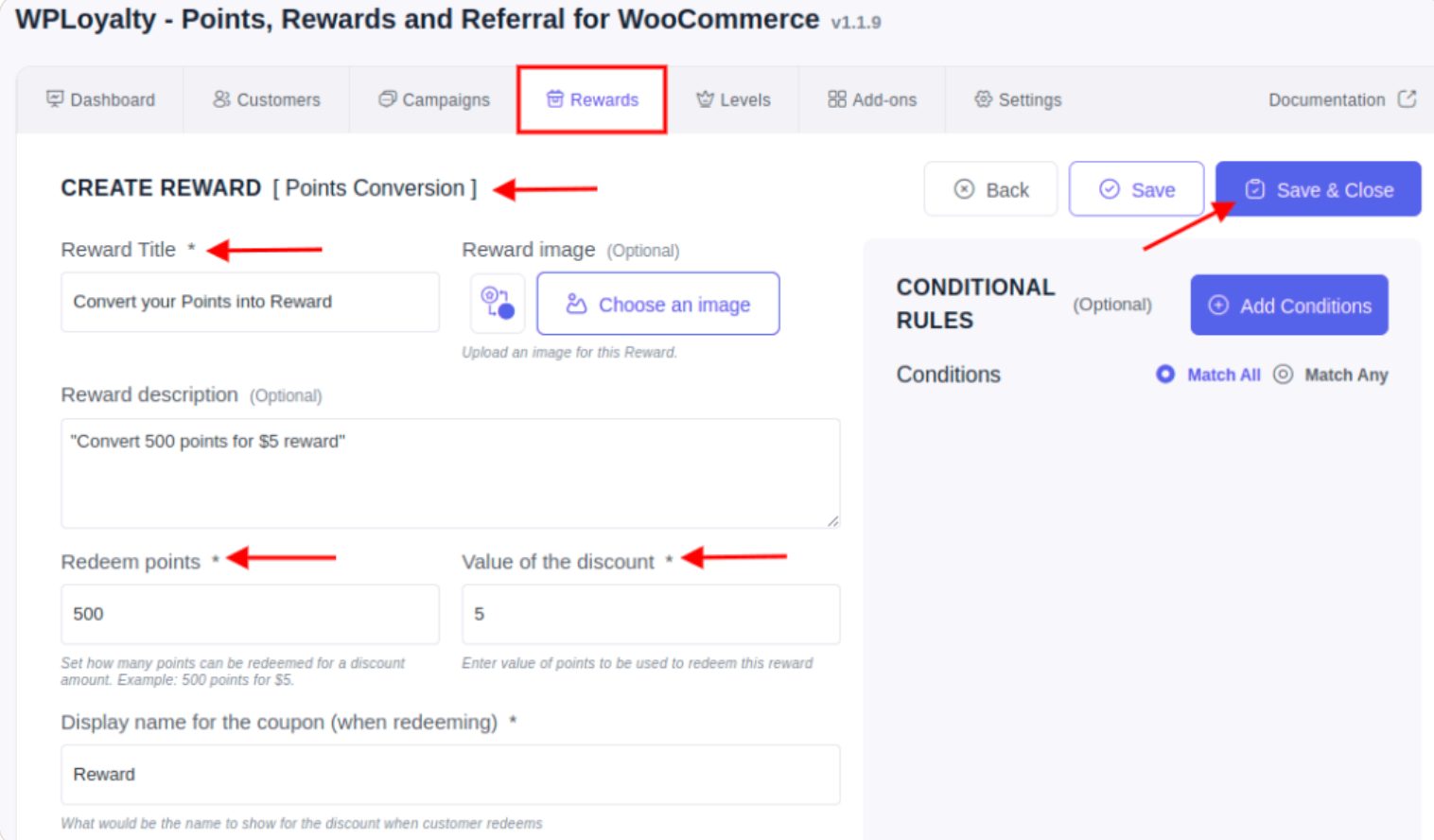
- Then set minimum and maximum order values for earning points. Add an expiry period for inactive accounts.
- Finally, place a test order and check the balance in My Account. Then go ahead and redeem the points and confirm the coupon is applied.
Stop overpaying for new customers and try WPLoyalty Lite free that brings existing buyers back.
Conclusion
Match the loyalty program to the store goal. For example, clearance calls for bonus points, new customers call for referrals, and top buyers call for tiers. Also ensure that lapsed buyers need point expiry with reminders. For stores wanting several programs in one plugin, WPLoyalty is the best fit. Following that, small catalogs can use WooCommerce Points and Rewards, and communities can use myCred or Gratisfaction.
Related Reading
- How to customize loyalty points email in your WooCommerce store?
- 5 Best WooCommerce points and rewards plugins
FAQ
The best plugin depends on store type and budget. WPLoyalty is a strong start for stores wanting points, referrals, and birthday rewards together. However, small stores may prefer WooCommerce Points and Rewards.
Install a points plugin and set an earning rate, for example, 1 point per $1 spent. Then let customers redeem points for a coupon, such as 500 points for $5.
WPLoyalty, WooRewards, and Gratisfaction all offer referrals. However, official WooCommerce Points and Rewards has none built in. Therefore, check the feature list before buying.
WPLoyalty lists Levels, and Gratisfaction offers customizable tiers, while myCred adds ranks and badges. However, some plugins charge extra for tier add-ons.
Any plugin with campaign scheduling, birthday rewards, and tiers suits fashion stores. Seasonal drops match time-limited bonus points. Therefore, delay points until the return window closes.
Prices range from free to about $295 a year. While WPLoyalty plans run $105 to $295, WooCommerce Points and Rewards lists $179 a year, and YITH falls around $144.99 a year.