
Customer acquisition is expensive – 5x to 10x more than customer retention.
One of the easiest ways to increase revenue from existing customers is by encouraging them to come back and place another order.
A WooCommerce next order coupon helps you do exactly that.
Instead of offering an immediate discount, you reward customers with a coupon they can use on their next purchase. This simple strategy can improve customer retention, increase repeat purchases, and boost customer lifetime value.
In this guide, you’ll learn what a WooCommerce next order coupon is, its benefits, and how to create one for your store using two ways with plugins.
Looking for other ways to boost conversions?
Check out our guides on:
These strategies can be combined with next-order coupons to increase sales and customer retention.
Table of contents
- Quick Summary
- What is a WooCommerce Next Order Coupon?
- Why Offer Next Order Coupons in WooCommerce?
- Default Coupon vs Next-Order Coupon in WooCommerce
- Method 1: Display Next-Order Coupons on WooCommerce Thank You Pages Using UpsellWP
- Method 2: Send Next-Order Coupons via Email Using Retainful
- Next Order Coupon Discount vs Nth Order Coupon Discount
- Best Practices for WooCommerce Next Order Coupons
- Common Mistakes to Avoid While Creating Next-Order Discounts
- Final Thoughts
- Frequently Asked Questions
What is a WooCommerce Next Order Coupon?
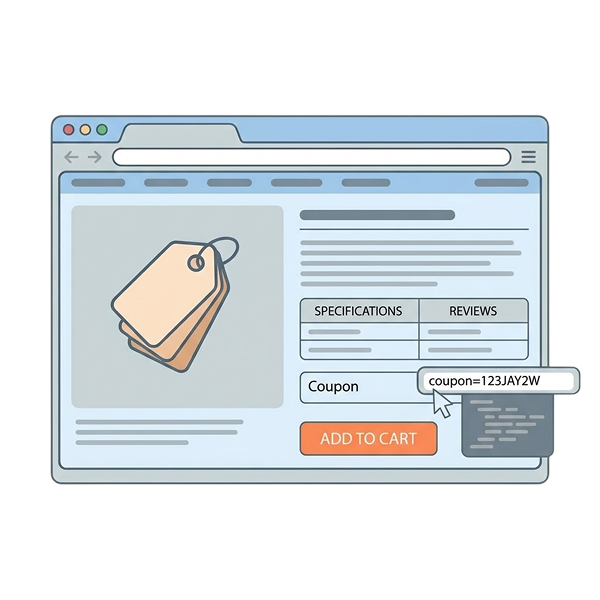
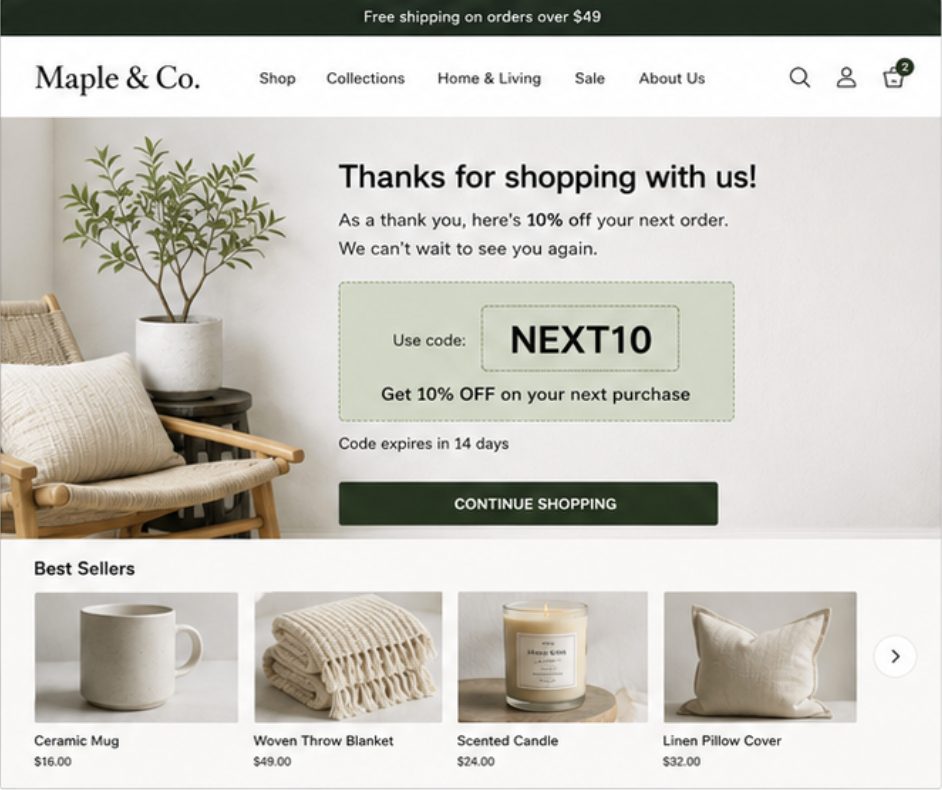
A WooCommerce next order coupon is a discount code that customers receive after completing a purchase. The coupon can be redeemed on their next order within a specified period.
For example:
Use the code “NEXTORDERREWARD” and
- Get 10% off your next purchase
- Receive $20 off your next order
- Enjoy free shipping on your next order
- Buy again within 7 days and save 15%
The goal is simple: motivate customers to return and shop again.
Why Offer Next Order Coupons in WooCommerce?
Here are some benefits of offering next order coupons in WooCommerce stores:
- Increase Repeat Purchases: Many customers buy once and never return. A future-order coupon gives them a compelling reason to come back.
- Improve Customer Retention: Retaining existing customers is often more cost-effective than acquiring new ones.
- Increase Customer Lifetime Value: When customers place multiple orders, their overall value to your business increases.
- Encourage Faster Repeat Orders: Time-limited coupons create urgency and encourage customers to purchase sooner.
- Build Customer Loyalty: Rewarding customers after a purchase creates a positive shopping experience and strengthens brand loyalty.
Default Coupon vs Next-Order Coupon in WooCommerce
A standard WooCommerce coupon helps customers save money on their current purchase. In contrast, a next-order coupon rewards customers after they complete an order and encourages them to return for another purchase.
Feature | Default Woo Coupon | Next-Order Coupon |
When customers receive it | Before purchase | After purchase |
When it is used | Current order | Future order |
Primary goal | Increase conversions | Increase repeat purchases |
Example | SAVE10 – 10% OFF today | NEXT10 – 10% OFF your next order |
How does a Next-Order Coupon work?
A typical next-order coupon campaign follows this process:
- Customers browse products in your store.
- They add items to their cart and complete checkout.
- After the purchase, they receive a coupon code.
- The coupon can be displayed on a Thank You page or sent via email.
- Customers use the coupon on their next purchase.
Customers can redeem the coupon when they return to the store and place another order.
Which One Should You Use?
Both coupon strategies are effective, but they serve different goals.
- Use default coupons to increase conversions and encourage first-time purchases.
- Use next-order coupons to retain customers and drive repeat purchases.
Many WooCommerce stores use both strategies together—offering a discount on the current purchase while rewarding customers with a coupon for their next order.
Why WooCommerce’s Default Coupons Aren’t Enough?
WooCommerce lets you create coupon codes, but it doesn’t provide a built-in way to automatically reward customers with a coupon after purchase.
Store owners often need additional tools to display coupons on Thank You pages, send them through email, or automate post-purchase promotions.
In the next sections, we’ll look at two effective ways to create WooCommerce next order coupons and encourage repeat purchases.
Method 1: Display Next-Order Coupons on WooCommerce Thank You Pages Using UpsellWP
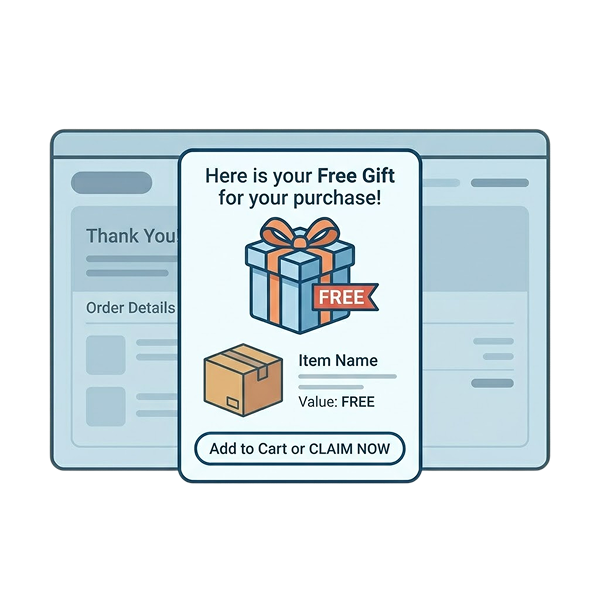
One of the most effective ways to promote a next-order coupon is to display it immediately after checkout. Since customers have just completed a purchase, they are more likely to notice and redeem the offer.
With UpsellWP , you can create a Thank You page campaign and display a coupon that customers can use on their future purchases.
Step 1: Create a New Next-Order Coupon Campaign
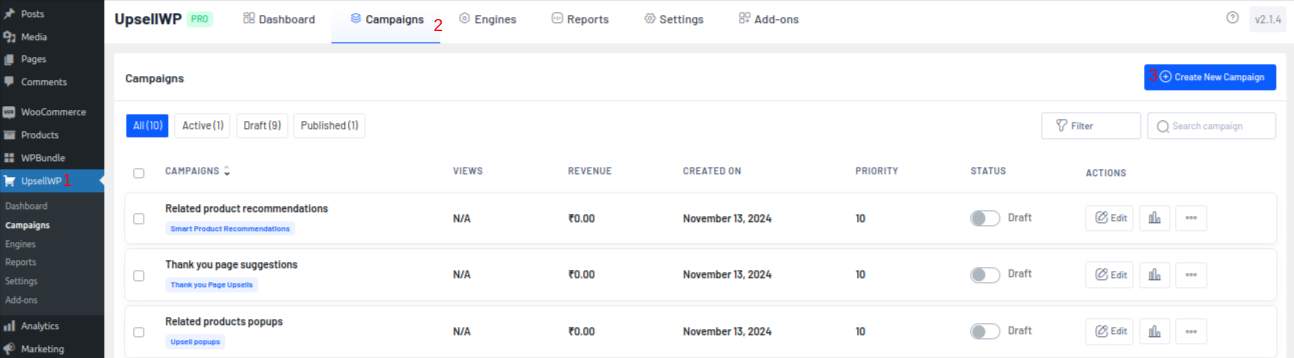
- Navigate to: “UpsellWP → Campaigns → Create New Campaign.”
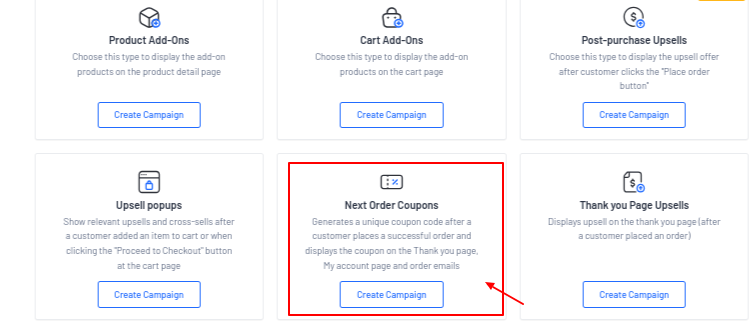
- Select Next Order Coupons as the campaign type and enter a name for internal reference.
- Examples: “Next Order Reward, Thank You Coupon, Repeat Purchase Discount.”
Step 2: Configure the Coupon Discount
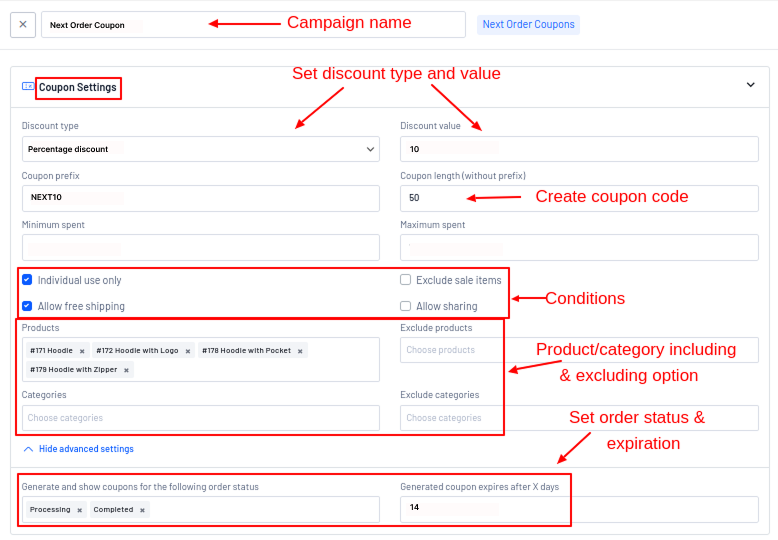
- Under the coupon settings, choose the type of discount you want to offer.
- Popular options include:
- Percentage discount (10% OFF)
- Fixed cart discount ($10 OFF)
- Free shipping coupon.
- Then configure:
- Discount value
- Coupon prefix
- Coupon code length
- Expiration period.
- Example:
- Discount Type: Percentage Discount
- Discount Value: 10%
- Coupon Prefix: NEXT10
- Coupon Expiry: 14 Days.
UpsellWP will automatically generate unique coupon codes based on your settings.
Step 3: Choose Where to Display the Coupon
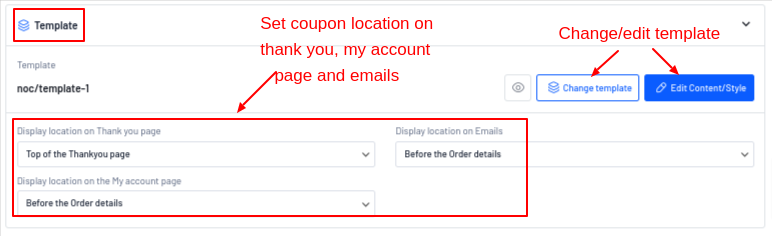
One of the biggest advantages of UpsellWP is that you can display the coupon in multiple locations.
- Enable one or more display locations:
- Thank You Page
- Order Confirmation Email
- My Account → Orders.
For maximum visibility, display the coupon on the Thank You page immediately after purchase. Customers can see the reward before leaving your store.
Step 4: Customize the Coupon Message
- Click Edit Content/Style to customize the design and messaging.
- Example:
“🎁 Thanks for your order!
Use coupon code NEXT10 to get 10% OFF your next purchase.”
- You can customize:
- Headline
- Description
- CTA button text
- Colors and styling
- Coupon layout.
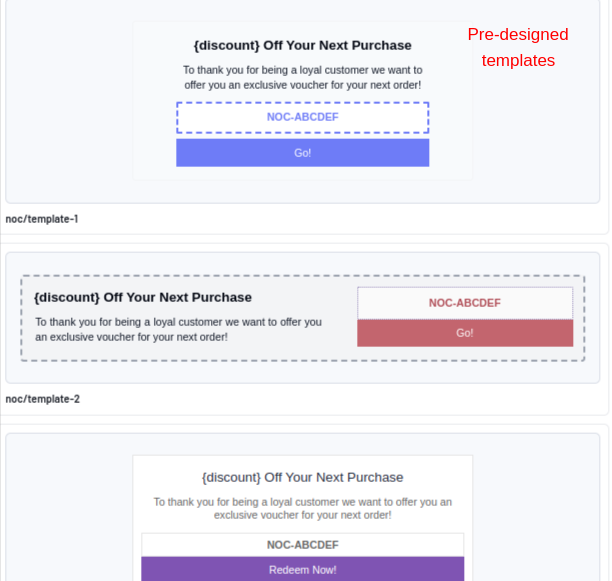
UpsellWP also includes ready-made templates that you can customize to match your store design.
Step 5: Add Targeting Rules (Optional)
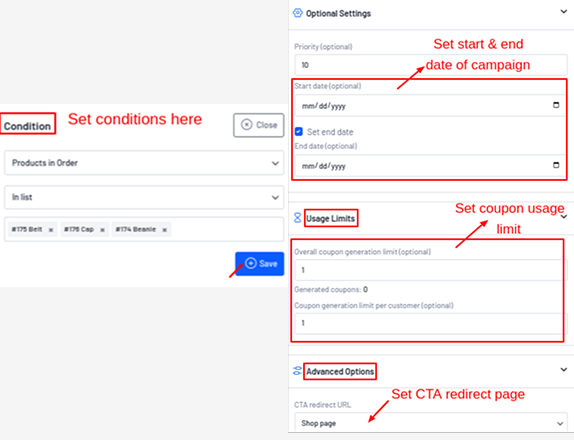
- If you only want certain customers to receive the coupon, add campaign conditions.
- For example:
- Order total greater than $100
- Specific products purchased
- First-time customers only
- Customers with a certain purchase history.
This helps you create more targeted post-purchase promotions.
Step 6: Publish the Campaign
- Review your settings and click Save.
Once activated, customers will automatically receive a next-order coupon after placing an order. The coupon can be displayed on the Thank You page, emailed to customers, or shown inside their account area, depending on your display settings.
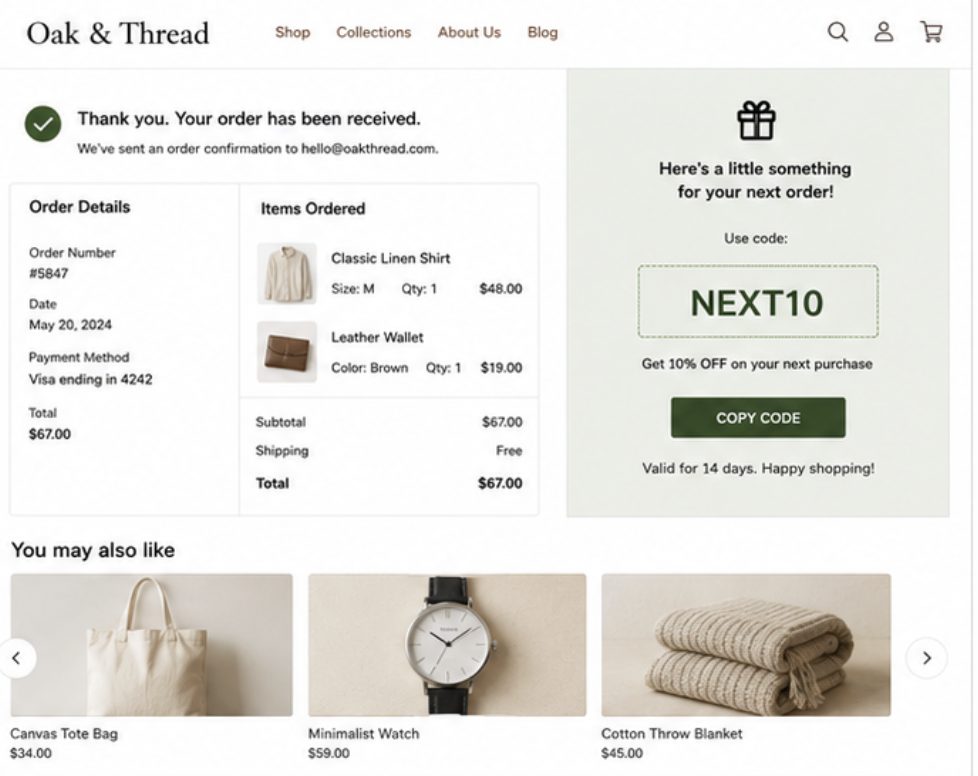
Customers will now see the coupon immediately after placing an order.
Result
Your customers receive an instant reward after checkout, increasing the chances of repeat purchases and coupon redemption.
Want to display next-order coupons directly on your WooCommerce Thank You page? UpsellWP makes it easy to create post-purchase coupon offers that encourage repeat purchases.
Method 2: Send Next-Order Coupons via Email Using Retainful
If customers leave your store immediately after checkout, they may never see a Thank You page offer. That’s where email-based next-order coupons can help.
With Retainful , you can automatically generate unique coupon codes and send them to customers through post-purchase emails, helping you drive repeat purchases even after they leave your website.
Step 1: Install and Connect Retainful
- Install and activate the Retainful plugin on your WooCommerce store.
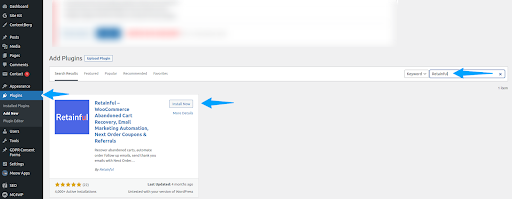
- Then connect your store to your Retainful account:
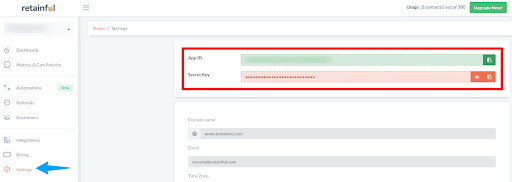
- Create or log in to your Retainful account.
- Copy your API credentials from the Retainful dashboard.
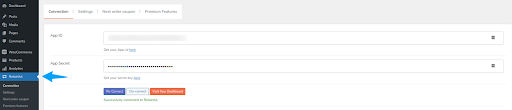
- Navigate to WordPress Dashboard → Retainful.
- Enter the credentials and connect your store.
Once connected, you’ll manage your next-order coupon campaigns directly from the Retainful dashboard.
Step 2: Create a Thank You Email Workflow
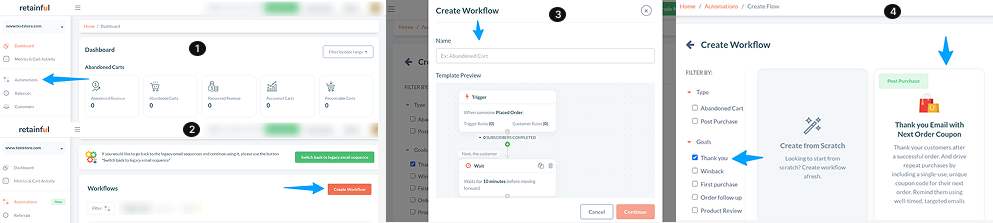
- Navigate to: “Retainful → Automations → Create Workflow.”
- Choose the pre-built workflow: “Thank You Email with Next Order Coupon.”
- Give the workflow a name such as: “Next Order Coupon Campaign, Post-Purchase Reward, Repeat Purchase Discount.”
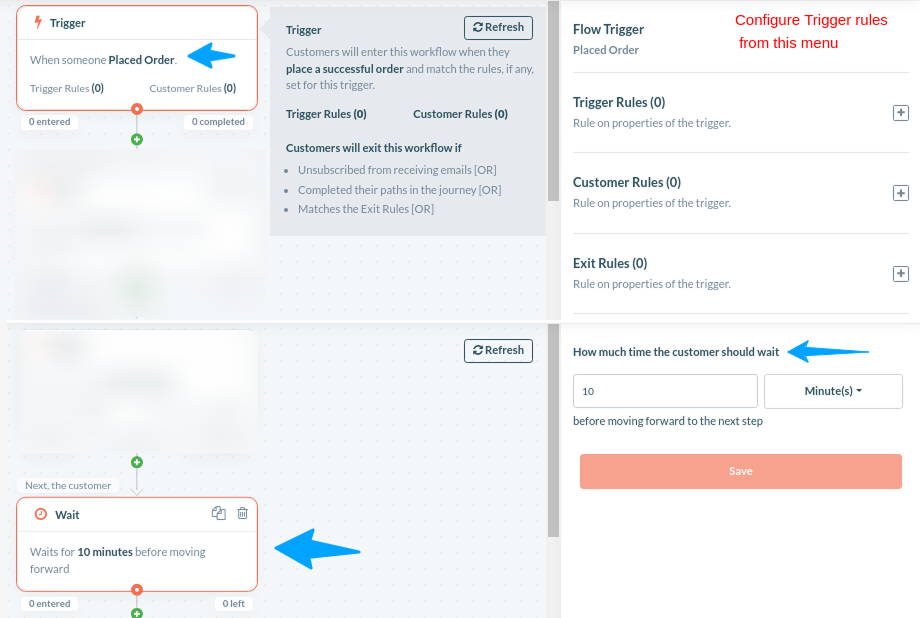
Retainful will automatically create a workflow that includes a purchase trigger, coupon generation, thank-you email, and coupon reminder emails.
Step 3: Review the Customer Journey Workflow
Retainful automatically creates a pre-built workflow containing all the essential elements needed for a next-order coupon campaign.
- The workflow includes:
- Order Trigger
- Wait Action
- Coupon Generation
- Thank You Email
- Coupon Reminder Emails.
- Since the workflow is already configured, you only need to customize the settings to match your store’s requirements.
Step 4: Configure the Coupon Settings
- Click the Coupon block in the workflow builder.
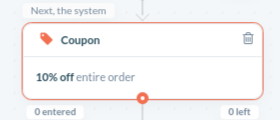
- By default, Retainful creates a coupon offer, but you can customize it based on your promotion.
- Configure:
- Discount type
- Discount amount
- Expiration period
- Minimum purchase value.
- Example:
- Discount Type: Percentage Discount
- Discount Value: 15%
- Coupon Expiry: 14 Days
- Once configured, click Save.
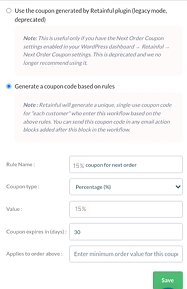
Retainful will automatically generate unique next-order coupons for eligible customers.
Step 5: Customize the Thank You Email
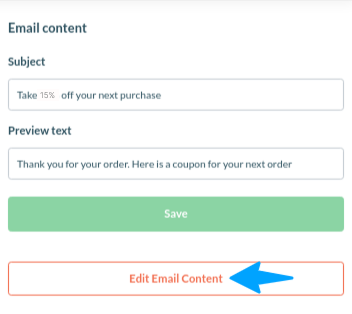
- Next, select the Email block and click Edit Email Content.
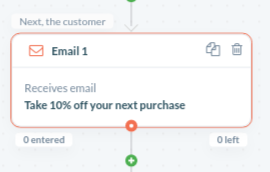
- You can customize:
- Subject line
- Email content
- Branding elements
- Coupon messaging.
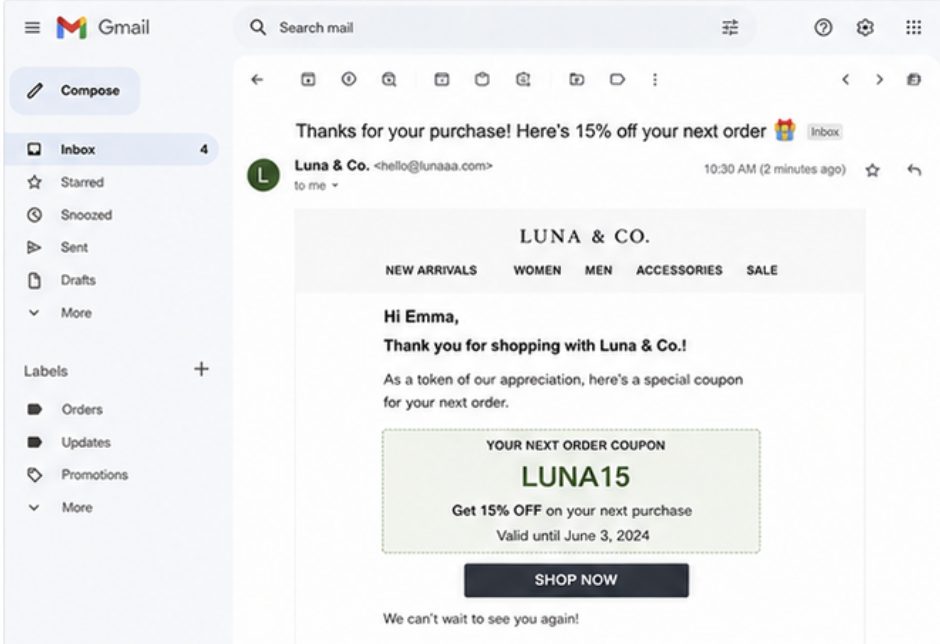
- Example: “Subject: Thanks for your purchase! Here’s 15% OFF your next order 🎁.”
The generated coupon code will automatically be inserted into the email when it is sent to customers.
Step 6: Configure Coupon Reminder Emails (Optional)
One advantage of Retainful is its built-in coupon reminder emails.
The workflow already includes reminder emails that can be sent before the coupon expires.
- You can edit:
- Reminder timing
- Email content
- Subject lines.
This helps increase coupon redemption rates by reminding customers about their unused discount.
Step 7: Launch the Automation
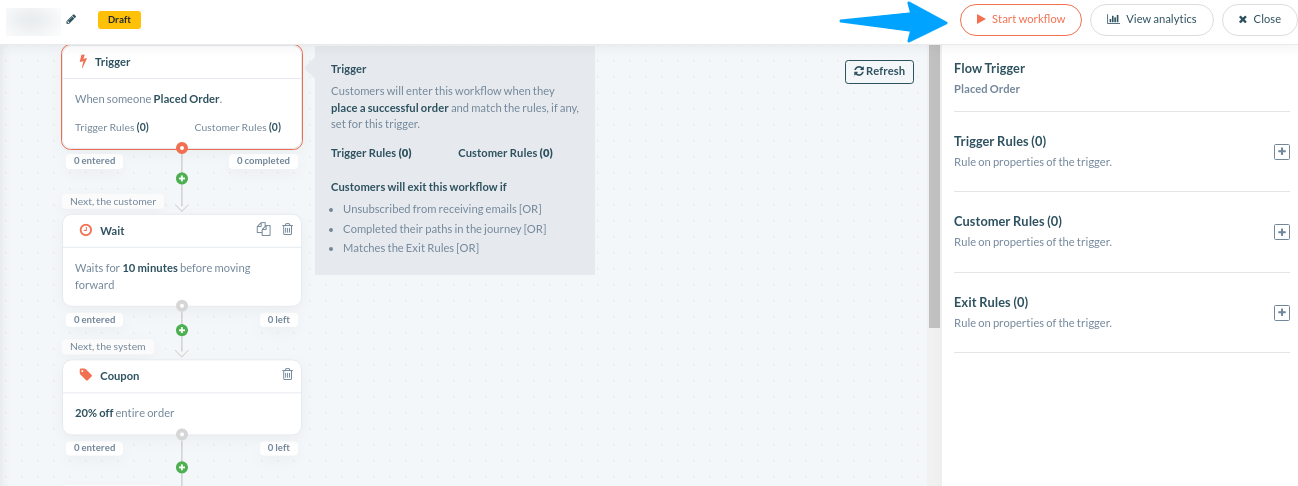
- Once you’ve configured the coupon, thank-you email, reminder emails, and wait actions, click Start Workflow.
Retainful will automatically:
- Generate unique next-order coupons
- Send thank-you emails after purchase
- Deliver coupon reminders
- Stop the automation once the workflow is completed.
Result
Every customer automatically receives a personalized next-order coupon in their inbox after completing a purchase, helping you increase repeat orders and customer retention through email automation.
Result
Customers automatically receive a personalized next-order coupon in their inbox, helping you bring them back for another purchase without any manual effort.
Looking to send automatic next-order coupons after every purchase? Retainful helps you generate and deliver coupon codes through email campaigns with minimal setup.
Quick Comparison of Two Methods
| Method | Best For |
| Thank You Page Coupons (UpsellWP) | Maximum visibility and immediate engagement |
| Email Coupons (Retainful) | Automated follow-ups and long-term retention |
Next Order Coupon Discount vs Nth Order Coupon Discount
Although they sound similar, they serve different purposes.
| Feature | Next Order Coupon Discount | Nth Order Coupon Discount |
| Trigger | Issued after a purchase and used on the customer’s next order | Applied when a customer reaches a specific order milestone |
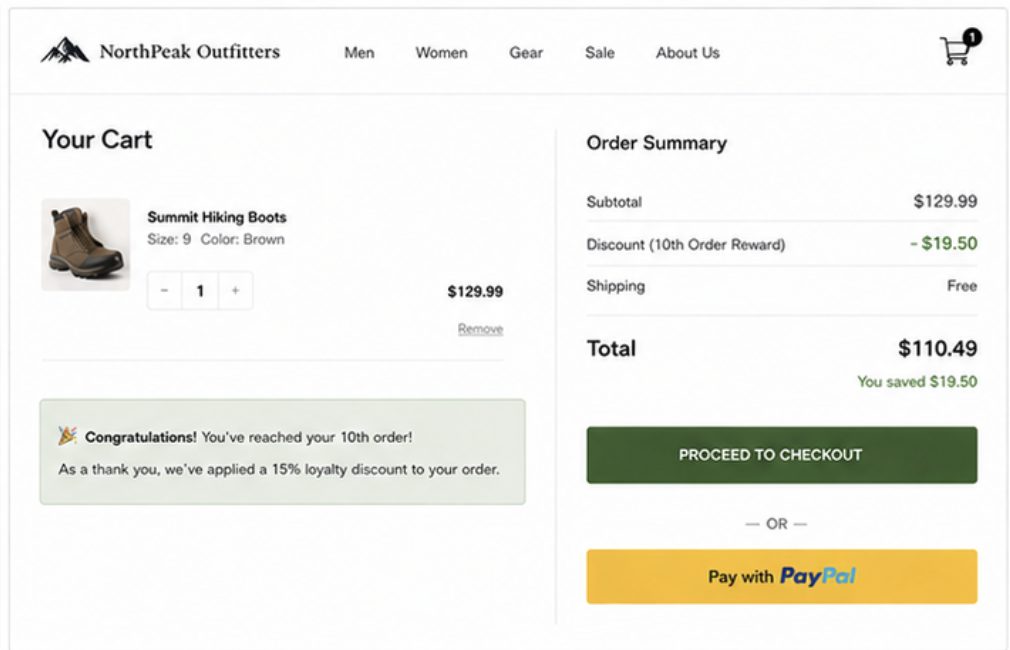
| Example | “Get 10% OFF your next purchase” | “Get 15% OFF on your 10th order” |
| Goal | Encourage an immediate repeat purchase | Reward long-term loyalty |
| Requires Coupon Code | Usually yes | Optional |
| Best For | Customer retention and repeat purchases | Loyalty and VIP rewards |
How Are They Related?
Both strategies encourage customers to return and purchase again.
The difference is that a next order coupon rewards the very next purchase, while an nth order discount rewards customers only after they reach a specific purchase milestone, such as their 5th, 10th, or 20th order.
How to Create an Nth Order Discount in WooCommerce?
We need a discount plugin, “ Discount Rules for WooCommerce – Pro ” to create nth order discount, as the regular WooCommerce coupon feature does not have this option.
Disclosure: “Discount Rules for WooCommerce – Pro” does not include a dedicated next-order coupon feature that automatically generates and delivers coupons after checkout. However, it can create loyalty discounts based on purchase history and order count.
- Install and activate the Flycart’s “Discount Rules for WooCommerce.
- Go to “WooCommerce → Discount Rules → Add New Rule.”
- Choose the “Discount type (percentage, fixed amount, etc.).”
- Configure the discount value (e.g., 15% OFF).
- Under “Conditions,” add a “Number of Orders Made” condition.
- Set the “Purchase date and Purchased quantity (e.g., Order Count = 10).” Also, set the order status.
- Save and activate the rule.
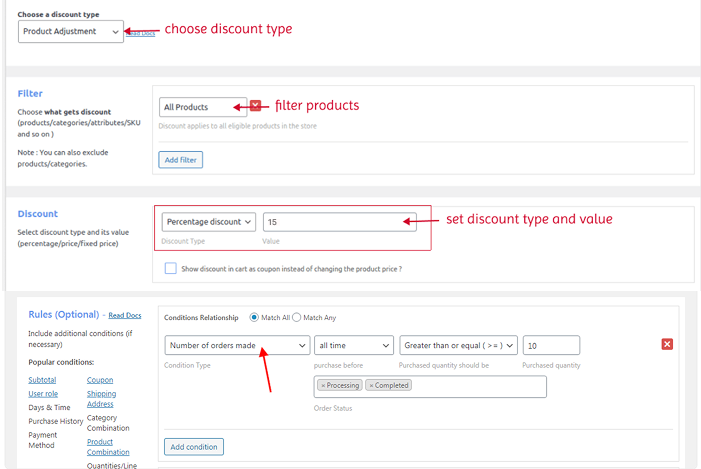
Now, customers automatically receive the discount when they place their 10th order.
Learn More:
Want to reward customers based on their order count or loyalty milestones? Read our complete guide on WooCommerce Nth Order Discounts to learn how to create discounts for 2nd, 5th, 10th, or any purchase milestone.
Best Practices for WooCommerce Next Order Coupons
A next-order coupon can increase repeat purchases, but its effectiveness depends on how you present and deliver the offer. Here are some best practices to improve coupon redemption rates.
- Keep the Offer Simple: Customers should immediately understand the reward. Instead of creating complex coupon rules, use straightforward offers such as:
- 10% OFF your next order
- $15 OFF your next purchase
- Free shipping on your next order.
Simple offers typically generate higher redemption rates.
- Deliver the Coupon at the Right Time: The timing of your offer matters. Consider showing the coupon:
- Immediately after checkout on the Thank You page
- In a post-purchase email
- Through reminder emails before the coupon expires.
The sooner customers see the reward, the more likely they are to remember it.
- Create a Sense of Urgency: Adding an expiration date encourages customers to act sooner. For example:
- Valid for 7 days
- Valid for 14 days
- Expires at the end of the month.
Limited-time offers often perform better than coupons with no expiry.
- Make the Coupon Highly Visible: Customers can’t redeem offers they never see. Display the coupon prominently:
- On the WooCommerce Thank You page
- In order confirmation emails
- In follow-up reminder emails.
Using multiple touchpoints can significantly improve coupon redemption rates.
- Personalize Rewards for Better Results: Not all customers have the same value to your business. Consider offering:
- Higher discounts for VIP customers
- Larger rewards for high-value purchases
- Special incentives for first-time buyers
Personalized offers often generate stronger repeat-purchase rates.
- Measure Performance: Track the effectiveness of your next-order coupon campaigns by monitoring:
- Coupon redemption rate
- Repeat purchase rate
- Revenue generated
- Customer lifetime value (CLV).
These metrics help you identify which offers drive the most repeat business.
Common Mistakes to Avoid While Creating Next-Order Discounts
- Offering Discounts That Are Too Small: A coupon should provide a meaningful incentive to return. For many stores, a 5–15% discount or free shipping offer performs better than extremely small discounts.
- Giving Customers Too Much Time: If a coupon is valid for several months, customers may forget about it. Shorter expiration periods often create urgency and encourage faster repeat purchases.
- Relying on a Single Delivery Method: Showing a coupon only on the Thank You page or only in an email may reduce visibility. Consider combining multiple touchpoints whenever possible.
- Making Coupon Terms Complicated: Customers should understand the offer at a glance. Avoid excessive restrictions, exclusions, or lengthy coupon conditions.
- Forgetting to Test the Customer Experience: Always place a test order before launching a campaign. Verify that:
- The coupon is generated correctly
- The coupon is displayed or emailed properly
- The discount applies as expected
- Expiration settings work correctly.
Start Rewarding Repeat Purchases Today
The easiest way to increase customer retention is to give shoppers a reason to come back. Create your first WooCommerce next-order coupon and start turning one-time buyers into repeat customers.
Final Thoughts
A WooCommerce next-order coupon is a simple but effective strategy for increasing repeat purchases and customer retention.
If you want customers to see the offer immediately after checkout, displaying a coupon on the Thank You page is an excellent option. If you prefer automated follow-ups, sending next-order coupons via email can help you stay connected with customers even after they leave your store.
Choose the method that best fits your marketing strategy, start with a compelling offer, and track performance to continuously improve your repeat-purchase campaigns.
Also Read
- How to Create WooCommerce Coupons By User Roles or Users?
- WooCommerce Smart Coupons: The Complete Guide that Drive Sales (2026)
Frequently Asked Questions
Both methods can work well. Thank You page coupons provide immediate visibility after checkout, while email coupons help customers access the offer later. Some stores use both methods together to maximize redemption rates.
Yes. Many WooCommerce coupon plugins can automatically generate unique coupon codes for individual customers. This helps prevent coupon sharing and allows you to track redemption rates more accurately.
A discount between 10% and 15% is often enough to encourage repeat purchases without significantly affecting profit margins. Free shipping coupons can also be highly effective.
Yes. WooCommerce coupons can be restricted to specific products, categories, customer groups, or minimum purchase amounts depending on your coupon configuration.
Most stores use expiration periods between 7 and 30 days. Shorter validity periods create urgency, while longer periods give customers more flexibility to return.
Yes. If the customer provides an email address during checkout, next-order coupons can be displayed on the Thank You page or sent through post-purchase emails regardless of whether they created an account.