Starting an online store today involves much more than choosing a theme and uploading products. Ecommerce website development has become a structured process that combines planning, technology, performance, and user experience.
A well-developed ecommerce site doesn’t just look good; it loads fast, works smoothly across devices, and supports long-term business growth.
Whether you’re planning to build an ecommerce website from scratch or improve an existing one, understanding each stage of ecommerce development is essential.
From selecting the right platform to optimizing checkout and scaling after launch, every decision impacts conversions, costs, and customer trust.
This 2026 guide breaks down ecommerce website development step by step, helping store owners make informed choices, avoid common mistakes, and create an online store that’s ready to sell and scale.
Boost sales with Discount Rules for WooCommerce – Pro. Run smart discounts, BOGO deals, and bulk pricing easily.
Table of contents
- What is Ecommerce Website Development?
- Ecommerce Website Development vs Ecommerce Web Development
- Planning Phase: The Foundation of a Successful Ecommerce Website
- Choosing the Right Platform to Build an Ecommerce Website
- WooCommerce Website Development: Why It’s Still a Top Choice
- Custom Ecommerce Web Development: When Does It Make Sense?
- Designing for Conversion: UX & UI Best Practices
- Core Features Needed for Ecommerce Site Development
- Performance, SEO & Mobile Optimization
- Developing an Ecommerce Website: Step-by-Step Process
- Common Ecommerce Development Mistakes (and How to Avoid Them)
- Scaling Your Online Store After Launch
- Answering Common Reddit Questions About Ecommerce Website Development
- How WooCommerce Store Owners Can Increase Sales With Smart Discounts?
- Ecommerce Website Development Checklist
- Conclusion: From Plan to Profitable Launch
- Frequently Asked Questions
What is Ecommerce Website Development?
Ecommerce website development is the process of planning, designing, building, testing, and launching an online store that allows users to browse products, make purchases, and complete payments securely.
It includes:
- Frontend design (store layout, product pages, checkout)
- Backend development (inventory, orders, users)
- Payment gateway integration
- Performance optimization
- SEO and security setup.
In short, ecommerce website development turns your business idea into a fully functional online selling platform.
Ecommerce Website Development vs Ecommerce Web Development
These terms are often used interchangeably, but there’s a subtle difference:
- Ecommerce website development focuses on the entire online store experience: from product pages to checkout and post-purchase flows.
- Ecommerce web development leans more toward the technical side, such as coding, APIs, databases, and integrations.
For store owners, both matter. A successful ecommerce project balances business goals with solid ecommerce web development practices.
Planning Phase: The Foundation of a Successful Ecommerce Website
Every high-performing store starts with a plan. Skipping this stage leads to slow sites, bloated plugins, and expensive rework later.
(A) Define Business Goals and Audience
Ask yourself:
- Who are you selling to (B2C, B2B, global, local)?
- What problem does your product solve?
- Are you focused on volume, premium sales, or subscriptions?
This clarity shapes your ecommerce site development decisions.
(B) Product & Catalog Planning
Before you build an ecommerce website, finalize:
- Number of products & variations
- Physical vs digital products
- Shipping complexity
- Discount and pricing strategies.
If you plan to run promotions, offer bulk pricing, or BOGO deals, your platform and plugins must support them from the outset.
(C) Budget & Timeline
Costs for ecommerce website development vary widely based on:
- Platform choice
- Customization level
- Developer involvement.
Choosing the Right Platform to Build an Ecommerce Website
One of the most important ecommerce development decisions is selecting the right platform.
Hosted vs Self-Hosted Ecommerce Platforms
Hosted ecommerce platforms (like Shopify and Wix) handle hosting, security, and updates for you, making them quick to launch but more restrictive in control and customization.
These are:
- Easy to start
- Monthly fees
- Less control
- Platform restrictions.
Self-hosted ecommerce platforms (like WooCommerce) give you full ownership and flexibility, allowing deeper customization at a lower long-term cost, but they require ongoing maintenance.
These are:
- Full ownership
- Flexible customization
- Lower long-term cost
- Requires maintenance.
5 Popular Ecommerce Platforms
A. Shopify
A fully hosted ecommerce platform ideal for fast launches and scaling, but it comes with recurring fees and limited backend control.
- Best for fast launches
- Highly scalable
- Ongoing monthly costs
- Limited backend control.
B. WooCommerce
A WordPress-based ecommerce solution that offers high flexibility, strong SEO capabilities, and cost efficiency when developed correctly.
- Built on WordPress
- Ideal for flexibility and SEO
- Cost-effective
- Requires good development practices.
A beginner-friendly platform designed for simple online stores, best suited for small catalogs with limited growth needs.
- Beginner-friendly
- Limited scalability.
D. Squarespace
An ecommerce option focused on design and content, suitable for visually rich stores but less flexible for advanced ecommerce functionality.
- Good for content-heavy stores
- Not ideal for complex ecommerce needs.
E. Custom Ecommerce Development
A fully tailored ecommerce solution offering complete control and customization, but requiring higher investment and longer development timelines.
- Maximum control
- Highest cost
- Longer development time.
WooCommerce Website Development: Why It’s Still a Top Choice
Despite mixed opinions online, WooCommerce website development remains one of the most powerful ways to build an ecommerce website, when done right.
Many negative experiences shared online are not caused by WooCommerce itself, but by how the store was developed and maintained.
Why WooCommerce Works Well?
- Full ownership of data, giving store owners complete control over products, customers, and transactions.
- Strong SEO capabilities, thanks to WordPress’s clean structure and advanced optimization options.
- Thousands of extensions, allowing stores to add features without rebuilding the site.
- No platform lock-in, making it easier to scale, migrate, or customize long-term.
Many Reddit discussions point out performance issues with WooCommerce, but these problems usually come from poor development practices, such as installing too many unnecessary plugins, using low-quality themes, choosing weak hosting, or skipping caching and performance optimization.
When WooCommerce is built with a lightweight setup, proper hosting, and a clear plugin strategy, these issues disappear.
-> In fact, a well-built WooCommerce store can outperform hosted platforms in terms of page speed, SEO visibility, and conversion optimization.
This makes WooCommerce a strong choice for businesses that want flexibility, control, and long-term growth without ongoing platform limitations.
Custom Ecommerce Web Development: When Does It Make Sense?
Custom ecommerce web development is ideal when:
- You have unique product workflows
- Platform restrictions affect your business
- You need full control over compliance or payments.
However, custom builds require:
- Higher upfront cost
- Ongoing developer dependency
- Longer time to market.
For most businesses, WooCommerce offers a middle ground between flexibility and cost.
Designing for Conversion: UX & UI Best Practices
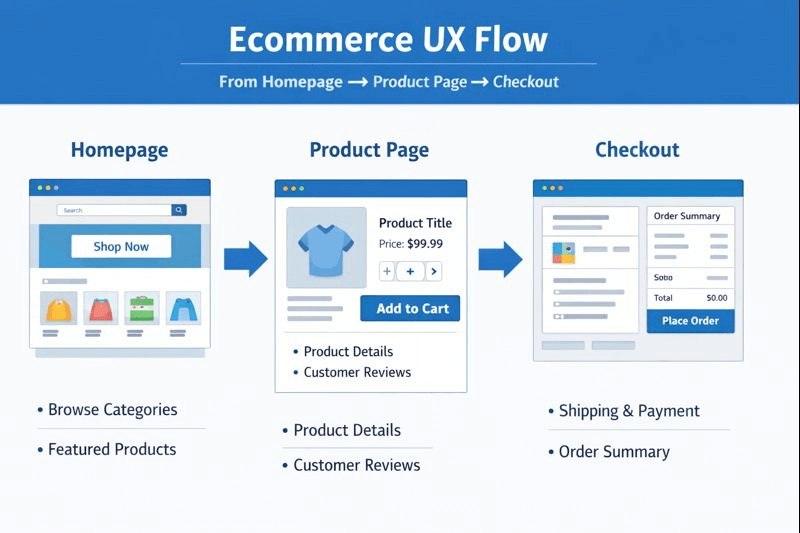
Design isn’t just about appearance; it directly influences how easily visitors browse, trust, and buy from your store. Strong UX and UI decisions reduce friction and guide users toward conversion.
Key UX principles to focus on include:
- Simple, intuitive navigation that helps users find products quickly
- Clear product pages with strong visuals, pricing, and descriptions
- A fast, distraction-free checkout process
- Mobile-first design for seamless shopping across devices
- Trust signals such as reviews, ratings, and security badges.
Good ecommerce website development aligns design with buyer psychology, making the shopping experience smooth, credible, and conversion-focused.
Core Features Needed for Ecommerce Site Development
Every successful ecommerce site development project should include:
- Product search & filters – Help customers quickly find relevant products, especially in large catalogs.
- Secure checkout – Protect customer data and build trust during the payment process.
- Multiple payment options – Allow customers to pay using cards, wallets, or local methods to reduce cart abandonment.
- Shipping & tax rules – Automatically calculate accurate shipping costs and taxes based on location.
- Inventory management – Track stock levels in real time to prevent overselling or stock issues.
- Discount & pricing rules – Apply promotions and dynamic pricing strategies to increase conversions and order value.
- Analytics & tracking – Measure traffic, sales, and customer behavior to improve performance over time.
Discounts play a major role in conversions, which is why using smart, flexible pricing tools is important for growth.
Performance, SEO & Mobile Optimization
Performance is a critical part of ecommerce website development in 2026, as speed directly affects rankings and sales.
- Optimized hosting – Ensures fast load times and stable performance during traffic spikes.
- Image compression – Reduces page size without sacrificing visual quality.
- Caching & CDN – Delivers content faster by storing and serving it closer to users.
- Clean code – Improves loading speed, stability, and long-term maintainability.
- Mobile responsiveness – Provides a smooth shopping experience across all screen sizes.
Search engines favor fast, mobile-friendly ecommerce websites, making performance optimization essential for visibility and conversions.
Payment, Shipping & Tax Setup (Global-Ready)
When building an ecommerce website for a global audience, especially in the USA and EU, flexibility and compliance are key.
- Support for cards, wallets, and BNPL – Gives customers familiar and preferred payment options.
- Flexible shipping options – Allows home delivery, local pickup, and region-based shipping rules.
- Clear tax calculations – Displays accurate taxes to avoid confusion and checkout drop-offs.
- Local compliance – Helps meet regional regulations and payment standards.
WooCommerce excels in global ecommerce setups due to its highly extensible ecosystem and wide range of integrations.
Developing an Ecommerce Website: Step-by-Step Process
Here’s a detailed roadmap for developing an ecommerce website, from planning to launch:
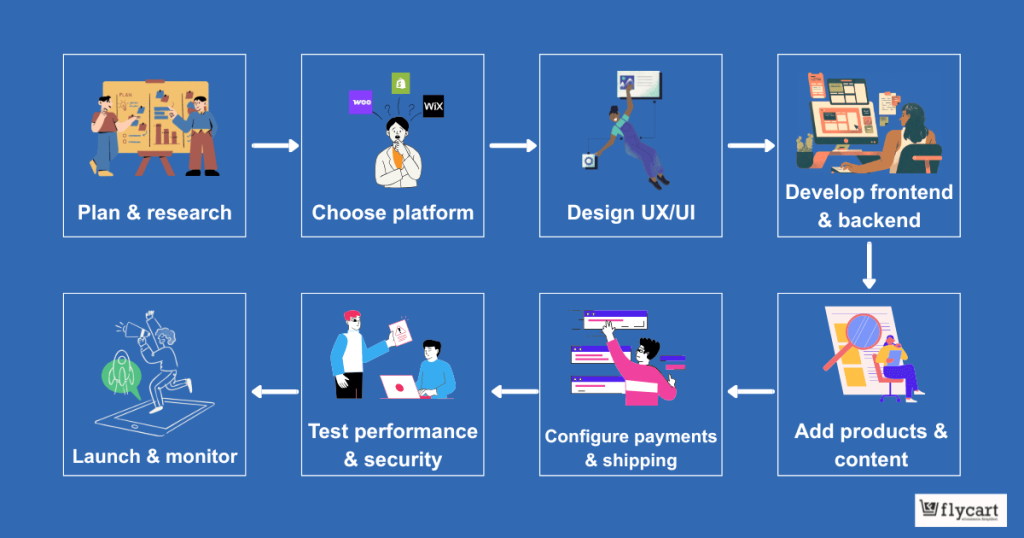
1. Plan & Research
Planning is the foundation of any successful ecommerce website development.
Before writing a single line of code or choosing a theme, you need to clearly define business goals, target audience, product offerings, and unique value propositions.
Start by analyzing your market, understanding customer pain points, and studying competitors to see what works and what doesn’t.
A well-thought-out plan also involves mapping your product catalog, pricing strategy, and expected growth.
Consider whether you want to sell globally, which affects shipping, taxes, and payment integrations. Researching the platform ecosystem is equally crucial.
For instance, WooCommerce offers flexibility, scalability, and a wide range of plugins for discounts, marketing, and analytics, making it ideal for store owners who want control over their store.
Finally, planning helps set a budget and timeline. Costs vary depending on whether you choose a hosted platform, a self-hosted solution, or a custom-built website.
Knowing your goals upfront prevents overspending and ensures each feature you include contributes to long-term success.
2. Choose Platform
Choosing the right platform is a critical step in ecommerce website development. Platforms determine how flexible your store will be, how scalable it is, and what technical expertise is required.
Hosted platforms like Shopify or Wix are easy to start with, but can be restrictive and costly over time. Self-hosted platforms like WooCommerce offer full control, customizability, and strong SEO capabilities, which are essential for businesses that plan to scale globally.
When deciding, evaluate factors such as product catalog size, expected traffic, payment options, security requirements, and available extensions.
For example, WooCommerce allows you to implement advanced discount rules, BOGO offers, and bulk pricing using tools like “Discount Rules for WooCommerce – Pro,” which can significantly boost conversion and average order value from the start. The platform choice will influence development speed, long-term costs, and your ability to innovate features as your business grows.
3. Design UX/UI
User experience (UX) and interface design (UI) directly affect conversion rates.
Good design ensures customers can navigate your store intuitively, find products quickly, and complete purchases without friction. Start by designing wireframes for key pages like home, category, product, and checkout pages.
Focus on mobile-first design, as a large portion of ecommerce traffic comes from mobile devices.
Ensure product pages are clear with high-quality images, concise descriptions, pricing, and trust signals like reviews and security badges. Simplify the checkout process to reduce cart abandonment, ideally in one to three steps.
Design decisions also include visual hierarchy, color schemes, and calls-to-action. These elements guide users naturally toward desired actions.
In WooCommerce, themes and builders like Elementor or Oxygen allow you to customize your UX/UI while keeping your site lightweight and fast, which is essential for performance and SEO.
4. Develop Frontend & Backend
This step transforms design into a fully functional store.
- Frontend development focuses on what users see: product pages, menus, buttons, and checkout forms.
- Backend development powers inventory, order management, payments, and user accounts.
A well-coded backend ensures smooth product management, fast page loading, and reliable payment processing.
WooCommerce provides a robust backend structure that can be extended via plugins or custom code. Avoid overloading with unnecessary plugins, as Reddit discussions often show slow stores are usually a result of poor backend practices.
Integration is also crucial. Connect your store with email marketing tools, analytics platforms, and payment gateways.
Performance optimization during development, including caching, CDN, and clean code, ensures your ecommerce website is fast, secure, and scalable.
5. Add Products & Content
Adding products and content is more than uploading images and prices; it’s about creating a shopping experience that drives sales.
Each product should have detailed descriptions, specifications, images, pricing, and availability. Include SEO-friendly titles and meta descriptions to improve search visibility.
Consider creating supporting content like blog posts, buying guides, and FAQ pages to educate customers and boost organic traffic. Content also helps position your store as an authority in your niche, building trust and engagement.
WooCommerce allows advanced product setups like variable products, bundles, and subscription services, making it easy to create flexible offerings.
Smart discount rules, seasonal promotions, and personalized pricing can be added during this stage using Discount Rules for WooCommerce – Pro, enhancing your conversion potential before launch.
Turn visitors into buyers with automated WooCommerce promotions using Discount Rules for WooCommerce – Pro.
6. Configure Payments & Shipping
Setting up payments and shipping correctly is essential for a smooth checkout experience.
Offer multiple payment options like credit/debit cards, PayPal, digital wallets, or Buy Now Pay Later (BNPL) to cater to diverse customers.
Shipping setup should consider regions, weight-based costs, and fulfillment options like home delivery or store pickup.
Tax calculations must comply with local regulations, particularly if selling internationally in regions like the USA or the EU.
WooCommerce supports advanced payment and shipping configurations through plugins, ensuring compliance, flexibility, and a seamless buying experience.
Correct configuration reduces cart abandonment and builds customer trust, which is especially important for first-time buyers.
7. Test Performance & Security
Testing is a crucial step in ecommerce website development that ensures reliability before launch. Conduct speed tests, mobile responsiveness checks, cross-browser compatibility checks, and security audits.
Performance optimization includes caching, CDN integration, image compression, and lightweight code. Security testing involves SSL certificates, payment gateway verification, and protection against common vulnerabilities like SQL injection or malware.
WooCommerce provides security plugins and regular updates to safeguard your store, but proper setup is critical.
Thorough testing prevents potential revenue loss due to slow performance, broken functionality, or security breaches.
8. Launch & Monitor
The final step is launching your ecommerce website and continuously monitoring its performance.
A soft launch can help identify last-minute issues before a full public rollout.
After launch, track traffic, conversion rates, page speed, and user behavior using analytics tools.
Continuous improvement is key. Adjust product listings, tweak UX/UI based on user feedback, and run promotions strategically.
Monitoring post-launch ensures your ecommerce website grows sustainably, remains competitive, and continues delivering a smooth experience to shoppers.
Common Ecommerce Development Mistakes (and How to Avoid Them)
Even strong ecommerce website development plans can fail if common pitfalls aren’t avoided. Understanding these mistakes helps save time and money while boosting sales:
1. Too Many Plugins
Adding excessive plugins can slow your site, create conflicts, and make maintenance difficult. Each plugin adds code that can impact load times and security.
Solution: Only install essential plugins, choose high-quality, well-supported options, and remove any that aren’t actively used.
For example, using Discount Rules for WooCommerce – Pro enables you to consolidate discount-related functionality, eliminating the need for multiple plugins.
2. Ignoring Performance
A slow site frustrates users and harms SEO rankings. Many store owners focus on design or features but overlook speed optimization.
Solution: Use fast hosting, enable caching and CDNs, optimize images, and keep your theme and code clean.
3. Poor Mobile UX
Mobile shoppers make up a large portion of ecommerce traffic. A non-responsive or cluttered mobile experience leads to high bounce rates.
Solution: Design mobile-first, simplify navigation, and ensure product pages and checkout are easy to use on small screens.
4. Complicated Checkout
Long or confusing checkout processes increase cart abandonment. Multiple unnecessary steps, unclear forms, or limited payment options frustrate customers.
Solution: Simplify checkout, allow guest purchases, and offer multiple payment methods like cards, wallets, and Buy Now Pay Later.
5. No Discount Strategy
Failing to offer promotions or discounts can leave potential revenue on the table. Customers are more likely to convert when they see personalized or strategic deals.
Solution: Implement a smart discount strategy using tools like Discount Rules for WooCommerce – Pro, allowing you to run bulk, BOGO, and conditional discounts that increase conversions and average order value.
Avoiding these mistakes ensures your e-commerce store runs smoothly, boosts sales, and supports long-term growth.
Related Read:7 B2B eCommerce Marketing Mistakes (and How to Fix Them)
Scaling Your Online Store After Launch
Launching your ecommerce website is just the beginning.
Post-launch, the focus shifts to scaling your store effectively to increase traffic, sales, and customer loyalty. Proper scaling involves both technical improvements and strategic marketing.
1. Conversion Optimization
Improving how visitors turn into buyers is key. This includes analyzing your product pages, checkout flow, and calls-to-action to remove friction and boost sales.
Techniques like A/B testing, simplified checkout, optimized product descriptions, and trust signals can make a big difference.
2. Email & Retargeting
Email marketing and retargeting campaigns help bring back visitors who didn’t complete a purchase.
Sending abandoned cart reminders, personalized offers, and product recommendations can drive repeat sales.
Integrating tools like Mailchimp, Klaviyo, or WooCommerce-specific email extensions ensures these campaigns run automatically and effectively, helping you scale without adding manual effort.
3. Smart Pricing & Promotions
Discounts, dynamic pricing, and time-sensitive offers motivate customers to buy more and faster. Implementing strategic campaigns, like BOGO deals or bulk discounts, encourages higher cart value.
Using “Discount Rules for WooCommerce – Pro” allows you to automate these promotions, ensuring every sale contributes to growth while reducing manual management.
4. Continuous Performance Tuning
As your store grows, traffic and orders increase, making performance optimization essential.
Monitor page speed, server load, and plugin efficiency regularly. Using caching, CDNs, and clean code practices helps maintain a fast, seamless experience.
A well-performing store reduces bounce rates, improves SEO, and ensures repeat customers have a smooth experience.
Discount strategies are especially powerful at this stage because they combine marketing and conversion optimization, giving customers a reason to purchase while maximizing your revenue.
Answering Common Reddit Questions About Ecommerce Website Development
-> “My WooCommerce site is slow and bloated.”
This is usually due to:
- Bad hosting
- Poor theme choice
- Excessive plugins.
Solution: Rebuild with performance-focused development, not abandon WooCommerce.
-> “I want a low-cost ecommerce site for a small business.”
WooCommerce is ideal because:
- No monthly platform fees
- Flexible scaling
- Affordable extensions.
-> “Should I go custom or use a platform?”
Unless you have very specific constraints, platform-based ecommerce website development is faster, cheaper, and easier to scale.
How WooCommerce Store Owners Can Increase Sales With Smart Discounts?
Discounts aren’t just about price cuts; they’re about strategy.
Smart discount types:
- Bulk discounts
- BOGO offers
- Cart-based discounts
- User-role pricing
- Scheduled promotions.
This is where WooCommerce shines with the right tool.
Why Discount Rules for WooCommerce – Pro Is Built for Growth?
Discount Rules for WooCommerce – Pro (by Flycart) is designed specifically for WooCommerce store owners who want more control over pricing and promotions.
With this plugin, you can:
- Create advanced discount rules
- Run bulk, BOGO, and conditional discounts
- Personalize offers by cart, user role, or product
- Increase average order value without complexity.
If you’re investing in ecommerce website development, pairing it with a powerful discount engine ensures higher ROI from day one.
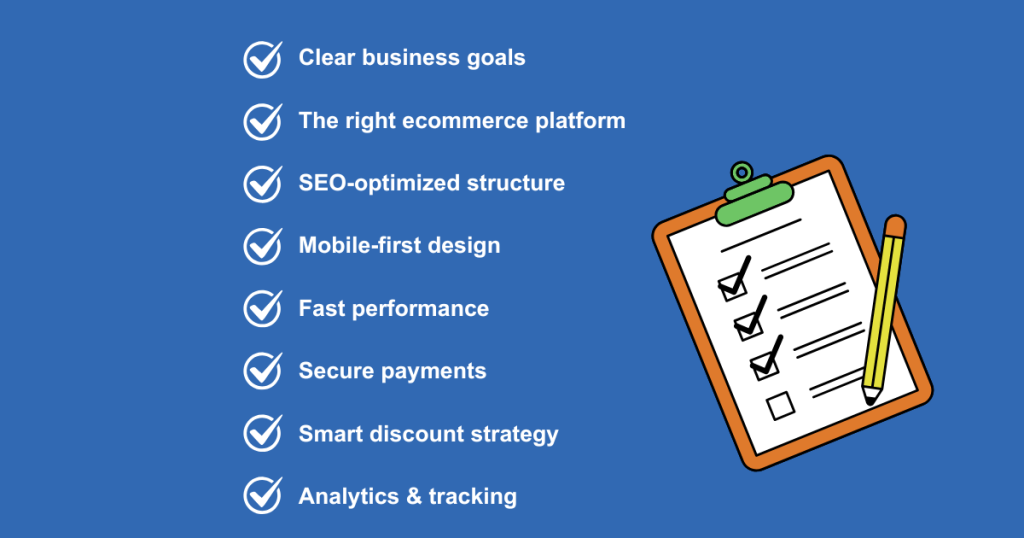
Ecommerce Website Development Checklist
(2026 Edition)
Level up your store and increase revenue with Discount Rules for WooCommerce – Pro, the ultimate WooCommerce discount plugin.
Conclusion: From Plan to Profitable Launch
Successful ecommerce website development is a combination of strategy, technology, and execution.
From planning and platform selection to performance optimization and conversion tactics, every step matters.
If you’re building or scaling a WooCommerce store, don’t stop at development alone.
Pair your store with smart tools like Discount Rules for WooCommerce – Pro to turn traffic into revenue and make your ecommerce investment truly pay off.
Frequently Asked Questions
Costs range from $1,000 to $50,000+, depending on platform, features, and customization.
Freelancers may charge $25–$100/hour; agencies can range from $5,000 to $100,000+.
Customer, Content, Convenience, Cost, and Communication.
B2C, B2B, C2C, C2B, D2C, and Marketplace.
Product, Price, Place, and Promotion.