A customer adds two products to their cart… pauses… and then adds one more — just to unlock a free item. That single extra click is exactly what makes a WooCommerce Buy 2 Get 1 Free offer so powerful.
Instead of offering flat discounts that quietly reduce margins, this strategy increases average order value (AOV), clears inventory faster, and creates a strong psychological trigger: “I’m getting something free.”
However, here’s the problem:
WooCommerce doesn’t support Buy Two Get One Free deals out of the box.
– No native BOGO logic.
– No automatic free item rules.
– No flexible conditions.
That’s where a buy 2 get 1 free plugin like Discount Rules for WooCommerce – PRO by Flycart comes in.
In this guide, you’ll learn exactly how to:
- Set up a WooCommerce Buy 2 Get 1 Free offer step-by-step
- Configure rules without coding
- Avoid common mistakes that kill margins
- Test and optimize your offer for better conversions.
Let’s get started.
Set up advanced WooCommerce BOGO offers without coding.
Try Discount Rules for WooCommerce – Pro and launch your first Buy 2 Get 1 Free deal in minutes.
Table of contents
- What is WooCommerce Buy 2 Get 1 Free Offer?
- Why Should You Offer Buy 2 Get 1 Free in WooCommerce?
- How to Set Up WooCommerce Buy 2 Get 1 Free Discount? (Step-by-Step)
- Display the Offer on Product Pages
- 5 Example Use Cases of Setting Up “Buy Two Get One Free” WooCommerce Deals
- 1. How to Create Buy 2 Get 1 Free Discount for a Different Product in WooCommerce?
- 2. How to Add Buy 2 Get 1 Free Discount for Category A in WooCommerce?
- 3. How to Set Up “Buy Two Products from Category A, Get One Free from Category B” in WooCommerce?
- 4. How to Offer Buy 2 Get 1 Free Deal for Variable Products in WooCommerce?
- 5. How to Create Buy 2 Get 50% Off on the 3rd Item” Offer in WooCommerce?
- 6. Bonus Scenarios
- Pro Tips for Running Successful Buy 2 Get 1 Free WooCommerce Offers
- Common Mistakes to Avoid While Running Buy Two Get One Free Deals
- Automatic BOGO Discounts vs Coupon-Based Offers
- Conclusion
- Frequently Asked Questions
What is WooCommerce Buy 2 Get 1 Free Offer?
A WooCommerce Buy 2 Get 1 Free offer is a type of BOGO (Buy One Get One) promotion where customers receive one free product when they purchase two qualifying items.
Instead of applying a coupon, the discount is:
- Applied automatically
- Triggered by quantity
- Visible directly in the cart
Example “Buy Two Get One Free” Deal:
- Buy 2 T-shirts → Get 1 T-shirt free
- Buy 2 skincare products → Get 1 free sample
- Buy 2 items → Cheapest item becomes free
This is one of the most effective pricing strategies because it:
- Works across industries (fashion, supplements, electronics, etc.).
- Encourages higher cart value
- Feels more rewarding than percentage discounts.
Why Should You Offer Buy 2 Get 1 Free in WooCommerce?
The Buy 2 Get 1 Free in WooCommerce is a proven promotion that helps boost sales, clear inventory, and enhance customer satisfaction.
Key Benefits:
- Increases Average Order Value (AOV): Customers add more items to unlock the deal.
- Boosts Conversion Rates: “Free” is more compelling than “20% off.”
- Clears Inventory Faster: Perfect for slow-moving or seasonal products.
- Reduces Cart Abandonment: Visible savings reduce hesitation.
- Improves Customer Perception: Feels like a bonus, not a price cut.
Other benefits of implementing such an offer:
- Increased Sales Volume: By offering a free product when customers purchase two items, businesses can incentivize customers to buy more than they originally intended. This can lead to a higher volume of sales and increased revenue, even after accounting for the cost of the free item.
Shoppers feel motivated to add more to their cart to get the reward, helping you move more inventory faster.
- Attracting New Customers: Buy 2 Get 1 Free promotions attract new customers with the appeal of a free product.
The offer sparks curiosity and trial purchases, giving shoppers a low-risk way to try your products while helping you grow your customer base and sales.
- Enhancing Customer Loyalty: Customers feel appreciated when they receive something for free. These kinds of offers build trust and emotional connection, making shoppers feel they’re getting more value for their money.
Over time, such experiences contribute to stronger brand loyalty and increase the likelihood of repeat purchases.
- Easy Marketing and Advertising: The ‘Buy 2 Get 1 Free’ offer works because it’s simple and instantly clear. It grabs attention in emails, banners, and ads, driving engagement and higher conversions.
How does the “Buy Two Get One Free” Offer Work? (Simple Example)
Let’s break down a real scenario:
| Quantity | Price per Item | Total |
| 1 item | $20 | $20 |
| 2 items | $20 | $40 |
| 3 items | $20 | $40 (1 item free) |
The customer pays for 2 items but receives 3.
This structure:
- Encourages adding the third product
- Maintains perceived product value
- Keeps margins healthier than flat discounts.
How to Set Up WooCommerce Buy 2 Get 1 Free Discount? (Step-by-Step)
Let’s dive into the actual setup process of the “Buy Two Get One Free” offer using the Discount Rules for WooCommerce – PRO plugin.
Prerequisites Before Setup
Before creating your woocommerce buy two get one free offer, ensure:
- WordPress installed (latest version)
- WooCommerce is installed and active
- At least one product has been added
- Discount Rules for WooCommerce – PRO installed and active.
Step 1 – Install Discount Rules for WooCommerce – PRO
To create a buy 2 get 1 free WooCommerce plugin-based rule, you need the PRO version.
Steps:
- Go to “WordPress Dashboard → Plugins → Add New.”
- Search for “Discount Rules for WooCommerce (by Flycart).”
- Install and activate the plugin.
Expected Result: A new menu appears: “WooCommerce → Discount Rules.”
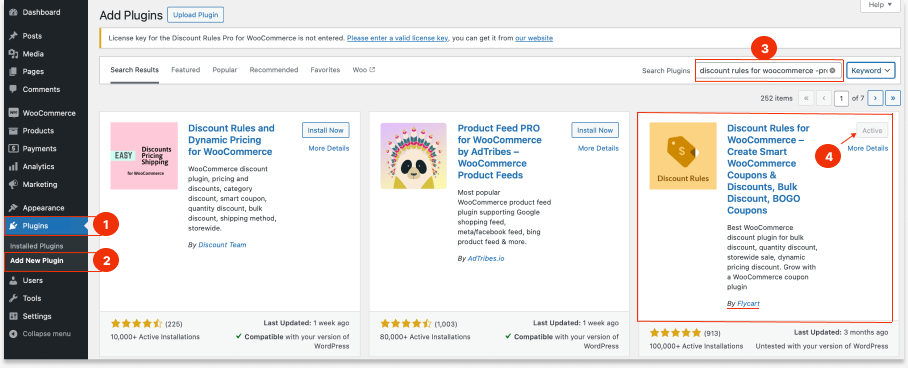
This installs the free version.
To access advanced features like “Buy X Get Y,” you’ll need the PRO version:
- Purchase the “Discount Rules for WooCommerce – PRO” license from Flycart’s website.
- Install and activate the PRO version using the license key.
- Once activated, you’ll find more advanced discount rule options inside your WooCommerce dashboard.
For more details on upgrading your plugin, check the detailed steps here. Upgrade from Free to Pro Plugin Version.
Step 2 – Create a Buy 2 Get 1 Free Rule
Now, let’s set up your first “Buy 2 Get 1 Free” offer.
- Go to “WooCommerce -> Discount Rules.”
- Click on “Add New Rule.”
- Enter a title: “Buy 2 Get 1 Free Offer,” for your reference.
- Under Discount Type, select “Buy X Get Y.” (You can also choose “Buy X Get X,” based on your free product offer.)
- Configure Product Filters: In the Filter Section, choose:
- All Products (to apply across your entire store), or
- Specific Products/Categories (for targeted offers).
- Set Discount Logic: Under the Discount Section, choose “Buy X Get Y – Products.”
- Set your rule:
- Buy 2 products
- Get 1 product free.
- Enable the Recursive Option so the offer repeats automatically:
- Buy 4, get 2 free
- Buy 6, get 3 free, and so on.
- Add Conditions (Optional but Powerful): Optionally, set discount conditions like minimum order amount, specific customer roles, or others.
- Save and enable the rule.
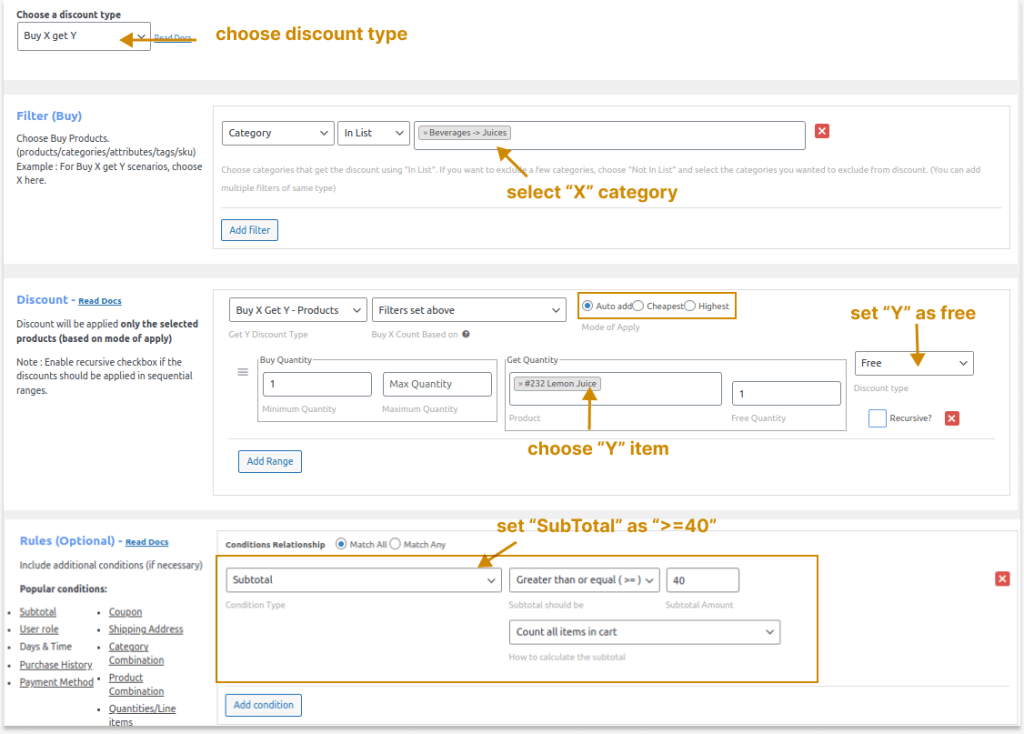
Result: Your “‘WooCommerce Buy 2 Get 1 Free” promotion is now active!
Step 3 – Test Your WooCommerce Buy 2 Get 1 Free Offer
Before going live, test everything.
Checklist:
- Add 2 items → No discount
- Add 3 items → 1 free
- Try different products
- Test as guest + logged-in user
- Check the cart and checkout.
Fix if not working:
- Clear cache
- Check rule priority
- Disable conflicting plugins.
Run smart Buy X Get Y campaigns and boost your WooCommerce sales with the advanced discount features of Discount Rules Pro.
Display the Offer on Product Pages
A hidden discount doesn’t convert. You must show the offer clearly.
Enable Display:
- Go to “Discount Rules → Settings.”
- Enable:
- Discount badge
- Promotional message
- Cart notice.
Example Message: “Buy 2 items and get 1 FREE – limited time!”
5 Example Use Cases of Setting Up “Buy Two Get One Free” WooCommerce Deals
The advantage of the “Discount Rules for WooCommerce – PRO” plugin lies in its flexibility. You can easily create advanced versions of the Buy 2 Get 1 Free deal to fit your marketing strategy.
Let’s look at a few examples.
1. How to Create Buy 2 Get 1 Free Discount for a Different Product in WooCommerce?
Here’s a step-by-step guide on how to create a “Buy 2, Get 1 Free” discount where the free item is different from the purchased items.
Example Scenario: Offer “Buy 2 sunglasses and receive a cap for free.”
- Install and activate the “Discount Rules for WooCommerce – Pro” plugin by Flycart.
- Go to your WordPress Dashboard -> WooCommerce -> Discount Rules.
- Click on the “Add New Rule” button and provide a title for the rule.
- Choose the discount type as “Buy X Get Y”.
- In the filter section, select “sunglasses”.
- In the Discount section, choose “Buy X Get Y – Products”, and under “Filters set above”, select “Cap” as the free product. Set the range accordingly.
- Ensure you’ve selected the “Recursive” option so customers get every third item free.
- Save and enable the rule.
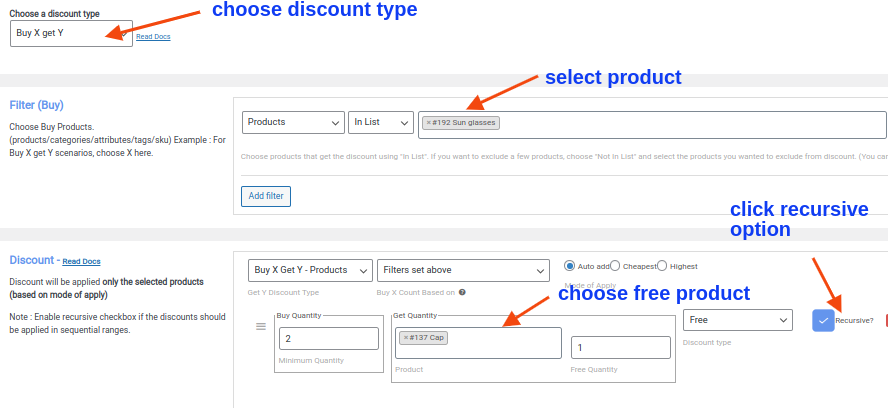
By following these steps, you’ve successfully created a WooCommerce Buy 2 Get 1 Free offer for a different product. This can help incentivize purchases and drive more traffic to your store.
2. How to Add Buy 2 Get 1 Free Discount for Category A in WooCommerce?
This offer invites customers to purchase two products from category A and receive a product from the same category for free.
Let’s explore how to set up this discount rule in WooCommerce.
To create a Buy 2 Get 1 Free discount for a specific category:
- Install the “Discount Rules for WooCommerce – Pro” plugin by Flycart.
- Go to your WordPress Dashboard -> WooCommerce -> Discount Rules.
- Click on the “Add New Rule” button and provide a title for the rule.
- Choose the discount type as “Buy X get Y.”
- In the Filter Section, select “Category,” then choose “In list,” and finally, select “Apparel.”
- Move to the discount section, where you will find the option “Buy X Get Y – Categories.” Select “Filters set above,” then choose “Apparel” as the category, and set the range accordingly.
- Ensure that you have selected the “Recursive” option. This ensures that customers receive every third item free.
- Finally, save and enable the rule.
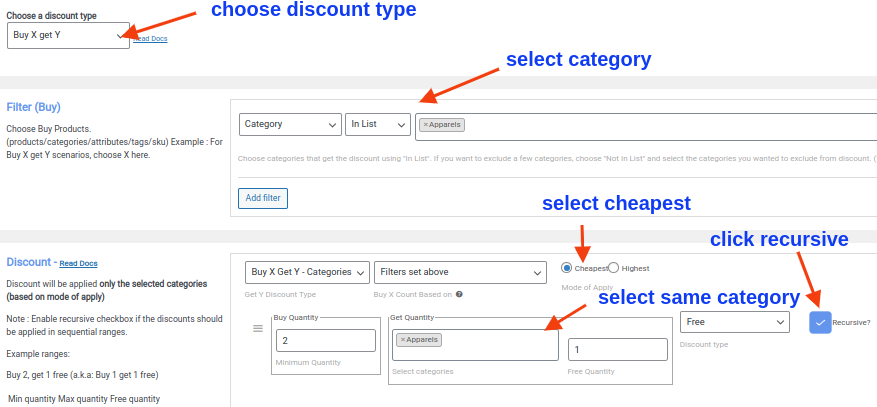
Now, you’ve successfully set up a discount scenario where customers receive free products from the same category when they purchase two items.
3. How to Set Up “Buy Two Products from Category A, Get One Free from Category B” in WooCommerce?
In this discount scenario, customers can purchase two products from category A and receive one product from category B for free.
For instance, buying two items in Apparel entitles customers to a free product in Accessories.
- Install and activate the Flycart’s “Discount Rules for WooCommerce – Pro” plugin.
- Navigate to your WordPress Dashboard -> WooCommerce -> Discount Rules.
- Click on the “Add New Rule” button and provide a title for the rule.
- Select the discount type as “Buy X get Y”.
- Under the Filter Section, choose “Category”, then select “In list” and pick “Apparel”.
- In the discount section, select “Buy X Get Y – Categories”, then choose “Filters set above”. Now, specify “Accessories” as the category and set the range accordingly.
- Ensure that you have selected the “Recursive” option so that customers receive every third item free.
- Save your settings and enable the rule.
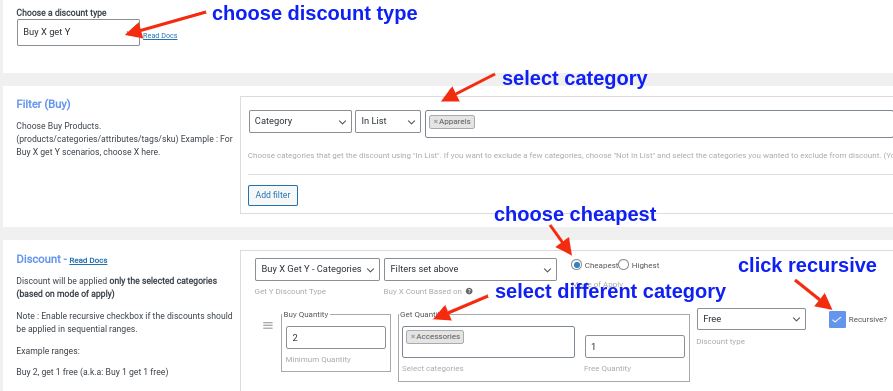
You have successfully set up a WooCommerce “Buy Two Get One Free” discount scenario where customers can receive free products from a different category.
4. How to Offer Buy 2 Get 1 Free Deal for Variable Products in WooCommerce?
Offering discounts like “Buy 2 Get 1 Free” can be a great way to incentivize customers to purchase more from your online store.
For example, Buy 2 Red T-shirts and get a cap for free.
To offer a Buy 2 Get 1 Free deal for variable products in WooCommerce:
- Install and activate the “Discount Rules for WooCommerce – Pro” plugin by Flycart.
- Go to your WordPress Dashboard -> WooCommerce -> Discount Rules.
- Click on the “Add New Rule” button and provide a title for the rule.
- Choose the discount type as “Buy X get Y.”
- In the Filter Section, select “Products,” then choose “In list” and specify the variable product, such as “T-Shirts – Red.”
- Under the discount section, choose “Buy X Get Y – Products,” then select “Filters set above.” Choose the complementary product, like a “cap,” and set the range accordingly.
- Ensure to check the “Recursive” option to offer every third item for free.
- Lastly, save and enable the rule to activate the discount scenario.
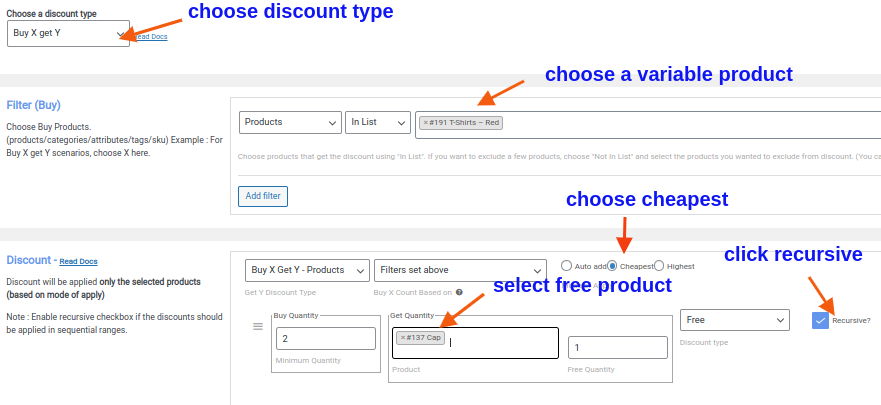
By following these simple steps, you’ve successfully created a “Buy Two Get 1 Free” discount scenario for a variable product in your WooCommerce store. This attractive offer can help drive sales and increase customer satisfaction.
5. How to Create Buy 2 Get 50% Off on the 3rd Item” Offer in WooCommerce?
Instead of offering the “Get” product for free, you can apply discount on that third “Get” item, to save some money on your promotions.
The “Buy 2 Get 50% off on the 3rd item” offer is a great way to incentivize customers and increase sales.
This offer allows customers to receive a discounted price on the third item they purchase, making it an attractive deal.
Setting up this discount scenario in WooCommerce is simple and can be done in a few easy steps.
To create a Buy Two Get One 50% Off in WooCommerce:
- Activate the Flycart’s “Discount Rules for WooCommerce – Pro” plugin.
- Go to WordPress Dashboard -> WooCommerce -> Discount Rules.
- Click on the “Add New Rule” button and give a title for the rule.
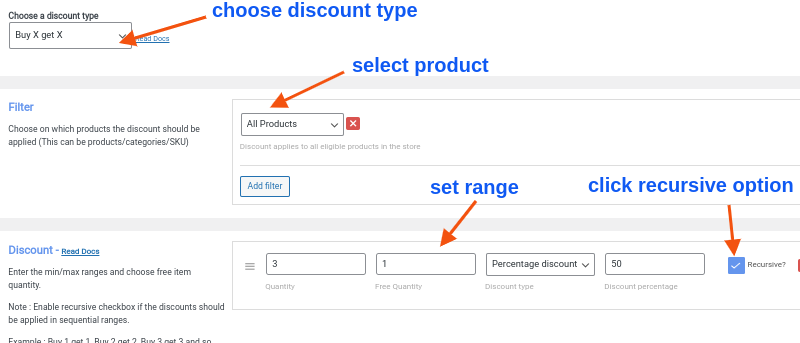
- Select the discount type as “Buy X Get X”.
- Under the Filter section, choose “All Products”.
- Set up the discount rule following the instructions in the screenshot below.
- Ensure you select the “Recursive” option to allow customers to get every third item free.
- Save and enable the rule.
6. Bonus Scenarios
Other than “WooCommerce Buy Two Get One Free” and “WooCommerce Buy Two Get 50% Off” deals, you can run other related promotions like:
- WooCommerce Buy One Get One Free
- WooCommerce BOGO deals using coupon codes
- Buy a specific product, and customers choose the free product of their choice, and more.
Check full setup steps here: How to Create WooCommerce BOGO (Buy One Get One) Deals?
Pro Tips for Running Successful Buy 2 Get 1 Free WooCommerce Offers
Creating the “WooCommerce Buy 2 Get 1 Free” offer is just the first step. To make it successful, keep these practical tips in mind:
1. Highlight the Offer on Key Pages
- Display banners on your homepage and category pages.
- Add promotional badges to product images.
- Mention the offer on the cart and checkout pages to prevent drop-offs.
2. Use Clear Call-to-Action (CTA) Phrases
Examples:
- “Add 2 more to your cart and get 1 free!”
- “Don’t miss out—Buy 2, Get 1 Free ends soon!”
3. Combine With Other Offers
- Apply tiered discounts (e.g., buy 2 get 1, buy 4 get 2).
- Add loyalty points through a plugin like WPLoyalty for repeat engagement.
4. Monitor Performance
- Check which products perform best with the promotion.
- Use analytics tools or built-in plugin reports.
5. Time Your Campaigns
- Seasonal sales (like Black Friday or New Year’s) perform well with this offer.
- Announce it via newsletters and social media for maximum reach.
6. Advanced Buy 2 Get 1 Free Strategies
Once your basic rule works, optimize it:
- Cheapest Item Free Strategy: Prevents giving away expensive products.
- Category-Based BOGO: Example: “Buy 2 from ‘Shirts, Get 1 from ‘Accessories’”
- Limited-Time Offer: Add urgency: Valid for 48 hours only
- Role-Based BOGO: Wholesale users get exclusive deals.
Common Mistakes to Avoid While Running Buy Two Get One Free Deals
Even though setting up a WooCommerce Buy Two Get One Free deal is simple, some mistakes can reduce its effectiveness.
1. Not Specifying Product Limits
- Always define which products or categories the offer applies to.
- Avoid confusion for customers at checkout.
2. Ignoring Profit Margins
- Don’t set offers on low-margin products unless you’re aiming to clear stock.
3. Forgetting to Promote
- The offer only works if people know about it.
- Use pop-ups, banners, and email campaigns to spread the word.
4. Poor Rule Configuration
- Always double-check “Buy X Get Y” settings before publishing.
- Use test orders to confirm the rule applies correctly.
Automatic BOGO Discounts vs Coupon-Based Offers
Automatic Buy 2 Get 1 Free offers apply instantly when customers meet the cart conditions.
Coupon-based BOGO offers require customers to manually enter a coupon code.
Most WooCommerce stores now prefer automatic BOGO discounts because they:
– reduce checkout friction,
– improve conversions,
– and simplify the customer experience.
Start increasing your store’s average order value today.
Download Discount Rules for WooCommerce – Free or upgrade to Pro for advanced Buy 2 Get 1 Free offers.
Conclusion
The WooCommerce Buy 2 Get 1 Free offer is more than just a discount; it’s a powerful sales and marketing strategy. Instead of lowering prices across the board, you:
- Encourage larger orders
- Improve customer satisfaction
- Maintain better profit margins.
Using Discount Rules for WooCommerce – PRO, you can create not just this offer but a wide variety of smart discounts, including:
- BOGO (Buy One Get One) deals
- Category-based offers
- Tiered quantity discounts
- Percentage and flat rate discounts, and more.
Whether you’re a beginner or an experienced WooCommerce store owner, the plugin gives you full control to automate your promotions and increase conversions.
Related Reads:
- WooCommerce Cart Discount: 2 Steps + 7 Examples to Boost Sales
- 11 Best WooCommerce BOGO Free Plugins to Boost Sales
- How to Set Up WooCommerce Bulk Discount (Step-by-Step Guide)
Frequently Asked Questions
In a Buy 2 Get 1 Free offer, when a customer purchases two eligible items, they automatically receive a third item for free.
For example, if a shopper buys two T-shirts, the third one is added to their cart at no cost. The discount plugin applies this rule automatically during checkout, ensuring a smooth shopping experience.
By default, WooCommerce doesn’t include built-in features for advanced promotions like “Buy 2 Get 1 Free.”
You would need custom code or a third-party plugin to manage these offers easily. Using a plugin such as Discount Rules for WooCommerce -Pro is the most convenient and reliable method; it saves time, reduces errors, and offers flexible rule options.
Yes, absolutely! Most discount plugins let you target specific products, categories, or even product variations.
Yes. Once you’ve configured the discount rule correctly, the plugin automatically applies the promotion at checkout.
The customer doesn’t need to enter any coupon codes, making the process seamless and improving the likelihood of conversion.
While both are promotional strategies, the difference lies in the quantity:
– Buy One Get One Free (BOGO) gives a free item for every product purchased.
– Buy 2 Get 1 Free requires purchasing two products to receive one free.
The Buy 2 Get 1 Free offer is often better for increasing average order value because it encourages customers to buy more items per transaction.