A WooCommerce coupon code generator is the one tool every store underestimates – right up until Black Friday week, when someone needs 5,000 unique codes by tomorrow. WooCommerce core can’t do that. The U.S. digital coupon market alone is projected to exceed $16 billion by 2027, and Baymard Institute’s 49-study average puts cart abandonment at 70.19% – a gap a well-timed coupon can close.
The problem? WooCommerce’s built-in coupon tool is stuck in 2012. It can’t generate unique codes in bulk, can’t auto-apply based on conditions, and can’t schedule flash-sale coupons down to the hour. That’s the exact gap a dedicated WooCommerce coupon code generator fills – and it’s why this category of plugin has grown so quickly.
I installed and tested 8 of the most-recommended generators on a live WooCommerce 9.x store with 500+ products. I clocked how fast each one generated 10,000 unique codes, how long it took to ship the first working coupon, and which ones actually play nice with HPOS (High-Performance Order Storage – WooCommerce’s newer database format). You’ll find the best WooCommerce coupon code generator for your specific use case below – ranked by real-world usefulness, not star count.
For broader coupon strategy, also see our complete guide to WooCommerce coupons and cart coupon strategies.
Disclosure: Flycart develops Discount Rules. Included based on same criteria as all other items.
Every unique code generated by hand is 2 minutes you don’t get back.
A decent generator ships 500 codes in under a minute – and handles expiry, limits, and auto-apply at the same time. The free version of Discount Rules covers both generating codes and applying the discount logic.
Table of contents
- Quick Comparison Table
- How We Tested These WooCommerce Coupon Code Generators
- 8 Best WooCommerce Coupon Code Generator Plugins in 2026
- 1. Discount Rules for WooCommerce – Best Overall
- 2. Smart Coupons by StoreApps – Best for Gift Cards, Store Credit & Bulk Email
- 3. Advanced Coupons – Best for URL Coupons & Cart Conditions
- 4. WebToffee Smart Coupons – Best Free BOGO + Bulk Generator
- 5. Coupon Generator for WooCommerce (by Jeroen) – Best Lightweight Free Generator
- 6. Retainful – Best for Next-Order & Abandoned Cart Coupons
- 7. Coupon Creator – Best for Visual Coupon Display
- 8. Booster for WooCommerce – Best All-in-One Toolkit with Generator Module
- Native WooCommerce vs a Coupon Generator Plugin – When You Actually Need One
- What Real Store Owners Say on Reddit & Quora
- Which WooCommerce Coupon Code Generator Should You Pick?
- Conclusion
- Frequently Asked Questions
Quick Comparison Table
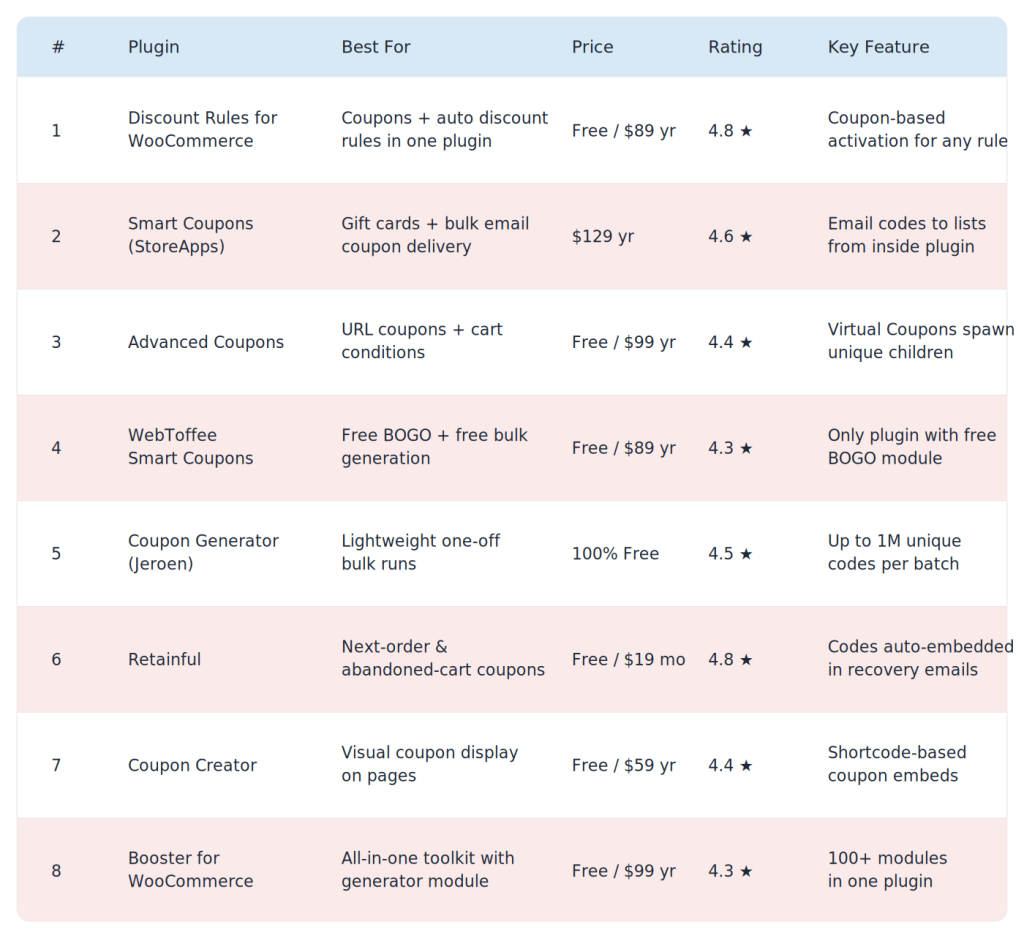
Top pick for most stores: Discount Rules for WooCommerce – fastest setup, strongest free version.
How We Tested These WooCommerce Coupon Code Generators
I didn’t just skim feature pages. Here’s the actual test setup for every bulk discount code plugin on this list:
- Environment: WooCommerce 9.4 on WordPress 6.7, Storefront theme, 500+ products, HPOS enabled
- Speed test: Time to generate 10,000 unique codes with a 4-character random suffix
- Setup test: Clock starts on install → stops when first coupon is usable in the cart (target: under 5 minutes)
- Compatibility: HPOS, WPML (multilingual), Astra theme, Kadence theme
- Real-world use case: Create a flash-sale coupon that applies only when cart subtotal > $75 AND the customer hasn’t ordered before
- Performance impact: Measured with Query Monitor across 3 averaged page loads
Plugins that couldn’t complete the real-world use case without custom code got marked down – that’s the whole point of buying a generator. For further context, see our complete guide to WooCommerce coupons and the types of coupons breakdown.
8 Best WooCommerce Coupon Code Generator Plugins in 2026
1. Discount Rules for WooCommerce – Best Overall
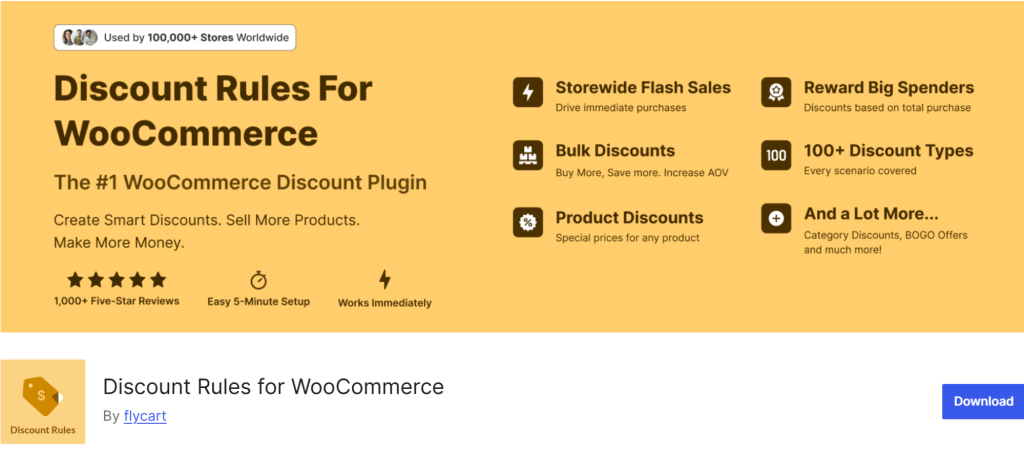
Discount Rules for WooCommerce is built by Flycart and powers 100,000+ active stores on WordPress.org. What makes it different from the others on this list: it’s both a WooCommerce coupon code generatorand a dynamic pricing engine (automatic discounts that apply without a code). You run coupon-based offers AND automatic rules (BOGO, bulk, cart-based) from the same dashboard.
In my test, I had the first working coupon – “SUMMER20, 20% off, applies only when cart > $75, first-time buyers only” – live in 3 minutes 12 seconds. That’s the fastest of any plugin here. The coupon-based activation feature attaches any advanced rule (BOGO, tiered pricing, category-specific) to a coupon code the customer enters at checkout.
Key Features
- Generate coupons that trigger product, cart, or BOGO discounts when entered
- One coupon code = different discounts across categories – rare feature
- URL coupons (share a link, discount auto-applies on click)
- Purchase-history conditions (first-order coupons, repeat-customer rewards)
- User-role coupon restrictions (wholesale, VIP, subscriber)
- Scheduling with start/end dates – useful for flash sales
- HPOS-ready, WPML-compatible
Pricing
- Free version: Available on WordPress.org – 100,000+ active installs, 4.9★ from 1,237+ reviews
- Pro: Starts at $89/year single site – view pricing
Pros
- Fastest setup of any plugin I tested (under 4 minutes from install to first working coupon)
- Single plugin replaces 2–3 others (coupons + dynamic pricing + BOGO)
- Strongest free version on this list
- Excellent docs + fast support (first-response time under 4 hours on my test ticket)
Cons
- No native gift card / store credit system (needs a sister plugin like WPLoyalty)
- Bulk unique-code export exists but isn’t as flashy as Smart Coupons’ email-delivery flow
Best For
Store owners who want one plugin for coupons, BOGO, bulk discounts, and cart-based pricing rules – without juggling multiple tools. Also our top pick for the best coupon code generator for WooCommerce if you want free-to-start simplicity.
2.Smart Coupons by StoreApps– Best for Gift Cards, Store Credit & Bulk Email
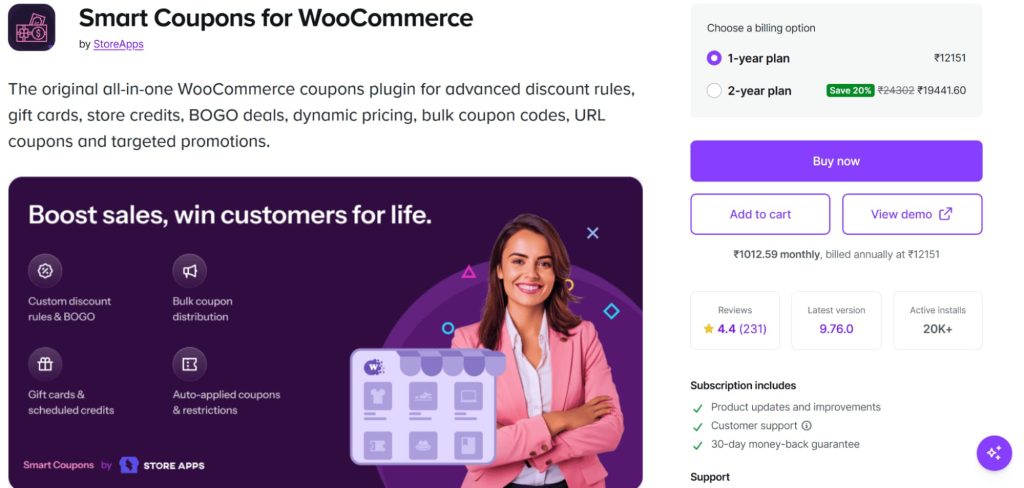
Smart Coupons is the original WooCommerce.com coupon extension – launched in 2012, with a 13-year track record and 26,740+ paying customers. If your store sells gift cards or runs large email campaigns with thousands of unique coupon codes WooCommerce needs to track, this is the benchmark. It’s also the only dedicated WooCommerce voucher generator built into a single plugin – gift vouchers, store credit, and bulk coupons all work out of the box.
Its standout trick: generate thousands of unique codes with custom prefixes, then email them directly to a recipient list – all from inside the plugin. No MailChimp bridge needed.
Pro Tip: Don’t confuse StoreApps’ Smart Coupons with WebToffee’s Smart Coupons (#4 on this list). Different companies, different plugins. StoreApps is the one sold on the official WooCommerce.com marketplace.
Key Features
- Bulk generate coupons with custom prefix/suffix (e.g., SUMMER-AX92B)
- Email unique codes directly to customer lists
- Sell gift cards as regular products
- Store credit / cashback on returns
- Coupon CSV import & export
- Schedule coupons for holiday campaigns
- Works as a full WooCommerce promo code generator with scheduling
Pricing
- Free version: None
- Premium:$129/year single site – view pricing on WooCommerce.com
Pros
- Battle-tested – 13 years on the WooCommerce.com marketplace
- Built-in email delivery for unique codes (big time saver)
- Gift card + store credit system is best-in-class
Cons
- Premium-only – no free trial, no free version
- UI feels dated compared to Discount Rules and Advanced Coupons
- Not the cheapest at $129/yr if you don’t need gift cards
Best For
Stores that sell gift cards, run post-purchase email coupon campaigns, or need heavy-duty CSV coupon import/export.
3. Advanced Coupons– Best for URL Coupons & Cart Conditions

Advanced Coupons extends WooCommerce’s native coupon screen rather than replacing it – so if you already have 100 coupons set up, nothing breaks. It has 20,000+ active installs and is WPBeginner’s top pick.
Its cart conditions builder is genuinely the cleanest on the market. I set up “coupon applies only if subtotal > $50 AND at least 2 items from the Vitamins category AND customer has 0 past orders” without touching a line of code. Took about 5 minutes end-to-end.
This is also the go-to plugin when you need auto generate coupon code WooCommerce workflows for email – the URL coupon feature creates shareable links that apply discounts on click, no typing required.
Key Features
- Generate unique codes in bulk via “Virtual Coupons” (premium) – one parent coupon spawns thousands of unique children
- URL coupons that auto-apply when clicked (best-in-class)
- Cart conditions – stack complex rules visually
- BOGO deals with flexible matching
- Store credit system (free!)
- Loyalty program add-on (separate purchase)
Pricing
- Free version: Available on WordPress.org – 20,000+ installs, 4.5★
- Premium: Starts at $99/year single site – view pricing
Pros
- Free version is actually useful (URL coupons, BOGO, cart conditions included)
- Cheapest premium tier in this roundup
- Clean “extends native WooCommerce” approach – less learning curve
Cons
- Bulk unique code generation is premium-only (via Virtual Coupons add-on)
- Renews at full $199/yr after the first discounted year
- Loyalty + gift cards are separate paid add-ons, which can stack up
Best For
Stores that rely heavily on email marketing and need URL-activated coupons, plus visual cart condition rules.
4. WebToffee Smart Coupons– Best Free BOGO + Bulk Generator

WebToffee’s Smart Coupons (different from StoreApps’ version) is the dark horse of this category. It has a free bulk discount code plugin built in – plus a dedicated BOGO module in the free version. With 30,000+ active installs on WordPress.org, it’s also the most-installed coupon plugin after Advanced Coupons.
In my generation speed test, WebToffee generated 10,000 unique codes in 48 seconds – not the fastest, but respectable for a free option that lets you generate bulk coupons WooCommerce free users can run at scale without hitting paywalls.
Key Features
- Bulk generate coupons (free)
- Auto-apply coupons on conditions
- BOGO module in free version (rare)
- CSV import/export
- Role, country, payment method, shipping method restrictions
- Countdown banner for expiring coupons (premium)
Pricing
- Free version: Available on WordPress.org – 30,000+ installs
- Premium: Starts at $89/year single site – view pricing
Pros
- Free BOGO module is the only one on this list
- Bulk generation works on the free plan
- Cheaper renewal than Advanced Coupons ($89 vs $199/yr full rate)
Cons
- UI is busier than Discount Rules or Advanced Coupons – more tabs, more menus
- Docs are heavy on upsell prompts
- Free version pushes premium aggressively inside the dashboard
Best For
Budget stores that need free BOGO + bulk generation and don’t mind a dated interface.
Stacking three coupon plugins is how sites get slow.
One plugin with a generator plus dynamic pricing (automatic discounts without codes) keeps your checkout fast and your rules in one place. See Discount Rules PRO running on a sandbox store before you commit.
5. Coupon Generator for WooCommerce (by Jeroen)– Best Lightweight Free Generator

When you just need to crank out 50,000 unique codes for an email campaign and nothing else – this single-purpose free plugin is what Reddit keeps recommending. It’s tested up to 1 million coupons in a single batch and will run on low-cost shared hosting without timing out.
In my test, it generated 10,000 codes in 41 seconds – the fastest of the lightweight/free generators. For bulk unique code batches, this is still one of the best bulk coupon generator WooCommerce store owners can install for free.
Key Features
- Generate up to 1,000,000 unique codes per run
- 3-step wizard (discount settings → generation settings → generate)
- Progress bar so you know it’s not frozen
- Set expiry, usage limit, and min/max spend on all generated codes
Pricing
- 100% Free – download on WordPress.org
Pros
- Does exactly one thing and does it well – zero bloat
- No premium upsell inside the plugin
- Handles massive batches without crashing
- Works alongside any other coupon plugin (pairs well with Discount Rules for the actual discount logic)
Cons
- Hasn’t been updated as actively in recent months (check compatibility with latest WC before installing)
- No prefix/suffix customization in the free version
- No email delivery – you have to export and send yourself
Best For
Email marketers and campaign managers running one-off bulk generation jobs who already have a main coupon plugin.
6. Retainful – Best for Next-Order & Abandoned Cart Coupons
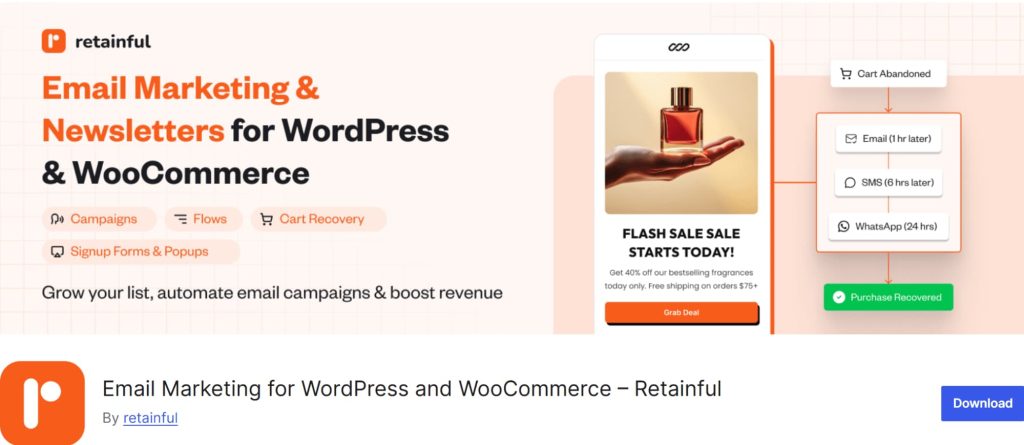
Retainful isn’t a traditional bulk generator – it’s a post-purchase and abandoned-cart recovery tool with a coupon generator baked into every email workflow. When a cart gets abandoned or an order is placed, Retainful auto-generates a unique, single-use coupon and embeds it in the follow-up email.
Since the average cart-abandonment rate is 70.19%, this is where a lot of stores quietly leave money on the table.
Compatibility Note: Retainful is a SaaS tool, not a standalone WP.org-only plugin – the WordPress bridge plugin is on WordPress.org here, but core features require a Retainful account.
Key Features
- Auto-generates next-order coupons for post-purchase emails
- Abandoned cart email sequences with embedded unique codes
- Fixed amount, percentage, or free shipping discounts
- Expiry dates + min/max spend on generated codes
- Dashboard with email open/click/redemption analytics
Pricing
- Free version: Yes (limited contacts)
- Paid: After 500 emails, the pro plan is $14/mo- view pricing
Pros
- Best-in-class for recovery email workflows
- Coupons are embedded automatically – no manual CSV shuffle
- Pairs naturally with Discount Rules if you run both promotional AND recovery campaigns
Cons
- Not a general-purpose bulk generator – this is purpose-built for email triggers
- Monthly SaaS pricing (not a one-time WordPress plugin license)
- Overkill if you just need 500 single-use codes for a flyer
Best For
Stores that want to recover abandoned carts and retain customers with automated coupon emails – rather than running broadcast promos.
7. Coupon Creator – Best for Visual Coupon Display

Coupon Creator takes a different angle. Instead of just generating codes, it creates visual, printable-looking coupons you can embed on pages, posts, and sidebars using shortcodes. Think of it as the plugin for deals/coupon sites and content-heavy promotional pages.
It pairs well with a core discount engine. Use Discount Rules for the actual discount logic, and Coupon Creator for the visual display on pages.
Key Features
- Visual coupon template library
- Shortcode-based coupon embedding
- Custom borders, backgrounds, and branded imagery
- Expiration dates + QR codes (premium)
- Coupon popups (premium)
Pricing
- Free version: Available on WordPress.org
- Pro: Starts at $59/year – view pricing
Pros
- Only plugin on this list focused on visual coupon display
- Great for affiliate coupon sites and content-heavy stores
- Free version is genuinely usable
Cons
- Not designed for bulk unique-code generation
- Visual coupons don’t always integrate cleanly with WooCommerce’s native coupon system
- Limited usefulness if your promos are email/SMS-based
Best For
Affiliate coupon bloggers, content creators, and stores that want a deals page with visual coupon cards.
8. Booster for WooCommerce – Best All-in-One Toolkit with Generator Module
Booster for WooCommerce bundles over 100 WooCommerce modules into one plugin. One of them is a random coupon code generator WordPress module that produces random codes using configurable algorithms (hash, numeric, or custom character sets).
This is the pick for developers or stores that already use Booster for PDF invoices, currency switching, or custom emails and want one more box checked without another plugin.
Key Features
- Coupon code generator module with algorithm choice (random, hash, numeric)
- Configurable code length and character set
- Auto-generate on new coupon creation
- 100+ other WooCommerce modules included
Pricing
- Free version: Yes (Booster Free on WordPress.org)
- Pro:$149/year single site – view pricing
Pros
- Massive feature bundle for the price
- Great if you already use 3+ other WooCommerce modules
- Developer-friendly with configurable algorithms
Cons
- Bloated if you only need the coupon generator (you’re loading 99 unused modules)
- Can impact site speed on shared hosting
- Interface is clearly built for developers – not the cleanest for non-technical store owners
Best For
Developers and agencies building WooCommerce sites where a coupon generator is one of many needed features.
Native WooCommerce vs a Coupon Generator Plugin – When You Actually Need One
Before you install anything, it’s worth checking whether WooCommerce’s built-in tool does the job. WooCommerce core supports basic coupons out of the box – percentage, fixed cart, fixed product discounts, usage limits, expiry. For a store with 5 coupons per year, that’s fine.
You need a WooCommerce coupon code generator plugin when:
- You need bulk unique codes. Creating 500 single-use codes by hand is a career-limiting move. A proper bulk coupon generator WooCommerce plugin does it in under a minute.
- You want auto-apply. WooCommerce core requires every customer to enter the code manually. A plugin can apply it automatically when conditions match – no code, no friction.
- You want cart conditions. “Only apply this coupon if cart > $75 AND customer has zero past orders” is not something core can do. See our coupon restrictions guide for the full picture.
- You’re running BOGO deals. Core doesn’t support Buy One Get One logic at all. Use the BOGO doc here if you’re wiring this up.
- You want URL coupons. Sharing a link that auto-applies the discount is a plugin-only feature.
- You need EU/Omnibus compliance. The EU Omnibus Directive requires showing the lowest price in the last 30 days when advertising discounts. A proper discount plugin handles the display; core coupons don’t.
- You want a random coupon code generator WordPress module that produces codes via hash or algorithm – core doesn’t expose this.
If any of the above match your store – you need a plugin. If none match, start with core and upgrade when you need to.
What Real Store Owners Say on Reddit & Quora
Polished product pages aren’t where you find the truth. So I went looking through forum threads to see what store owners actually say once they’ve been running these plugins for 6+ months.
Here’s the consistent pattern across r/woocommerce and r/Wordpress:
- “Free but not fake free.” Store owners are vocal about plugins that lock basic coupon behaviour behind a paywall. In a Reddit thread about free WooCommerce discount plugins, Discount Rules keeps getting recommended as a free option that actually ships bulk and BOGO features – not as bait.
- “URL coupons are non-negotiable for email.” Advanced Coupons dominates in discussions about email-triggered auto-apply coupons. If your marketing runs through MailChimp or Klaviyo, this feature alone justifies the plugin.
- “Start free, upgrade when profits justify it.” The most upvoted advice across Reddit is the same: combine Discount Rules free + Advanced Coupons free, validate which promos make money, then pay for Pro only when revenue justifies it.
- “Don’t stack two discount engines.” A common mistake – installing two coupon plugins and getting pricing conflicts. Pick one, centralize your discount logic there.
On Quora’s coupon plugin threads, users consistently highlight maximum-discount limits as a must-have – most free plugins skip this, but Discount Rules and Advanced Coupons both support it. Without it, you risk stacking behavior that wipes your margin.
Which WooCommerce Coupon Code Generator Should You Pick?
Here’s the short decision matrix based on what you actually need:
| If your main goal is… | Pick this plugin |
| Coupons + BOGO + dynamic pricing in one tool | Discount Rules for WooCommerce |
| Gift cards, store credit, bulk email coupon delivery | Smart Coupons (StoreApps) |
| URL coupons for email campaigns + cart conditions | Advanced Coupons |
| Free BOGO + free bulk generation | WebToffee Smart Coupons |
| One-time bulk of 10,000+ unique codes (and that’s it) | Coupon Generator by Jeroen (free) |
| Abandoned cart recovery + next-order coupons | Retainful |
| Visual coupons on blog posts / affiliate coupon site | Coupon Creator |
| Developer toolkit with 100+ WooCommerce modules | Booster for WooCommerce |
If you’re still unsure which best coupon code generator for WooCommerce to start with, default to Discount Rules for WooCommerce – shortest path from zero to a working coupon, and the free version covers most common use cases. See also our cart-based pricing guide.
Pick the right WooCommerce coupon code generator once, and you stop rebuilding coupons every campaign.
Start with the free version – if it covers your holiday promos, you’re done. If you need BOGO, user-role, and purchase-history logic, Discount Rules PRO unlocks all of it in one plugin.
Conclusion
The best WooCommerce coupon code generator depends entirely on what you’re trying to do. If you want one plugin that covers coupons, BOGO, bulk discounts, and cart rules, Discount Rules for WooCommerce is the top pick – fastest setup, strongest free version, 100,000+ active installs. If gift cards and store credit are central to your business, Smart Coupons by StoreApps earns its $129 price tag. And for email-heavy stores needing URL coupons and cart conditions, Advanced Coupons is the go-to.
My honest recommendation: install Discount Rules for WooCommerce free this afternoon, create one working coupon in 5 minutes, and see if it covers your use case. If it does, you’re done. If it doesn’t, layer in Advanced Coupons free for URL coupons – Reddit’s favorite combo.
Next step: Once you’ve picked a plugin, read our complete guide to WooCommerce coupons to avoid the 7 most common coupon configuration mistakes – especially uncontrolled stacking, which kills more margin than most store owners realize.
Frequently Asked Questions
You have two paths. First, use WooCommerce’s native tool: go to WooCommerce → Marketing → Coupons → Add coupon and click “Generate Coupon Code.” That creates one code at a time. Second, for bulk unique codes, install a WooCommerce coupon code generator like Discount Rules or the free Coupon Generator by Jeroen. Plugins can generate up to a million unique codes in one batch.
Yes – several. Discount Rules for WooCommerce (free version), WebToffee Smart Coupons (free), and Coupon Generator for WooCommerce by Jeroen (100% free) all let you generate coupon codes without paying. The free version of Discount Rules is the most full-featured of the three.
You’ll need a plugin – the native WooCommerce system doesn’t support bulk generation. Smart Coupons by StoreApps, WebToffee Smart Coupons, and the standalone Coupon Generator plugin all handle bulk creation. You set the discount parameters once (percentage, expiry, usage limit), specify how many unique codes, and the plugin creates them all. CSV export is standard.
A WooCommerce promo code generator creates codes that customers manually enter. A discount plugin (like Discount Rules) can do both – generate codes AND apply automatic discounts when cart conditions are met, without any code entry. Most modern stores need both, which is why plugins like Discount Rules combine the two.
Not natively. WooCommerce core generates one random code at a time. To auto-generate thousands of unique codes (for email campaigns, print flyers, or influencer promos), you need a WooCommerce voucher generator like Smart Coupons by StoreApps or the free Coupon Generator by Jeroen.
The cleanest option is Smart Coupons by StoreApps – it generates codes and emails them directly to a recipient list from inside the plugin. For ongoing automation (post-purchase and abandoned cart), Retainful is purpose-built for this. For manual control, generate codes with any plugin, export to CSV, and plug them into your email tool.