Every successful online store runs on clarity. Sales numbers alone rarely explain why customers buy, leave, or return. This is where ecommerce analytics becomes a powerful growth engine.
By tracking the right metrics, store owners gain a clear view of customer behavior, marketing performance, and revenue growth across the entire funnel.
Instead of relying on assumptions, you can use ecommerce website analytics to understand which products sell best, which discounts convert, and where customers drop off. As a result, decisions become faster, smarter, and more profitable.
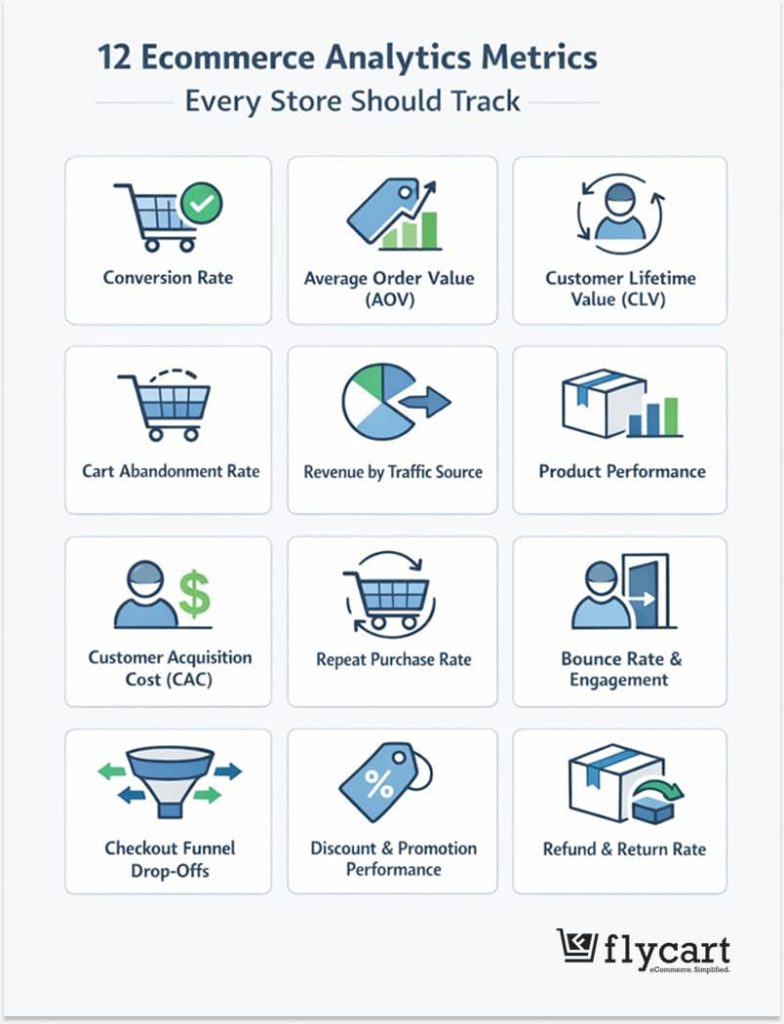
This guide breaks down the 12 ecommerce analytics metrics every store should track.
Along the way, you will also learn how to set up ecommerce tracking, improve ecommerce reporting, and apply insights using tools like Google Analytics for ecommerce and WooCommerce advanced analytics.
Whether you run a growing WooCommerce store or manage multiple digital commerce analytics dashboards, this guide will help you turn data into action.
Turn your ecommerce analytics into revenue.
Use Discount Rules for WooCommerce –Pro to create smart, data-driven discounts that increase conversions, boost AOV, and encourage repeat purchases, without guesswork.
Table of contents
- What is Ecommerce Analytics and Why Does It Matter?
- Key Areas of Analysis
- How to Set Up Ecommerce Tracking the Right Way?
- 12 Key Analytics Metrics Every Ecommerce Store Owner Should Track
- 1. Conversion Rate
- 2. Average Order Value (AOV)
- 3. Customer Lifetime Value (CLV)
- 4. Cart Abandonment Rate
- 5. Revenue by Traffic Source
- 6. Product Performance Metrics
- 7. Customer Acquisition Cost (CAC)
- 8. Repeat Purchase Rate
- 9. Bounce Rate and Engagement Metrics
- 10. Checkout Funnel Drop-Offs
- 11. Discount and Promotion Performance
- 12. Refund and Return Rate
- Using Ecommerce Reporting to Turn Data into Action
- Google Analytics for Ecommerce: GA4 Best Practices
- WooCommerce Website Analytics: Built-In vs Advanced Tools
- WooCommerce Advanced Analytics with Discount Rules for WooCommerce – Pro
- Conclusion: Turning Ecommerce Data Analytics into Growth
- Frequently Asked Questions
What is Ecommerce Analytics and Why Does It Matter?
Ecommerce analytics refers to the collection, analysis, and interpretation of data generated by your online store. This includes everything from traffic sources and product views to purchases, refunds, and customer lifetime value. Together, these insights form the foundation of ecommerce data analytics.
Analytics in ecommerce matters because it connects daily activity to long-term growth.
For example,
- Understanding how customers move from product pages to checkout helps optimize user experience.
- Similarly, analyzing revenue by channel highlights which campaigns deserve more investment.
Over time, ecommerce website analytics reduces unnecessary spending and improves ROI.
Digital commerce analytics also plays a critical role in personalization.
When store owners understand buying patterns, they can tailor offers, discounts, and product recommendations more effectively. This is especially important for WooCommerce stores using flexible pricing and promotions.
Key Areas of Analysis
Ecommerce analytics can be broken down into several key areas, each providing unique insights:
- Audience: Understand who your visitors are, demographics like age, location, and interests help shape marketing and product strategies. Knowing your audience allows you to tailor promotions, personalize content, and improve targeting across channels.
- Acquisition: Track where visitors come from, such as organic search, paid ads, social media, or email campaigns. Analytics in ecommerce shows which channels bring high-value traffic and which campaigns provide the best ROI.
- Behavior: Examine how users interact with your store, including pages visited, time spent, clicks, and navigation paths.
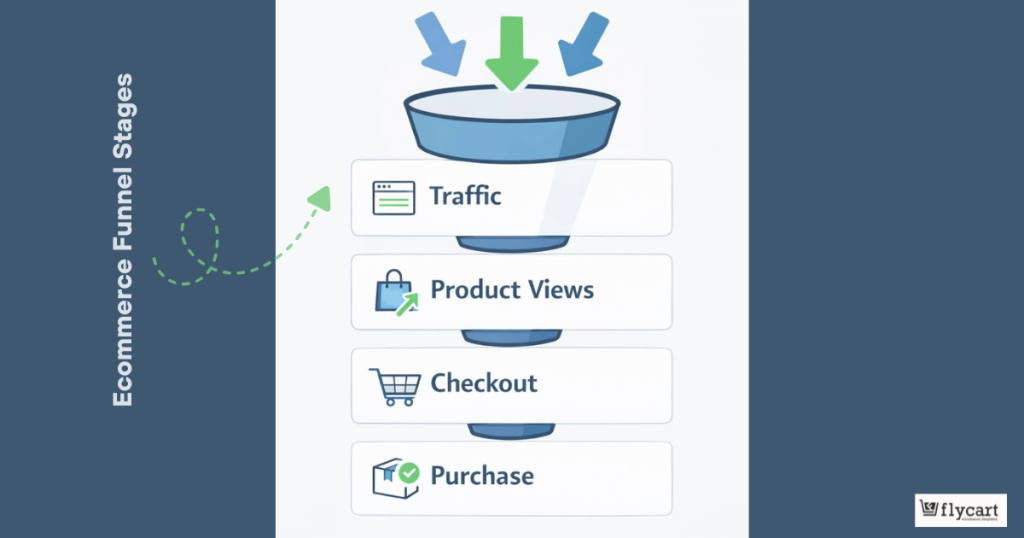
- Conversion: Follow visitors from landing to purchase, identify drop-off points, and optimize the funnel.
- Sales/Product: Analyze top-selling products, revenue, and average order value (AOV) to prioritize high-impact strategies.
How to Set Up Ecommerce Tracking the Right Way?
Before diving into metrics, accurate tracking must be in place.
Setting up ecommerce tracking ensures that every click, add-to-cart action, and purchase is recorded correctly. Without clean data, even the best ecommerce reporting loses value.
Start with Google Analytics for ecommerce, preferably GA4.
GA4 focuses on event-based tracking, which aligns well with ecommerce behavior. Track key events such as product views, add to cart, begin checkout, and purchase.
For WooCommerce stores, plugins can simplify this setup and ensure accurate data flow. WooCommerce GA4 integration is especially useful for tracking product-level performance. It also supports enhanced ecommerce features like coupon usage, refunds, and user journeys. When combined with ecommerce website analytics dashboards, store owners gain full visibility.
Set up goals and conversions early!
Define what success looks like, whether it is completed purchases, email signups, or upsell clicks. Once ecommerce tracking is live, metrics become meaningful and actionable.
12 Key Analytics Metrics Every Ecommerce Store Owner Should Track
1. Conversion Rate
Conversion rate is one of the most critical ecommerce analytics metrics. It shows the percentage of visitors who complete a purchase.
A strong conversion rate indicates that your store experience aligns with customer expectations.
Analytics in ecommerce often reveals that small changes can significantly impact conversion rate.
For example, faster page speed, clearer product descriptions, and trust signals can all improve performance.
Ecommerce website analytics helps identify which pages convert best and which need optimization.
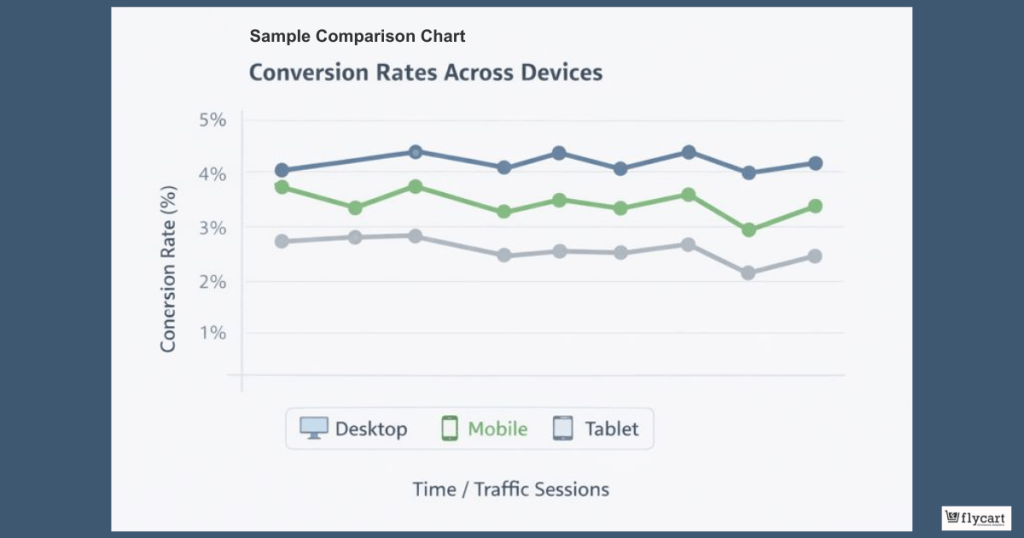
Tracking conversion rate by device, channel, and region provides deeper insight.
- Mobile users may behave differently from desktop shoppers.
- Similarly, paid traffic may convert differently from organic visitors.
Ecommerce data analytics turns these patterns into optimization opportunities.
2. Average Order Value (AOV)
Average Order Value measures how much customers spend per transaction.
Increasing AOV often delivers faster revenue growth than acquiring new traffic. Ecommerce analytics highlights opportunities for upsells, bundles, and discounts.
WooCommerce store owners can use analytics in ecommerce to test pricing strategies. For example, free shipping thresholds or tiered discounts can encourage higher cart values.
Ecommerce reporting shows which offers lift AOV without hurting margins. This is where promotion-focused insights become valuable.
Tracking AOV alongside coupon usage reveals which discounts drive profitable behavior. Digital commerce analytics connects promotional tactics to real revenue impact.
Related Read: How to Add a WooCommerce Order Bump to Increase AOV?
3. Customer Lifetime Value (CLV)
Customer Lifetime Value estimates the total revenue a customer generates over time.
CLV shifts focus from one-time sales to long-term relationships.
Ecommerce analytics makes this metric easier to track by combining order history and repeat purchases. It shows that retaining customers often costs less than acquiring new ones.
Ecommerce website analytics highlights repeat buying patterns, preferred products, and engagement frequency.
WooCommerce stores can use CLV insights to personalize offers. Loyalty discounts, targeted promotions, and exclusive deals become more effective when aligned with customer value. WooCommerce data analytics ensures these efforts stay profitable.
4. Cart Abandonment Rate
Cart abandonment rate measures how often customers add products to their cart but leave without purchasing. This metric reveals friction in the buying process.
Ecommerce analytics pinpoints where users drop off.
Common causes include unexpected shipping costs, complex checkout flows, or limited payment options. Ecommerce website analytics combined with funnel tracking makes these issues visible.
Analytics in ecommerce also supports recovery strategies. Abandoned cart emails, limited-time discounts, and simplified checkout flows help recover lost revenue.
Related Read: WooCommerce Abandoned Carts – a Guide to Convert Lost Sales Into Revenue
5. Revenue by Traffic Source
Revenue by traffic source shows which channels drive sales.
Ecommerce analytics connects marketing spend to revenue outcomes: Organic search, paid ads, email, and social traffic often perform differently. It helps allocate budgets effectively.
For example, a channel with lower traffic but higher conversion may deserve more focus. A detailed store report makes these comparisons clear.
Using Google Analytics for ecommerce, store owners can track revenue attribution accurately. It ensures campaigns are optimized for profitability, not just traffic volume.
Related Read: SEO in E-Commerce: The Complete Guide for Store Owners
6. Product Performance Metrics
Product-level analytics reveals which items drive revenue and which underperform.
Analytics feature in your ecommerce store tracks views, add-to-cart rates, and purchase frequency for each product. It helps refine merchandising strategies.
High-performing products can be promoted more aggressively, while low performers may need better descriptions or pricing adjustments.
7. Customer Acquisition Cost (CAC)
Customer Acquisition Cost measures how much it costs to acquire a new customer.
Analytics report compares marketing spend with new customer revenue. It makes sure campaigns remain sustainable. When CAC exceeds CLV, adjustments become necessary.
Ecommerce reporting also helps optimize channels. By lowering CAC through better targeting and messaging, stores improve long-term performance.
8. Repeat Purchase Rate
Repeat purchase rate shows how often customers return to buy again.
Personalized offers, loyalty rewards, and targeted discounts increase repeat purchases. Ecommerce website analytics measures the effectiveness of these initiatives.
9. Bounce Rate and Engagement Metrics
Bounce rate shows how many visitors leave your store after viewing just one page. While it does not directly measure sales, it plays an important role in ecommerce analytics because it reflects content relevance and user experience.
A high bounce rate often signals mismatched traffic, slow page speed, weak product pages, or confusing navigation.
Alongside bounce rate, engagement metrics such as time on site, pages per session, and scroll depth provide deeper context.
Analytics in ecommerce becomes more accurate when these metrics are reviewed together. It helps identify which landing pages need optimization to keep users engaged and moving toward purchase.
10. Checkout Funnel Drop-Offs
Checkout funnel drop-offs reveal where customers abandon the buying process after adding products to their cart. This metric is essential in ecommerce analytics because even small improvements in checkout flow can significantly increase revenue.
Analytics often shows drop-offs caused by unexpected costs, lengthy forms, forced account creation, or limited payment options.
By analyzing each step: cart, shipping, payment, and confirmation, store owners can pinpoint friction points. Reducing checkout friction leads to higher conversion rates and smoother customer experiences.
11. Discount and Promotion Performance
Discount and promotion performance measures how offers impact conversion rate, average order value, and revenue.
These data helps determine whether discounts attract profitable customers or simply reduce margins.
Metrics such as coupon usage rate, revenue per promotion, and AOV with discounts provide clear insights.
Ecommerce website analytics ensures promotions remain strategic rather than reactive. also shows how different customer segments respond to offers.
For WooCommerce stores, tracking this metric is especially important when running tiered pricing, BOGO deals, or cart-based discounts, as data-driven promotions consistently outperform generic sales.
12. Refund and Return Rate
Refund and return rate measures how often customers send products back or request refunds after purchase. This metric offers valuable insight into product quality, customer expectations, and post-purchase experience.
Ecommerce analytics helps identify patterns, such as high returns for specific products, categories, or traffic sources. It often links high return rates to misleading descriptions, sizing issues, or fulfillment problems.
This metric allows store owners to act early by improving product pages, shipping clarity, or quality control. Lower return rates improve profitability, customer trust, and long-term brand value.
Using Ecommerce Reporting to Turn Data into Action
Numbers become valuable only when they guide decisions. This is exactly where ecommerce reporting plays a critical role.
While ecommerce analytics collects data, reporting transforms that data into insights your team can act on quickly and confidently.
A strong ecommerce reporting framework starts with goal-focused dashboards.
Instead of tracking everything, focus on metrics that connect directly to revenue, growth, and customer experience.
For example, pairing conversion rate with cart abandonment rate reveals whether traffic quality or checkout friction needs attention. In the same way, combining average order value with discount usage explains whether promotions are increasing profitability or simply reducing margins.
Segmentation makes reports even more powerful.
Analytics in ecommerce becomes clearer when you segment data by device, traffic source, customer type, or geography. This often show that mobile shoppers behave differently from desktop users.
Similarly, returning customers usually respond better to targeted discounts than first-time visitors. These insights allow store owners to personalize strategies instead of applying one-size-fits-all decisions.
Reporting frequency also matters.
- Weekly reports help detect short-term issues, such as sudden drops in conversion rate or spikes in cart abandonment.
- Monthly ecommerce reporting, on the other hand, highlights trends in customer lifetime value, repeat purchases, and revenue growth.
Ecommerce data analytics thrives when comparisons are consistent and time-based.
Most importantly, every report should end with a clear action. Whether that action involves refining product pricing, adjusting discount rules, or optimizing checkout steps, digital commerce analytics should always lead to improvement, not just observation.
Google Analytics for Ecommerce: GA4 Best Practices
GA4 has reshaped how Google Analytics for ecommerce works, making it more flexible and behavior-focused.
Instead of relying on sessions alone, GA4 tracks every interaction as an event. This approach aligns naturally with ecommerce analytics, where each action, from product views to coupon application, matters.
The first best practice involves validating your ecommerce tracking setup.
Events such as “view_item, add_to_cart, begin_checkout, and purchase” must fire accurately.
For WooCommerce stores, using a reliable WooCommerce GA4 integration plugin simplifies this process and reduces tracking gaps. Accurate data ensures ecommerce website analytics remain trustworthy.
Custom events add another layer of insight. Tracking actions like coupon application, discount removal, or payment method selection enhances analytics in ecommerce. These events reveal how promotions and checkout options influence buying decisions.
Ecommerce data analytics becomes more actionable when promotions are measurable.
GA4’s Explorations feature is especially useful for ecommerce reporting. Funnel explorations visualize where users drop off during checkout.
Path explorations show how shoppers navigate product pages. Cohort analysis highlights repeat behavior over time. Together, these tools support advanced digital commerce analytics without complex external platforms.
Finally, routine audits keep GA4 effective.
Review event consistency, conversion definitions, and attribution settings monthly.
As your store grows, clean tracking ensures Google Analytics for ecommerce continues to support confident decision-making.
WooCommerce Website Analytics: Built-In vs Advanced Tools
WooCommerce website analytics begins with built-in reports that show revenue, orders, customers, and products. These reports work well for early-stage stores that need a quick performance overview. They offer clarity without complexity.
However, growth quickly exposes limitations. Built-in analytics lacks deep segmentation, detailed funnel analysis, and cross-channel attribution. As a result, analytics in ecommerce can feel incomplete when marketing spend, promotions, and customer behavior grow more complex.
Advanced tools fill this gap by combining ecommerce analytics with customer, marketing, and promotion data. Ecommerce reporting becomes richer when you can segment by device, campaign, customer role, or purchase history. Ecommerce data analytics also benefits from customizable dashboards that align with specific business goals.
For WooCommerce stores running frequent discounts, bundles, or tiered pricing, advanced analytics becomes essential.
Digital commerce analytics reveals which strategies increase AOV, which promotions attract repeat buyers, and which campaigns drive high-value customers.
In practice, many successful stores use both. Built-in WooCommerce analytics offers a quick snapshot, while advanced tools provide the depth needed for optimization and scaling.
WooCommerce Advanced Analytics with Discount Rules for WooCommerce – Pro
Discounts influence nearly every key ecommerce analytics metric, from conversion rate to average order value and repeat purchases.
“Discount Rules for WooCommerce – Pro by Flycart” helps store owners connect promotions directly to measurable outcomes.
The plugin allows you to create advanced discount strategies based on cart value, product categories, quantities, customer roles, or purchase history. When paired with ecommerce analytics, these rules become testable growth experiments.
Analytics in ecommerce shows which discounts lift AOV and which simply reduce margins.
For example, tiered discounts can encourage higher cart values, while personalized offers improve the repeat purchase rate. Ecommerce reporting highlights how each rule performs over time; then reveals how customers respond across devices and channels.
Another advantage involves control and precision. Instead of blanket discounts, store owners can apply targeted promotions that align with customer lifetime value. Ecommerce data analytics ensures these promotions remain profitable and scalable.
For WooCommerce store owners focused on growth, this creates a powerful feedback loop and identifies opportunities.
Your analytics show the problem – now fix it with smarter discounts.
With Discount Rules for WooCommerce –Pro, you can test, optimize, and scale promotions that actually perform, using insights from your ecommerce analytics.
Conclusion: Turning Ecommerce Data Analytics into Growth
Ecommerce data analytics gives store owners clarity in an increasingly competitive landscape.
By tracking the right metrics and applying insights consistently, ecommerce analytics transforms daily activity into long-term growth. It works best when paired with action.
From optimizing checkout funnels to refining discount strategies, ecommerce website analytics supports smarter decisions at every stage. Over time, these improvements compound into stronger conversions, higher order values, and loyal customers.
For WooCommerce store owners, combining GA4, advanced ecommerce reporting, and tools like Discount Rules for WooCommerce – Pro creates a complete analytics-driven ecosystem.
With the right approach, digital commerce analytics becomes a sustainable advantage rather than a complex obligation.
Frequently Asked Questions
GA4 uses event-based tracking, making it ideal for monitoring product views, carts, checkouts, and purchases.
Google Analytics for ecommerce is powerful, but combining it with WooCommerce advanced analytics tools delivers deeper insights, if you are running your store on WordPress platform using WooCommerce plugin.
Analytics in ecommerce tracks coupon usage, conversion uplift, AOV changes, and repeat purchases to measure promotion impact.
Advanced tools offer better segmentation, reporting, and optimization insights, helping WooCommerce stores scale profitably.
1. Data Visualization: Use charts and dashboards to quickly spot trends and patterns in your store’s performance.
2. Statistical Analysis: Identify correlations and insights from customer behavior to guide smarter decisions.
3. Session Replays: Watch how visitors navigate your site to uncover friction points or confusing layouts.
4. A/B Testing: Test variations in design, pricing, or checkout flows to see what boosts conversions and revenue.