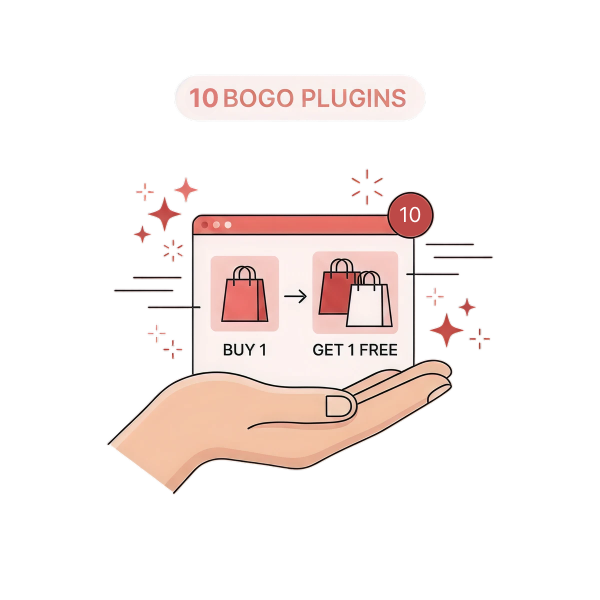
What does “Buy X Get Y” mean? When a customer buys a specific product(s), say “X,” they can get another product, “Y,” either for free or at a discount. You need the advanced BOGO plugin, “Discount Rules for WooCommerce – Pro,” to customize your Buy X, Get Y offers.
Are you tired of the same “Buy One Get One Free” deal on your WooCommerce store? Your shoppers have likely seen that offer countless times.
To give them a fresh and exciting experience, it’s time to upgrade your promotion strategy using the WooCommerce Buy X Get Y formula.
Whether you’re offering a different product for free, a discount on the Y item, or a targeted user-group campaign, the “Buy X Get Y” approach adds real value for customers and drives better results for your store.
In this blog, we’ll walk you through different ways to create Buy X Get Y offers in WooCommerce using the powerful plugin Discount Rules for WooCommerce – PRO (by Flycart).
We’ll cover setup, strategy, and best practices so you can implement these offers confidently and start increasing your sales.
Create Buy X Get Y deals For Specific Users Using Discount Rules Pro and Enhance Customer Engagement.
Table of contents
- What is WooCommerce Buy X Get Y?
- Why Use Buy X Get Y in WooCommerce?
- How to Create a WooCommerce Buy X Get Y Deal?
- 5 Proven WooCommerce Buy X Get Y Discount Strategies
- Best Practices for Buy X Get Y WooCommerce Offers
- Additional Tips to Run a Successful “WooCommerce Buy X Get Y” Offer
- Tracking the Success of Your WooCommerce Buy X Get Y Offers
- Conclusion
- Frequently Asked Questions
What is WooCommerce Buy X Get Y?
The WooCommerce Buy X Get Y is a promotional strategy where customers buy a product (X) and get a different (Y) product for free or at a discount.
The usual Buy One Get One (BOGO) campaigns have two categories:
- Buy X Get X – When a customer purchases a product (X), he can get the same (X) product for free or at a discount. For instance, when a customer purchases a T-shirt, he can receive another T-shirt for free.
- Buy X Get Y – When a customer purchases a product (Y), he can get another product (Y) for free or at a discount. For instance, when a customer purchases a T-shirt (X), he can receive a Cap (Y) for free.
Both categories help drive sales. You can implement both or choose one based on your sales goal. Let’s discuss only the “Buy X Get Y” WooCommerce category in this blog.
Why Use Buy X Get Y in WooCommerce?
Using the WooCommerce Buy X Get Y offer is one of the smartest decisions you can make for your online store.
Here are several key benefits of implementing such an offer:
- Increase Average Order Value (AOV):
The Buy X Get Y free WooCommerce offer encourages customers to add more products to their cart to claim the free or discounted “Y” item. That tends to raise the average order value per transaction.
- Promote New or Specific Products:
With a WooCommerce Buy X Get Y deal, you can highlight certain products (the “X”) and use the “Y” as a bonus to introduce or clear out items you want to push.
It’s a great way to bring attention to new arrivals or targeted inventory.
- Clear Inventory:
If you have slow-moving stock, seasonal items, or excess products, pairing them as the “Y” item gives customers an extra incentive to buy. This helps you move stock and reduce holding costs.
- Attract New Customers:
A compelling bonus offer like “Buy X Get Y Free” or “Buy X Get Y at a discount” makes shoppers sit up and take notice.
It can be a powerful trigger for new visitors to make that first purchase.
- Competitive Advantage:
In a crowded e-commerce market, offering unique promotions sets you apart.
The Buy X Get Y formula gives you a more creative angle than standard percentage discounts, helping position your store as offering extra value.
How to Create a WooCommerce Buy X Get Y Deal?
Creating Buy X Get Y in WooCommerce requires a plugin like ‘Discount Rules PRO for WooCommerce’, as it does not have built-in features to make this offer.
‘Discount Rules PRO for WooCommerce’ is one of the best WooCommerce discount plugins that allows you to set up different Buy X Get Y WooCommerce campaigns.
We will discuss the step-by-step setup process for three different examples.
For this tutorial, we will consider product “X” as a “T-shirt” and product “Y” as a ‘Cap.’
Before that, you can check this installation guide to download and install the ‘Discount Rules’ plugin in your WordPress platform.
Let’s start with the classic WooCommerce BOGO example:
Example 1: WooCommerce Buy X, Get Y Free
In the “WooCommerce Buy X Get Y Free” deal, when a customer purchases an “X” product, they can receive another product, “Y”, for free.
Here are the steps to create an offer where a customer who purchases a “T-shirt” will get a “Cap” for free:
- Go to “WordPress dashboard -> WooCommerce -> Discount Rules -> Add New Rule.”
- Enter the rule title (name) for reference and select the discount type as “Buy X Get Y.”
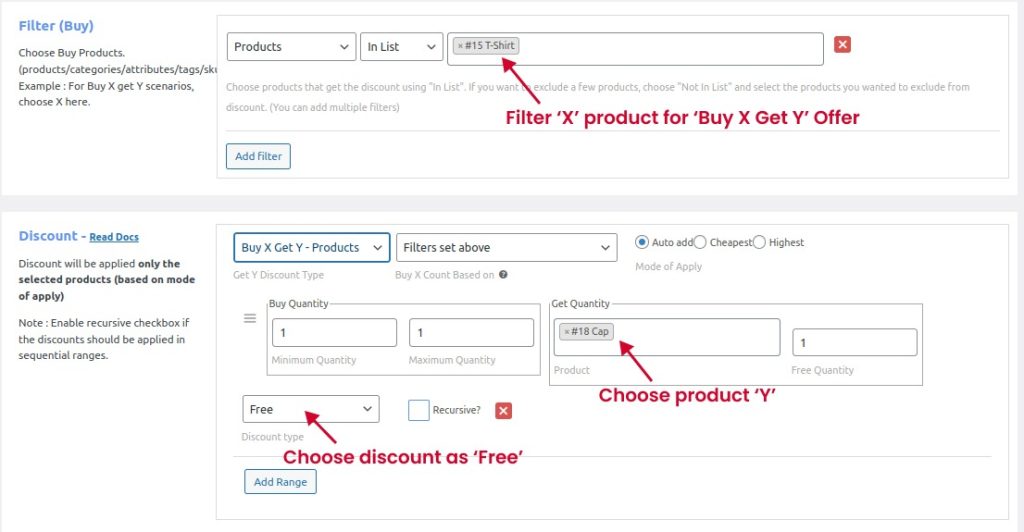
- In the filter section, you can filter product “X” as “T-shirt.”
- In the discount section, select “Y type” as “Buy X Get Y – Products” to set the specific “Y” product, “Cap.”
- Set “Buy and Get quantity” as 1 and choose Discount type as “Free” to provide a Buy X Get Y free gift offer.
- Click the “Auto add” option to automatically add the free “Y” product when the specified “X” product is added to the cart.
- It is optional to select the “Recursive” option. If this option is enabled, the offer works in a loop, i.e., for each Buying quantity, a free item is added.
- Click “Save and Enable” to save and activate the rule.
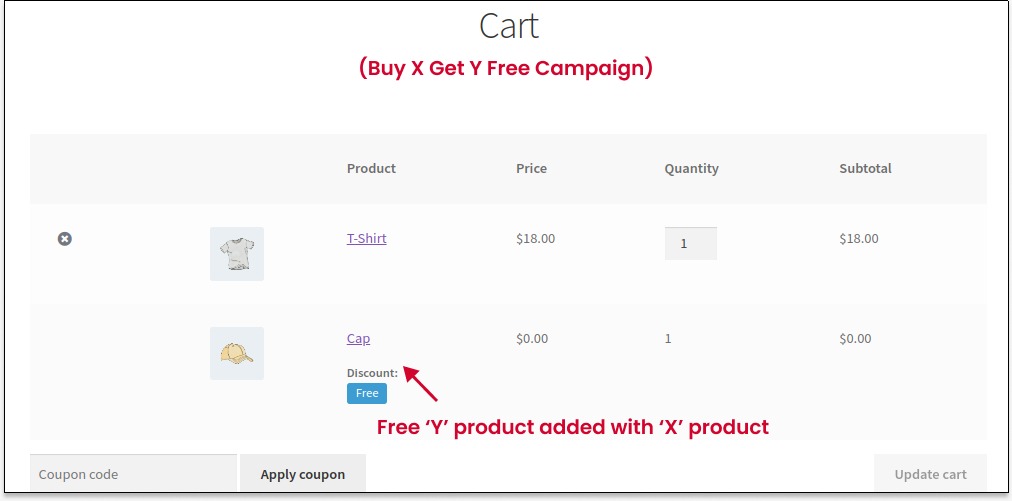
The “Buy X Get Y free” WooCommerce campaign is activated successfully. When a customer adds a “T-shirt” to their cart, a “Cap” will be added automatically.
Example 2: Buy X, Get Y At a Discount
In the WooCommerce “Buy X Get Y at Discount” offer, when a customer purchases an “X” product, they can get a discount on product “Y.”
You can set discounts in two ways:
- A percentage discount to provide a product discount as a percentage. For example: 50% off.
- Fixed discount to give a discount on the fixed cost. For example: $5 off.
For instance, here are the steps to create this Buy X Receive Y offer, where a customer who purchases a “T-shirt” will get a “Cap” at a 50% discount:
- Navigate to “WordPress dashboard -> WooCommerce -> Discount Rules -> Add New Rule.”
- Enter the rule title (name) for reference and select the discount type as “Buy X Get Y.”
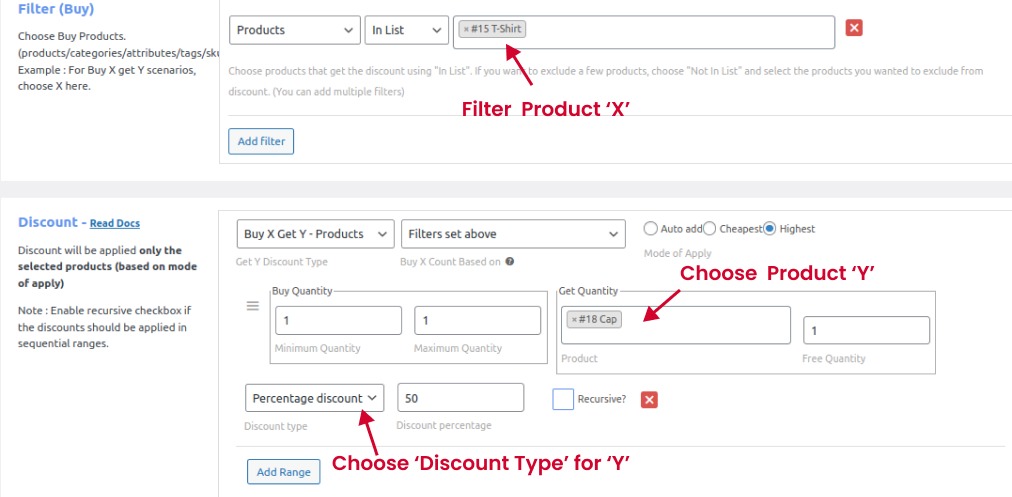
- In the filter section, you can filter product “X” as “T-shirt.”
- In the discount section, select “Y type” as “Buy X Get Y – Products” to set the specific “Y” product, “Cap.”
- Set the “discount type” as “Percentage Discount” and set “Discount Value” as “50.”
- You can provide this discount offer with two options:
- Choose “Auto add” to automatically add a discounted price to the cart.
- Choose “Cheapest/ Highest” to suggest the discounted product in the cart. Customers must click the “Add to Cart” button to add it to their cart.
Note: If “Auto add” is selected, customers have to remove product “X” to remove product “Y” from their cart.
- Save and enable to activate the offer.
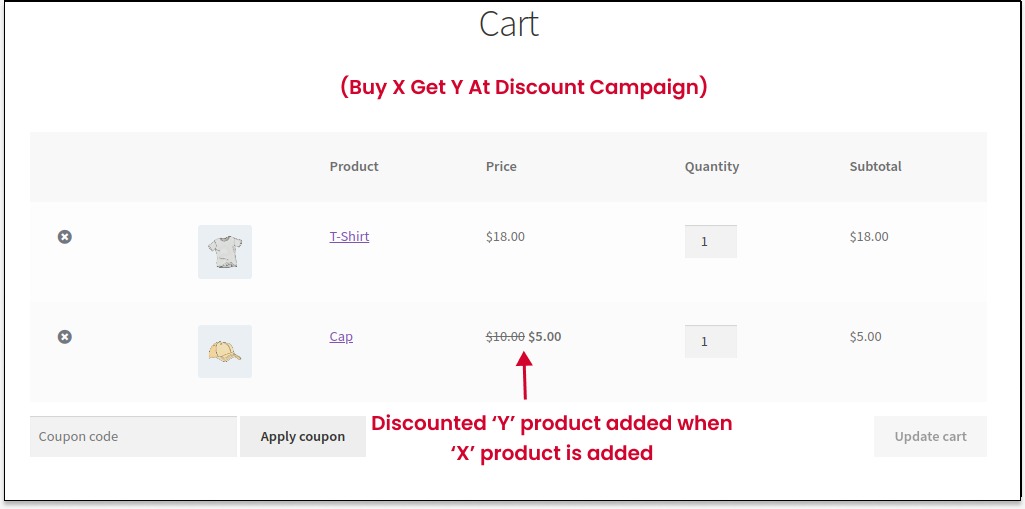
For this example, I chose the “Auto add” option, so when customers add a “T-shirt” to their cart, the discounted “Cap” is added automatically.
Create Buy X Get Y deals for products or categories and boost your store revenue today with Discount Rules for WooCommerce -PRO.
Example 3: Buy X Get Y With a Coupon
In the WooCommerce “Buy X Get Y With Coupon” discount, when a customer purchases an “X” product, he has to apply the coupon Code to get the free or discounted “Y” item.
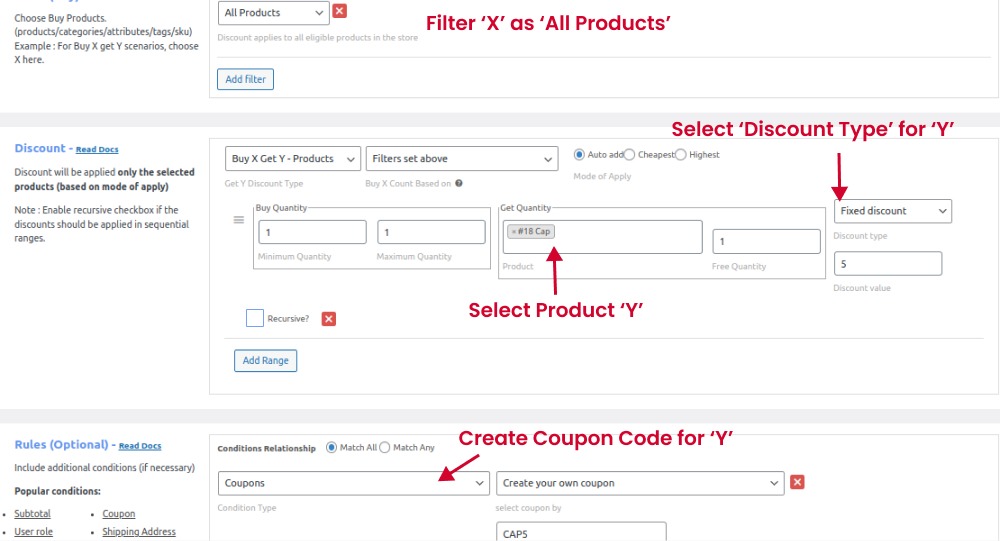
For this example, I take “X” as “All Products,” which means customers can buy any products in the store and apply the coupon “CAP5” to get a $5 fixed discount on “Y,” which is “Cap.”
To create this WooCommerce Buy X Get Y Coupon offer,
- Go to “WordPress dashboard -> WooCommerce -> Discount Rules -> Add New Rule.”
- Enter the rule title (name) for reference and select the discount type as “Buy X Get Y.”
- In the filter section, choose “All Products.”
- Choose “Cap” and select “Discount Type and Value” as “Fixed Discount” and “5.”
- Choose “Auto add” so customers can get the discounted product in their cart after applying the coupon code.
- In the “Rules” section, choose “Condition Type” as “Coupons” and create your Coupon code.
- Finally, save and enable the rule.
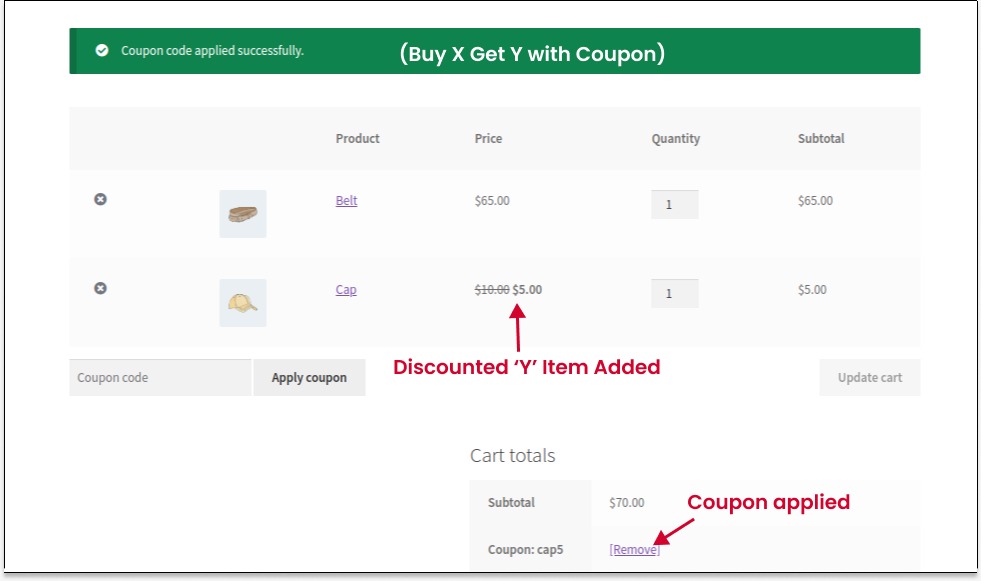
When customers add any products to their cart and apply the “CAP5” coupon code, a cap is added with a $5 discount.
Note: Customers can remove the “Coupon code” to remove discounted products from their cart. Also, you can create coupons for specific user roles and users.
WooCommerce has default coupon code settings.
With this “Discount Rules Pro” plugin, you can either create your own coupon code or integrate the default coupon code from the settings.
Tip:
Using this Buy X Get Y formula, you can also provide “Buy 2 Get 1 Free” WooCommerce offers.
You can check the WooCommerce Buy X Get Y documentation for more example scenarios.
Other Examples
In addition to offering “Buy X Get Y” deals, you can also create “Buy X Get X” offers and offer the same product at free or discount.
For more example offers like
- “Buy One Get One Free,”
- “Buy One Get One at 50% off,” or
- “Buy One Get One Free” with the customer choosing a free product of their choice.
You can check this guide:
How to Create WooCommerce BOGO (Buy One Get One) Deals?
5 Proven WooCommerce Buy X Get Y Discount Strategies
Buy X Get Y in WooCommerce is a helpful tactic to grow sales. Many popular online brands have implemented this method to increase their revenue. Discover the five proven discount strategies to boost your order value here:
- Classic Buy One Get One (BOGO) Free Offer
This straightforward and highly favored “Buy One Get One Free (BOGO)” offer is excellent for promoting products with high margins or for moving surplus stock efficiently.
It allows for two-for-one deals on the same items or on the least expensive item in a shopping cart.
- Buy X, Get Y at No Cost
This offer encourages customers to buy a certain amount (X) of a product to receive another item (Y) without charge. It’s a flexible promotion that can be applied to any product.
For example: “Buy 2 t-shirts, receive a tote bag free.”
- Pick and Choose BOGO
This option gives customers the liberty to select their complimentary item from a range of options, promoting multiple products and incentivizing bigger purchases.
An example is “Buy 3 items, choose any one item from a selection for free.”
- Tiered BOGO Offer
This tiered approach provides customers with more incentives to buy more, encouraging larger transactions while still offering attractive discounts or free products.
For instance, “Buy 1, get 10% off; buy 2, get 20% off; buy 3, receive one item free.”
- Time-Sensitive BOGO Offers
Generate urgency and a feeling of scarcity by setting a time limit on these offers.
Utilizing countdown timers on product pages or conducting limited-time flash sales are effective ways to boost sales during off-peak times or to clear out seasonal stock.
Implement these different BOGO offers and choose the best-performing ones to get more sales.
Best Practices for Buy X Get Y WooCommerce Offers
WooCommerce Buy X Get Y offers can drive sales and revenue only when implemented correctly based on customers’ interests and sales goals.
Check these best practices before activating your campaign:
- Clear Communication: Clearly communicate the promotion terms on your WooCommerce store.
- Strategic Product Pairing: Choose products for your Buy X Get Y offer that complement each other or are “frequently bought together.” Ensure that the pairing makes sense and adds value for the customer, encouraging them to take advantage of the offer.
- Use Attractive Images and Descriptions: Showcase the products involved in the promotion with high-quality images and compelling descriptions.
- Prominent Placement: Display the promotion details of Buy X Get Y in WooCommerce prominently on relevant product pages and the cart/checkout pages. Consider using banners, pop-ups, or dedicated sections to grab visitors’ attention.
- Responsive Design: Ensure that your WooCommerce store is mobile-friendly and has a responsive design. Many customers browse and shop on mobile devices, so a seamless experience across various screen sizes is crucial.
- Promote on Social Media and Emails: Leverage your social media channels and email marketing to promote your BOGO deals.
- Track and Analyze Performance: Use analytics tools within WooCommerce or external platforms to track the performance of your Buy X Get Y discount campaign.
- Implement Exit-Intent Popups: Use the Buy X Get Y formula to offer discounts in exit-intent popups to capture customers’ attention and keep them engaged.
- Offer Exclusive Deals to Subscribers: Encourage visitors to subscribe to your newsletter by offering exclusive Buy X Get Y deals to subscribers. It builds your email list and provides an additional incentive for potential customers.
- Utilize Discount Plugin: You can utilize the WooCommerce BOGO plugin, like the one above, to simplify your campaign process.
Things to Keep in Mind When Using the Buy X Get Y Rule
Running a WooCommerce Buy X Get Y offer is simple, but for it to work seamlessly and profitably, a few best practices are worth keeping in mind. These ensure your campaign is both customer-friendly and technically sound.
Here’s what you should consider:
- Define “Buy” and “Get” Products Clearly: Be specific about which items qualify. Confusion around eligible products can frustrate customers and hurt trust.
- Test Before You Go Live: Always test your discount rule in a staging environment. Make sure the free or discounted item appears correctly in the cart and that the offer applies only when the conditions are met.
- Plugin Compatibility: Ensure your chosen plugin, like Discount Rules Pro for WooCommerce, is updated and compatible with your WooCommerce and WordPress versions. Incompatible plugins can cause pricing errors or display issues.
- Avoid Overlapping Discounts: If you’re running multiple offers (like coupons, category sales, or loyalty rewards), make sure they don’t stack in unintended ways.
- Transparency is Key: Display your offer details clearly on product and checkout pages. Add terms and conditions like expiry dates, applicable products, or purchase limits.
Following these precautions ensures a smooth shopping experience for your customers and helps prevent technical hiccups.
When customers clearly understand how your offer works, they’re more likely to trust your store and come back for more.
Additional Tips to Run a Successful “WooCommerce Buy X Get Y” Offer
Here are a few extra tips to help you run a successful BOGO offer, whether it is “Buy X Get Y” or “Buy X Get X.”
We will discuss ways to promote your BOGO offers and how to create urgency for quick and immediate sales.
5 Ways to Promote Your Buy X Get Y Offers Effectively
Creating a great WooCommerce Buy X Get Y offer is only half the job; promoting it effectively is what truly drives results.
Even the best deals need the right visibility to catch customers’ attention. Think of it like this: if no one knows about your offer, it’s like having a sale in a hidden store!
Here are some smart ways to get the word out:
- Homepage Banners: Design an attractive banner announcing your “Buy 2 Get 1 Free” offer right on your store’s homepage. Use clear visuals, a strong CTA like “Shop the Offer Now,” and contrasting colors to make it stand out.
- Email Campaigns: Reach out to your existing customers and subscribers with engaging emails. Highlight what they’ll gain from the offer (e.g., “Get your favorite products for free this week!”) and link them directly to the product page.
- Social Media Marketing: Showcase your promotion through short reels, Instagram Stories, or Facebook carousel ads. Visuals that show the free product being added to the cart can drive curiosity and clicks.
- Cart and Checkout Reminders: Many customers forget or abandon carts. Use automation plugins like WPRelay or Retainful to remind them about ongoing BOGO deals. Adding time-limited messages (“Only 2 days left!”) can re-engage potential buyers.
- Pop-ups and Exit Intent Offers: Add subtle pop-ups reminding visitors about the offer before they leave your site.
When you actively promote your Buy X Get Y deals, you not only increase sales but also build excitement and trust with your audience.
Well-marketed offers attract new customers, bring back existing ones, and create a sense of urgency that boosts conversions.
Setting Time Limits and Expiry Dates for BOGO Offers
One of the most effective ways to maximize the success of a WooCommerce Buy X Get Y campaign is by creating urgency.
Time-limited offers tap into the psychology of scarcity; customers act faster when they know a deal won’t last forever.
Using the Discount Rules Pro plugin, you can easily:
- Set Start and End Dates: Define when your offer goes live and when it expires. This helps you plan seasonal campaigns like “Buy 2 Get 1 Free – Valentine’s Week Special.”
- Limit Usage: Control how many times an offer can be redeemed — per customer or overall. For instance, allow each user to claim the offer once to avoid overuse.
- Schedule Ahead: Plan multiple discount periods, so your marketing team can align promotions with holidays, sales events, or product launches.
- Add Countdown Timers: Display a timer on your product or cart page to emphasize urgency. Phrases like “Offer ends in 03:12:45” can double conversion rates.
For Example: “Buy 2 Get 1 Free — valid until Sunday midnight!”
Short-term, limited-time campaigns create excitement, reduce decision fatigue, and push hesitant customers to act quickly. They’re especially effective for clearing inventory and boosting quick sales surges.
Tracking the Success of Your WooCommerce Buy X Get Y Offers
Once your Buy X Get Y offer is live, tracking its performance is crucial. Without data, you’re just guessing what works, and in WooCommerce, data-driven decisions always win.
Here’s how to measure the success of your promotion:
- WooCommerce Analytics: Use built-in reporting tools to check key performance indicators (KPIs) like sales volume, average order value (AOV), and total revenue. Compare these numbers before, during, and after the offer.
- Discount Rules Pro → Reports Tab: This plugin includes detailed insights into each discount rule , how many times it was applied, total discount value, and products involved.
- Monitor Customer Behavior: See which products trigger the most redemptions. This helps you identify bestsellers or cross-sell opportunities.
- Track ROI: Balance the total discount cost against the increased revenue and new customers gained. If you see higher sales even with the free product cost, your promotion is a win.
- Customer Feedback: Gather post-sale reviews or run short polls to know if shoppers enjoyed the deal.
By consistently tracking performance, you can tweak your campaigns for better results, such as adjusting product combinations, tweaking time limits, or experimenting with new “Buy X Get Y” variations.
Effective tracking ensures every future promotion is smarter, more profitable, and more engaging than the last.
Set up user-role specific Buy X Get Y rules to enhance customer engagement and boost sales with Discount Rules for WooCommerce -PRO.
Conclusion
Implementing a WooCommerce Buy X Get Y offer unlocks more creative and effective ways to drive customer engagement, increase average order value, and move inventory, much more than standard percentage discounts.
With the Discount Rules for WooCommerce – PRO plugin, you can automate and customize these campaigns without needing custom code.
Whether you run free Y product offers, discounted Y items, coupons, or tiered campaigns, you’ll be empowered to test and optimise high-impact promotions that resonate with your customers.
Make the shift from generic BOGO deals to dynamic Buy X Get Y strategies today, and start turning browsing visitors into committed buyers.
Also Read:
- 11 Best WooCommerce BOGO Free Plugins to Boost Sales
- What is a BOGO Sale? A Complete Guide
- How to Set Up WooCommerce Bulk Discount (Step-by-Step Guide)
Frequently Asked Questions
In a Buy X Get Y offer, your store asks the customer to purchase “X” items (could be one or more) and then rewards them with “Y” items, either free or at a discount.
It’s a flexible promotional formula that goes beyond “Buy One Get One Free” and allows for tailored marketing and inventory strategies.
Technically, you could attempt custom code, but WooCommerce does not have built-in support for dynamic promotions like Buy X Get Y.
Using a plugin such as Discount Rules for WooCommerce – PRO is the easiest, most reliable way to set up, manage, and track these offers without development overhead.
Yes. With the plugin, you can filter which products qualify as “X”, what items count for “Y”, select categories, tags, product variations, and even restrict to certain user roles like wholesale customers or VIPs. This level of targeting gives you full control.
Yes. When you enable settings like “Auto-add free product”, the Y item is automatically added to the customer’s cart once the conditions (X items purchased) are met.
It ensures a smooth user experience and eliminates the need to manually select the bonus item.