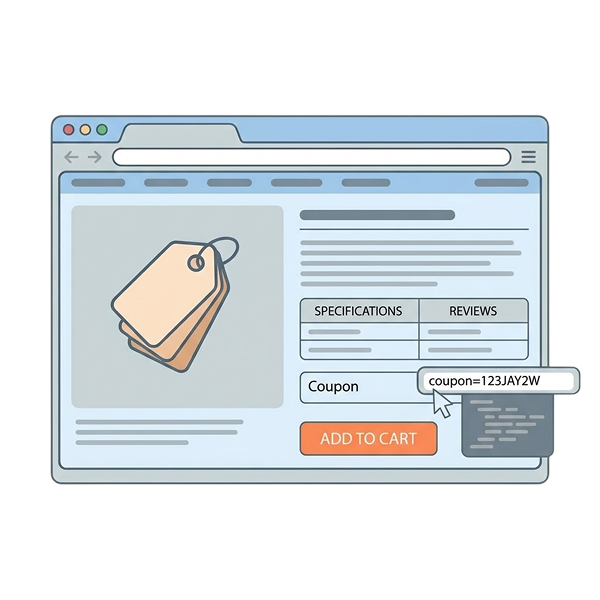
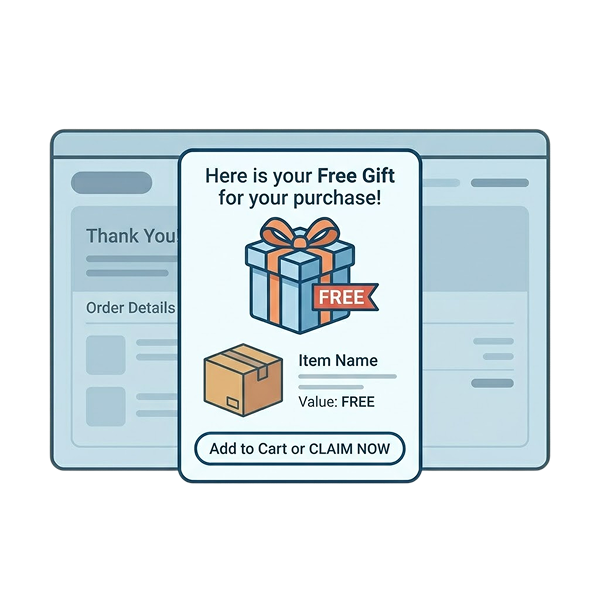
A WooCommerce first-order discount is a targeted promotional offer offered to first-time (new) buyers who have not made a single purchase from your store. The first-purchase discounts motivate them to buy your products at a low cost, enhance their shopping experience, and increase brand awareness.
People don’t trust new brand products unless they are recommended by friends, family, or “favorite influencers.” So, you can easily reach them with attractive product deals that encourage them to try your products at a low cost.
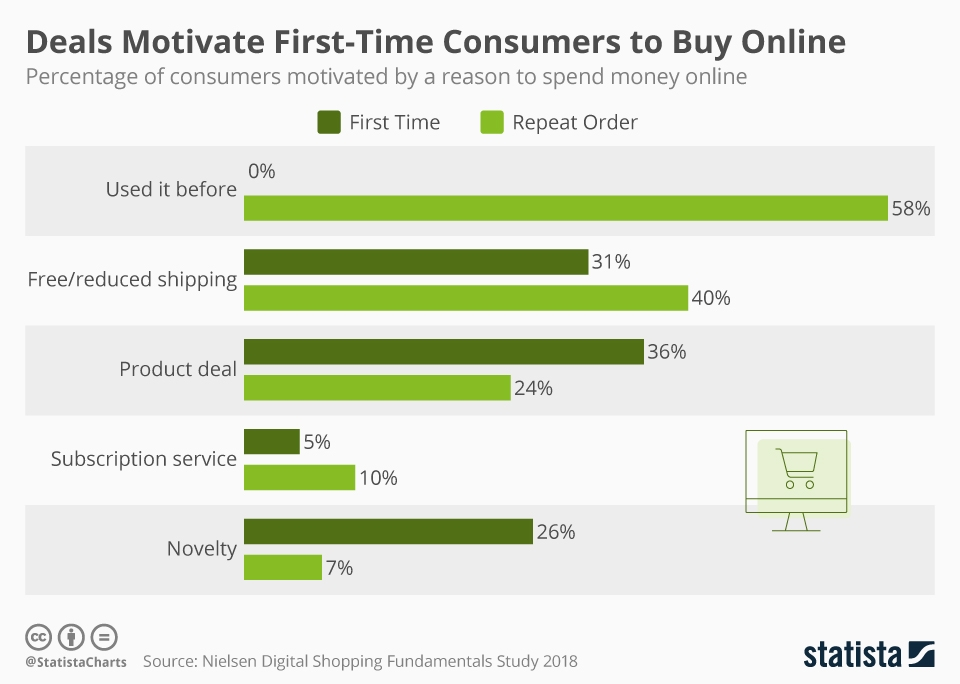
A study was conducted to analyze the customer spending percentage between first-time vs repeat customers, where 36% of new customers love first-time discounts, while 31% expect free shipping for their first order, which is also discussed in the steps below.
Offering discounts to new customers will make them click the “Buy” button and even retain them for future purchases.
In this blog, you’ll learn how to set up WooCommerce first-order discounts in six different ways to attract new customers, enhance their experience, and convert them into repeat customers.
Let’s get started.
Note: You cannot create first-order discounts with the WooCommerce default settings. However, I’ll show you the quick setup process using a freemium discount plugin, “Discount Rules for WooCommerce -Pro.”
Convert 36% of new buyers into repeat customers by offering customized first-order discounts using the “Discount Rules for WooCommerce -Pro” plugin.
Table of contents
- What is a WooCommerce First Order Discount?
- Is It Necessary to Offer a First-Time Order Discount in WooCommerce?
- Comparing the Types of First-Order Discounts
- How to Set Up a WooCommerce First Order Discount?
- 1. How to Add a 10% First Order Discount in WooCommerce?
- 2. A Limited-Time 20% First-Order Discount in WooCommerce
- 3. Offering a WooCommerce BOGO Deal for First-Purchase Customers
- 4. How to Offer a WooCommerce First Order Discount With a Coupon?
- 5. A New-Order Discount Based on Minimum Spend (Cart Total)
- 6. A Free Shipping Offer only for First Orders in WooCommerce
- How to provide an Nth order discount in WooCommerce?
- Is a First-Order Discount Better Than Free Shipping?
- Can I Combine First-Order Discounts with Other Offers?
- First Purchase Discount Examples By Popular Brands
- How to Prevent First-Order Discount Abuse in Your WooCommerce Store?
- Best WooCommerce Plugins for Creating First-Order Discounts
- Conclusion
- Frequently Asked Questions
What is a WooCommerce First Order Discount?
WooCommerce first-order discount is the only strategy you need to capture new customers’ attention and motivate those hesitant buyers to complete their “first” order from your store by offering an exclusive discount.
For example, “a 10% off on all products on your first order. Use Coupon “WELCOME10.”
Is It Necessary to Offer a First-Time Order Discount in WooCommerce?
In brief, yes!
Offering a WooCommerce first-time order discount makes a significant difference in your store’s sales. It offers the following benefits:
- A WooCommerce first-order discount is a practical incentive to reward new customers for completing their first sale from your store. It enhances customer loyalty.
- Customers who visit your store for the first time will hesitate to try your products. Offering first-time order discounts can influence them to make purchases, which will increase the conversion rate.
- You can also use this WooCommerce signup discount to encourage customers to sign up for your newsletter. Customers will provide their email addresses to receive the discount, which will help you increase your subscriber list.
- You can strategically use the first-purchase discount with purchase conditions, motivating customers to meet those criteria to claim their discounts and increasing the order value and sales.
Comparing the Types of First-Order Discounts
| First-Order Discount Type | Example Offer | Best For | Main Benefit | Potential Drawback |
| Percentage-Based First-Order Discount | 10% off on the first purchase | Stores selling products across multiple price ranges | Easy to understand and attractive to new customers | Higher discounts on expensive products can reduce margins |
| Limited-Time First-Order Discount | 20% off for first orders this weekend | Flash sales, seasonal campaigns, product launches | Creates urgency and encourages faster purchase decisions | Customers who miss the deadline may abandon the purchase |
| BOGO Deal for New Customers | Buy anything, get a cap free | Fashion, cosmetics, food, and consumable products | Increases perceived value without directly reducing product prices | Additional inventory costs may affect profitability |
| First-Order Discount Coupon | Use code FIRSTORDER for 10% off | Stores that want to track campaign performance | Helps measure coupon usage and marketing effectiveness | Customers may forget to apply the coupon at checkout |
| New Order Discount Based on Minimum Order Value | $30 off orders above $200 | Stores aiming to increase average order value | Encourages customers to spend more to qualify for the discount | High spending thresholds may discourage some buyers |
| Free Shipping for First Orders | Free delivery on the first purchase | Stores with competitive product pricing and moderate shipping costs | Reduces cart abandonment caused by shipping fees | Shipping costs are absorbed by the store |
Which First-Order WooCommerce Discount Should You Choose?
| Goal | Recommended Discount Type |
| Increase conversion rates quickly | Percentage-Based Discount |
| Create urgency during promotions | Limited-Time Discount |
| Move inventory and increase perceived value | BOGO Deal |
| Track marketing campaigns and coupon usage | First-Order Coupon |
| Increase average order value (AOV) | Minimum Order Value Discount |
| Reduce cart abandonment | Free Shipping |
How to Set Up a WooCommerce First Order Discount?
Setting up a WooCommerce first-order discount needs a plugin, as you can’t set it with the default settings.
To set up a WooCommerce first-order discount, follow these steps:
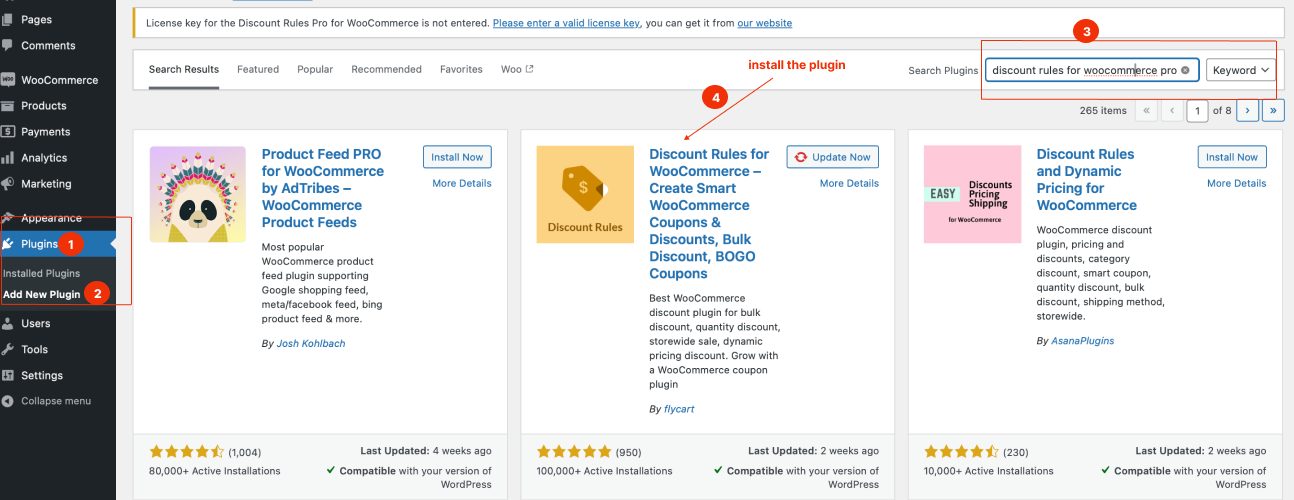
- Open your “WordPress” dashboard.
- Go to “Plugins” -> “Add New.”
- Search for “Discount Rules for WooCommerce.”
- Install and activate the plugin “ Discount Rules for WooCommerce -Pro ” (by Flycart).
After installing the plugin:
- Go to “WooCommerce” -> “ Discount Rules” -> “Add New Rule.”
- Choose the discount type, “Product/ Cart/ Bulk/ BOGO.”
- Filter specific products or keep “All Products.”
- Configure the “discount” section with a specific discount type and value.
- In the “Rules” section, add a condition “First Order” and set “Yes.”
- Optionally, add other conditions, save, and enable the rule.
Let’s check the six different ways to offer a WooCommerce first purchase discount.
1. How to Add a 10% First Order Discount in WooCommerce?
Example: 10% off on first orders.
- Navigate to your “WordPress” Dashboard.
- Go to ‘WooCommerce’ and then select “Discount Rules.”
- Click the “Add New Rule” button.
- Name your rule as desired.
- Set the discount type to “Product Adjustment.”
- In the filter section, select “All Products.”
- In the discount section, choose “Percentage Discount” and set it to “10.”
- In the “Rules” section, click on “Add Condition,” select “First Order,” and choose “Yes.”
- Finally, save and enable the rule.
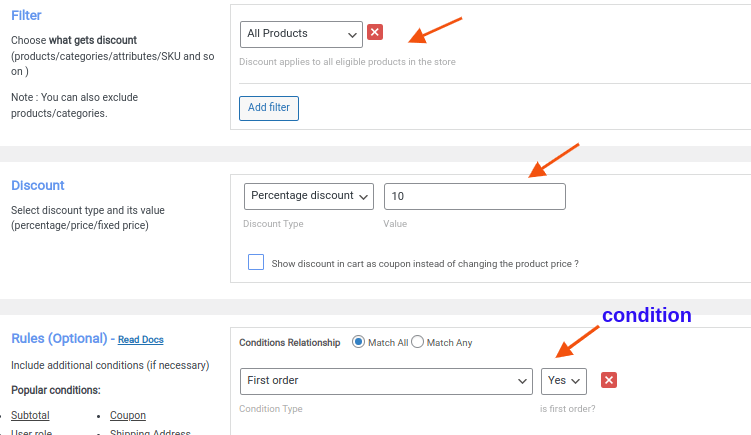
You have now successfully set up a 10% discount for new customers on their first orders.
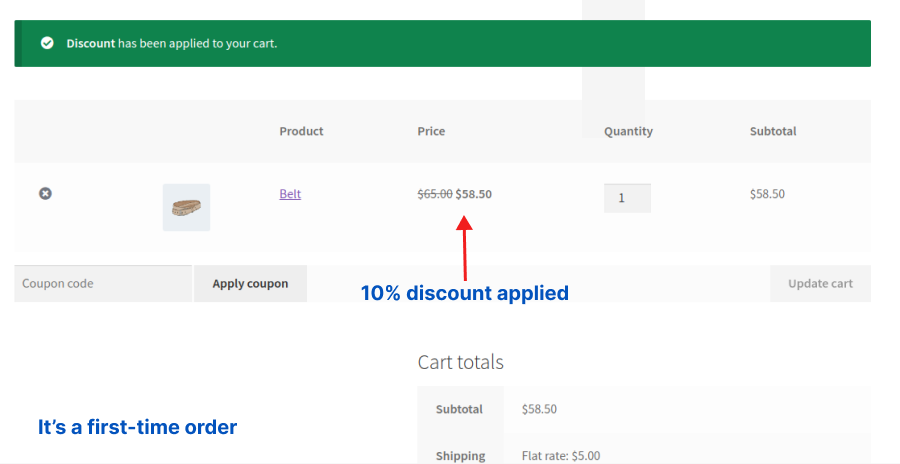
Tip: Instead of offering discounts on all products, you can also provide first-time discounts only when new customers purchase from a specific product category or item.
Related Read: How to create category discounts in WooCommerce?
2. A Limited-Time 20% First-Order Discount in WooCommerce
For instance, consider offering a 20% WooCommerce discount to new users only for a limited time.
Here’s how you can set up this limited-time first-order percentage discount :
- Go to “WooCommerce” -> “Discount Rules.”
- Select the discount type as “Product Adjustment.”
- In the “Filter” section, choose “All Products.”
- Select “Percentage Discount” and set the value to “20” in the “Discount” section.
- In the “Rules” section, click “Add condition,” choose “First order,” and set it to “Yes.”
- In the “Rule Limits” tab, set the “start and end (limited) time” to enable the discount. Optionally, set the “Maximum Usage Limit” to restrict users from using discounts more than once.
- Finally, save and enable the rule.
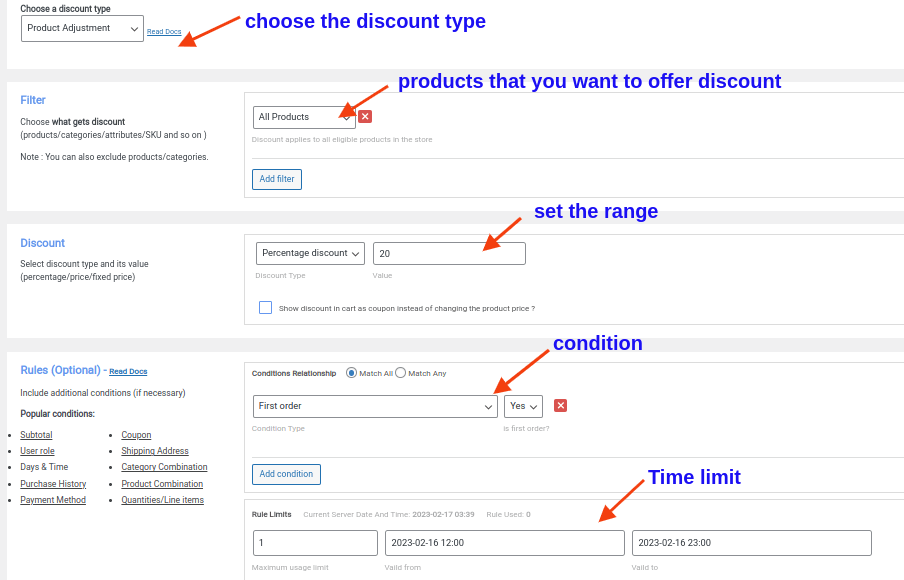
Now, only first-time customers who purchase within a specific time frame will receive discounts, while other new customers will not be eligible for this WooCommerce signup discount.
Create a simple or conditional first-order discount in WooCommerce using the “Discount Rules Pro” plugin to enhance the experience of first-time customers and grow a long-term customer relationship.
3. Offering a WooCommerce BOGO Deal for First-Purchase Customers
For example, you could offer new customers a free “cap” with the WooCommerce first-order deal.
- Navigate to “WooCommerce” -> “Discount Rules” -> “Add New Rule.”
- Select the discount type as “Buy X Get Y.”
- In the Filter section, choose “All Products.”
- In the Discount section, opt for “Buy X Get Y,” set the ranges, select “cap” as the product, and choose “Free” as the discount type.
- In the “Rules” section, click on “Add Condition,” select “First order,” and set it to “Yes.”
- Save and enable the rule.
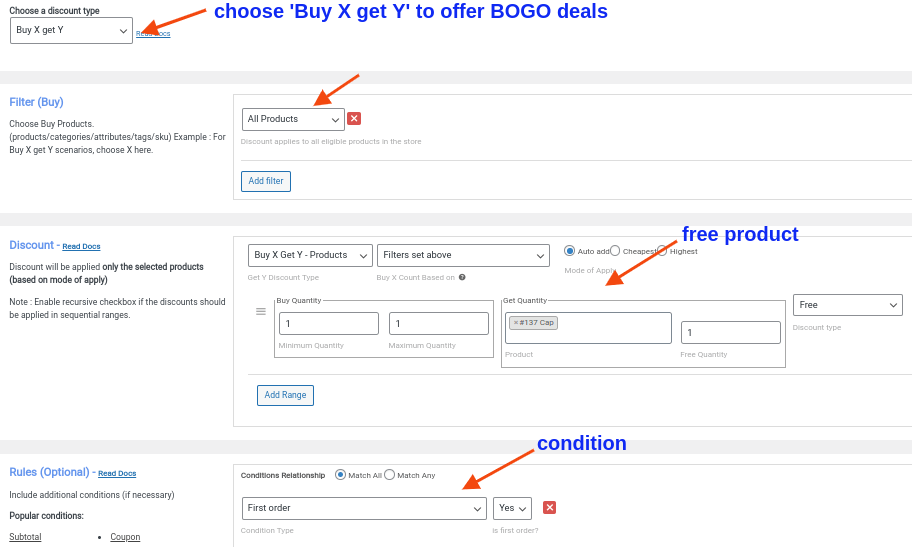
Now, each new customer will get a free cap when they complete their first purchase.
Note: Here, “ Buy X Get Y ” offers a different product for free, and you can also use “Buy X Get X” to provide the same item that customers purchase for free.
To learn detailed information about these deals, check out the blog “ How to offer WooCommerce Buy One Get One deals ?”
4. How to Offer a WooCommerce First Order Discount With a Coupon?
WooCommerce coupon codes grab customers’ attention and enhance their experience by requiring them to enter the discount code at checkout to claim a first-time order discount.
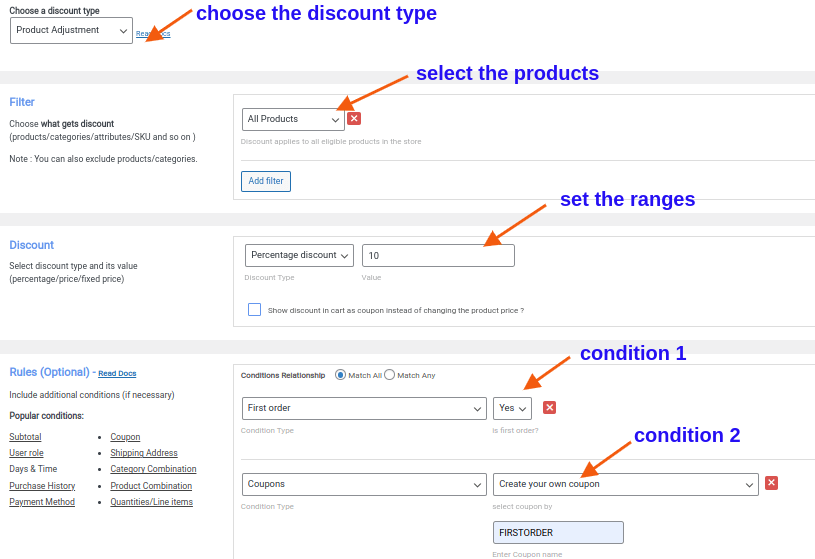
Example: New customers can apply the coupon code ‘FIRSTORDER’ to receive a 10% discount on their initial purchase.
- Go to “WooCommerce” -> “Discount Rules.”
- Add the new rule.
- Select “Product Adjustment” as the discount type.
- In the “Filter” section, choose “All Products.”
- Select “Percentage Discount” and set the discount value to “10.”
- In the Rules section, set two conditions:
- First Condition: Choose “First order” and select “Yes.”
- Second Condition: Choose “Coupons,” select “Create your own coupon,” and enter the coupon code as “FIRSTORDER.”
- Save and enable the rule.
If you have already used the default coupon option in WooCommerce, you can simply synchronize it with this plugin’s coupon option. To learn more about it, check the blog: How to create WooCommerce coupons in two ways?
Related Read: How to Create New User Coupons in WooCommerce?
5. A New-Order Discount Based on Minimum Spend (Cart Total)
A WooCommerce new-order discount can attract customers, yet setting a minimum purchase value will encourage them to reach the specific total to receive discounts. This will increase the average order value of each new customer.
Here’s an example: New customers receive a $30 fixed WooCommerce discount when they spend $200 or more on their first order.
To set up the WooCommerce first-order discount based on order value, follow these steps:
- Go to “WooCommerce” -> “Discount Rules.”
- Click “Add new rule.”
- Select “Product Adjustment” as the discount type.
- In the Filter section, choose “All Products.”
- Select “Fixed Discount” and set the value to “30” in the “Discount” section.
- In the “Rules” section, set two conditions:
- Click “Add Condition,” choose “First order,” and select “Yes.”
- Click “Add Condition,” choose “Subtotal,” select “greater than or equal to (>=),” set the total to “200,” and choose “Count all items in the cart.”
- Save and enable the rule.
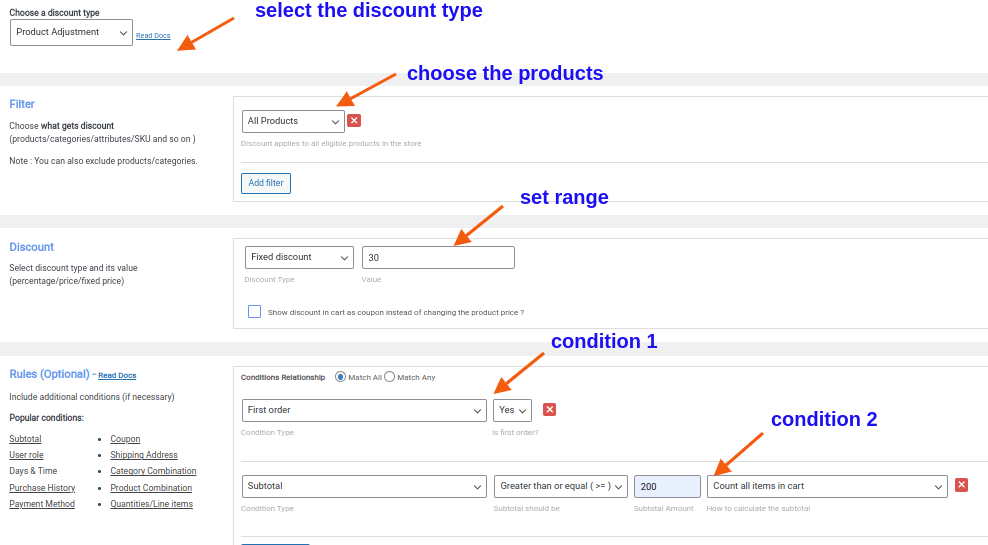
New customers only get discounts when their cart reaches the specific order value.
Related Read: How To Set A Minimum Order Amount In WooCommerce? (In Different Scenarios)
6. A Free Shipping Offer only for First Orders in WooCommerce
Since 31% of new customers prefer a free delivery deal, offering it instead of a product discount is a great strategy for helping them save on additional costs and increasing sales.
Example: “Free delivery on your first order.”
Here’s how you can set up free shipping for WooCommerce first-order customers:
- Open “Discount Rules” under “WooCommerce.
- Click the “Add new rule” button.
- Select the discount type as “Free Shipping.”
- In the “Rules” section, click on “Add condition,” choose “First order,” and set it to “Yes.”
- Finally, save and enable the rule.
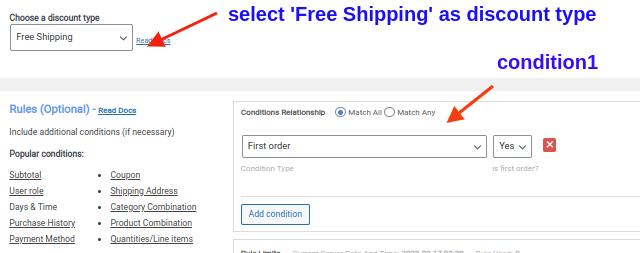
Now, free shipping is available only to first-time customers, while other customers will be charged a standard or express shipping fee.
Related Read: How To Offer WooCommerce Free Shipping? (Strategies + More Examples)
How to provide an Nth order discount in WooCommerce?
Similar to WooCommerce’s first-time order discounts, you can also provide discounts after customers order a specific amount.
You can use the “Discount Rules for WooCommerce -Pro” to easily create this discount:
- Go to “WooCommerce” -> “Discount Rules” -> “Add New Rule.”
- Choose the type of discount you want to provide.
- Filter specific products or categories.
- Choose the discount type and value, and set other requirements in the “Discount” section.
- In the “Rules” section, choose the condition as “Number of orders made.”
- Set the “Purchase before” time, “Order & Purchase quantities,” and “Order status.”
- Optionally set other purchase conditions and enable the rule.
For example, if you set the “number of orders” as “3,” customers who have purchased three times in your store can get this discount.
Is a First-Order Discount Better Than Free Shipping?
Both first-order discounts and free shipping can encourage new customers to place their first order, but the better option depends on your product pricing and customer expectations.
- A first-purchase reward – percentage or fixed discount often feels more rewarding because shoppers see immediate savings on the product price, which can speed up purchase decisions.
- On the other hand, free shipping works well for stores with low-priced items or high shipping costs, where delivery fees may be the main reason for cart abandonment.
Testing both options can help you understand which incentive drives higher conversions for your WooCommerce store.
Can I Combine First-Order Discounts with Other Offers?
Yes, first-order discounts can be combined with other promotions, but they should be used strategically to avoid reducing profit margins.
Limiting how discounts stack, such as allowing only one promotion per order or setting minimum purchase requirements, helps keep offers profitable and easy to understand.
When combined thoughtfully, multiple incentives can increase first-time conversions while still maintaining healthy margins for your WooCommerce store.
First Purchase Discount Examples By Popular Brands
First-time purchase discounts are not a new strategy. Many famous brands have used them for a long time to reward their new visitors.
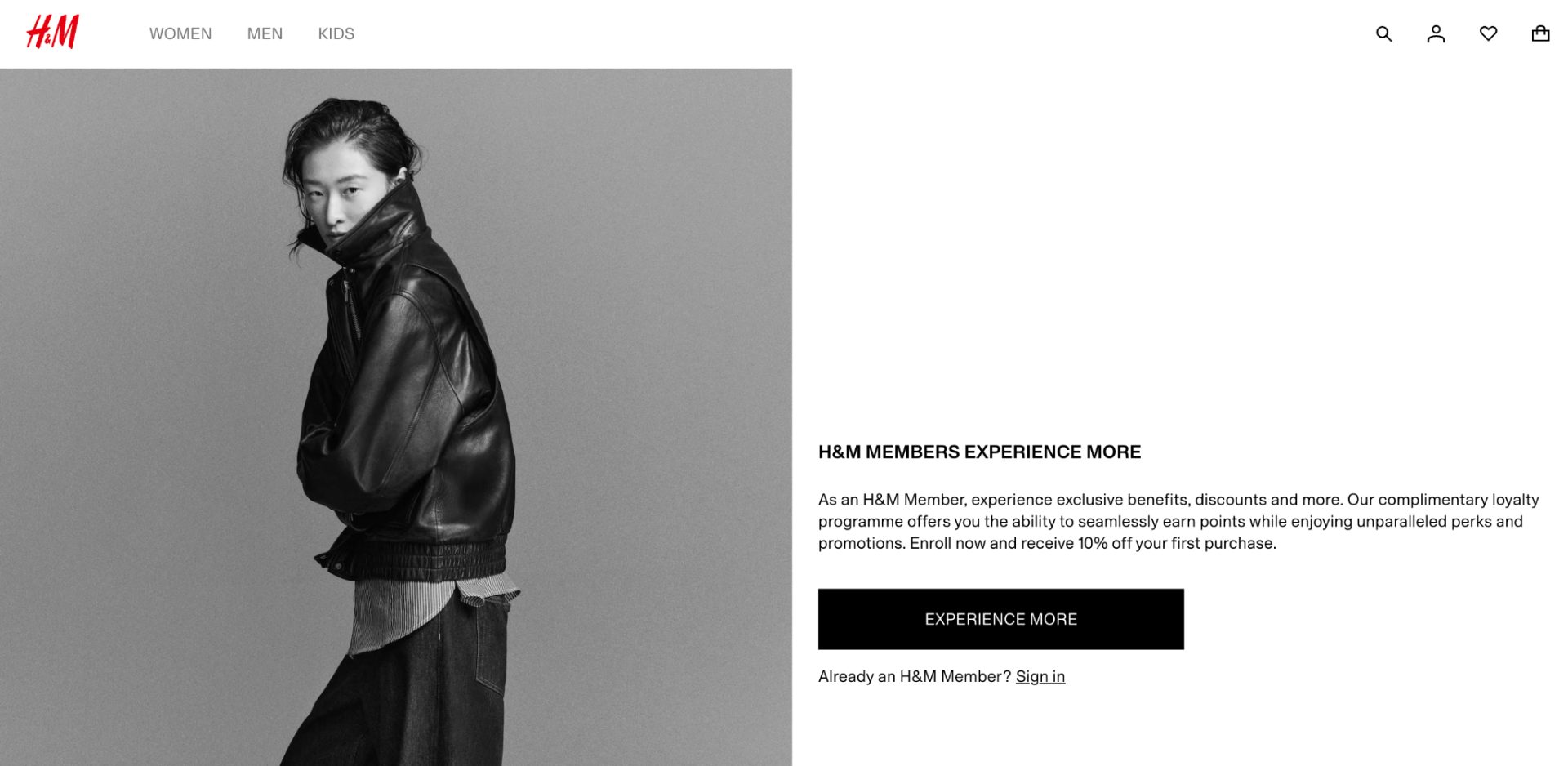
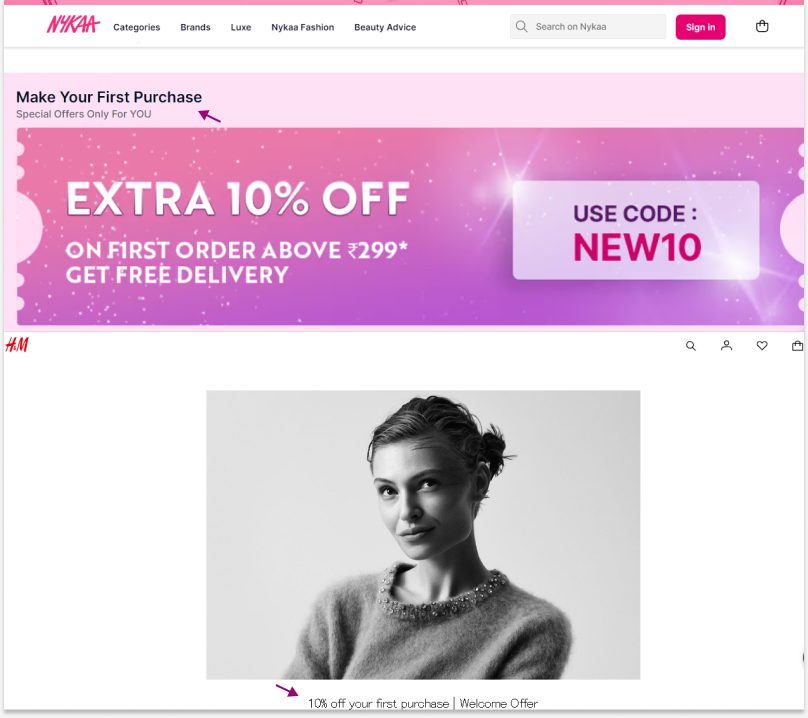
- The popular fashion brand H&M offers a 10% discount to its first-order customers when they become a member.
- The famous Indian cosmetics company Nykaa offers a 10% discount for newcomers who purchase above INR 299 using a coupon code. It also provides a free delivery deal.
Not only these two brands but also Zomato, Swiggy, and even Amazon offer a welcome discount to excite their new customers.
So, why not you can apply this strategy to give a warm welcome to your first-time customers?
Use the above scenarios, mix and match discount types and purchase conditions, and enhance your new customers’ experience with irresistible deals to become a part of your brand.
Increase your conversion rate and sales by up to 36% with the first-order discount offers using the “Discount Rules for WooCommerce -Pro” plugin.
How to Prevent First-Order Discount Abuse in Your WooCommerce Store?
To ensure your WooCommerce first-order discounts are used only by genuine new customers, follow these best practices:
- Restrict the discount to registered customers only instead of guest users.
- Limit the discount to one use per customer account.
- Verify eligibility using the customer’s email address and purchase history.
- Require a minimum order value to prevent low-value or fraudulent orders.
- Exclude customers who have already placed an order, regardless of order status.
- Use unique coupon codes instead of publicly shared generic codes whenever possible.
- Monitor for multiple accounts created from the same email pattern or customer information.
- Set an expiration date for first-order promotions to reduce misuse.
- Review discount usage reports regularly to identify unusual redemption patterns.
- Combine first-order discounts with other conditions, such as specific products, categories, or customer segments.
Tip: The Discount Rules for WooCommerce – Pro plugin can automatically check a customer’s order history and apply first-order discounts only to eligible new customers.
Best WooCommerce Plugins for Creating First-Order Discounts
If you want to offer first-purchase discounts to attract new customers, here are three popular WooCommerce plugins that can help you create and automate first-order promotions:
1. Discount Rules for WooCommerce – Pro
This plugin is ideal if you want complete control over your first-order promotions. You can create simple discounts, such as 10% off the first order or advanced offers like BOGO deals, minimum-spend discounts, and free shipping for new customers using a visual rule builder.
FunnelKit Automations helps you acquire and convert new customers by automatically sending personalized welcome coupons after signup.
Example: Send a unique coupon code like WELCOME10 immediately after a visitor subscribes to your newsletter. You can also schedule reminder emails and track coupon usage to measure campaign performance.
3. First Order Discount WooCommerce
If your goal is simply to offer a discount on a customer’s first purchase without complex promotional rules, this plugin provides a straightforward solution. It focuses specifically on first-order promotions and includes options for minimum cart value requirements and coupon-based discounts.
Conclusion
As discussed in the blog, research data and popular brands have proved that incentivizing new customers with first-order discounts is a must-try on your WooCommerce store.
Don’t lose 36% of new customers! Apply WooCommerce first-order discounts and grab them for the long term to boost your sales. Also, use the “Discount Rules for WooCommerce -Pro” plugin to simplify your discount process.
Also Read
- How to Create a WooCommerce Bulk Discount? (Quick Steps + Examples)
- How to Create a WooCommerce Bundle Discount?
- 5 Best WooCommerce Discount Plugins in 2024 (Free & Paid)
Frequently Asked Questions
Yes! Acquiring new customers is important for your WooCommerce store. It fuels growth, expands your reach, offsets churn, and increases long-term revenue, especially when paired with strong retention to maximize lifetime value.
You can use the “Discount Rules for WooCommerce -Pro” plugin to offer a first-order discount to new customers from specific locations, such as Country, State, or City. You can also set first-purchase discounts to specific Zip codes.
Here are the factors to consider when choosing the best plugin:
– Research the performance and available features of the plugin.
– Always check if the plugin is compatible with your version of WooCommerce.
– Look for a plugin that offers good customer support, is responsive to your queries, and is regularly updated.
– Also, check if the plugin suits your budget.
You can create one-time coupons using the default WooCommerce settings:
1. Go to your WordPress dashboard-> “WooCommerce” -> “Coupons.”
2. Click “Add Coupon.”
3. In the “Coupon data section,” enter a coupon code that customers can use.
4. Select the discount type and value in the “General tab.”
5. Set the “Usage limit per coupon” to “1” in the usage restriction tab.
6. Set the “Usage limit per user” to “1” in the usage limit tab.
7. Click “Publish” to save the coupon.
You may not be getting your first sale because new visitors lack a strong reason to buy right away. Offering a first-order discount or free shipping can reduce hesitation and encourage them to place their first order.